CA-DPH4K-J specification sheet
Specifications for CA-DPH4K-J
J5create JDA158 DisplayPort to HDMi(4K) Adapter


Video Cables
j5 create
About this product
The j5create JDA158 DisplayPort to HDMI 4K Active Adapter is a reliable solution for connecting a DisplayPort equipped PC or Mac to an HDMI monitor, TV, or projector. Supporting resolutions up to 4096 x 2160 at 60Hz, this active adapter delivers sharp Ultra HD video and digital audio with plug and play convenience. Buy now from our website for a simple and dependable 4K display upgrade.
Overview Summary
j5create JDA158 DisplayPort to HDMI 4K Active Adapter
The j5create JDA158 is an active DisplayPort to HDMI adapter designed to connect DisplayPort enabled desktop computers, laptops, and workstations to HDMI displays. It supports Ultra HD resolutions up to 4096 x 2160 at 60Hz, making it suitable for high quality monitors, televisions, and projectors.
This adapter is DisplayPort 1.2 compliant and also supports DisplayPort 1.1 devices at their supported resolutions. Its active conversion design improves compatibility with a wide range of graphics hardware while providing plug and play installation without requiring software or drivers. Digital audio is also supported when available from the source device.
Performance tier: Premium
Uses: 4K monitor connectivity, office workstations, presentations, digital signage, home entertainment, multi-display setups, business computing
Overview
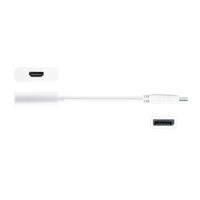
The JDA158 DisplayPort(TM) to 4K HDMI Active Adapter allows you to quickly and easily connect your Mac or PC to a 4K HDTV or other display device using an HDMI input. Simply connect the DisplayPort(TM) end of the connector to your computer and plug your existing HDMI cable from the display into the adapter. The adapter seamlessly converts the DisplayPort(TM) video signal into an HDMI signal for a fast plug-and-play setup. Fully DisplayPort(TM) 1.2 compliant, also compatible with DisplayPort(TM) 1.1
Description
The j5create JDA158 is built for users who need to connect a DisplayPort output to an HDMI display without sacrificing image quality. Its active conversion technology provides dependable compatibility with supported DisplayPort graphics hardware while delivering crisp Ultra HD video at resolutions up to 4096 x 2160 at 60Hz.
Ideal for offices, home users, education, and professional environments, the adapter allows DisplayPort enabled computers to connect to HDMI monitors, televisions, projectors, and conference room displays. The compact white housing and integrated cable make it easy to carry between workspaces while eliminating the need for software installation.
Digital audio is supported when provided by the host system, allowing compatible displays to receive both video and audio through a single HDMI connection. The adapter is suitable for Windows and macOS systems equipped with DisplayPort.
Features
The j5create JDA158 combines high resolution display support with simple installation and broad compatibility.
- Active DisplayPort to HDMI signal conversion.
- Supports Ultra HD resolutions up to 4096 x 2160 at 60Hz.
- Plug and play operation with no driver installation required.
- Compatible with DisplayPort 1.2 and DisplayPort 1.1.
- Supports digital audio when available from the source device.
- Works with DisplayPort equipped Windows PCs and Mac computers.
- Compact design with integrated cable.
- Ideal for monitors, TVs, projectors, and presentation displays.
System requirements
- Available DisplayPort(TM) 1.2
- The maximum resolution for DisplayPort(TM) 1.1a is 2560 x 1200
What's in the Box
- j5create JDA158 DisplayPort to HDMI 4K Active Adapter
- Quick Installation Guide
Specifications
| © 2026 Respective owners and brand holders. This table has been carefully researched and generated by ComXpert International CC (//www.comx-computers.co.za), however, errors and omissions may occur. Only references to South Africa apply. All products are sourced in South Africa from the official suppliers and the warranty is that of the local supplier. E&OE. This table and our site's content may be used on condition that this notice and link remains intact and unaltered. | |
Specifications and features | |
| Product Code | CA-DPH4K-J |
| Interface | |
| Host Interface | DisplayPort Male Connector |
| Video & Audio Interface | HDMI Female Connector |
| Converter Type | Active |
| Physical Specifications | |
| Housing Material | Plastic |
| Dimensions | Main body: |
| 17.7 (W)x 17.7 (H)x 5.9 (D) in. | |
| 45 (W)x45 (H)x15 (D) mm | |
| Cable length: 6.3 in. (160 mm) | |
| Weight | Approximately 0.04 lbs (17.5 g) |
FAQ
What does the j5create JDA158 do?
The JDA158 converts a DisplayPort output from a compatible computer into an HDMI output for connecting monitors, televisions, or projectors. It uses active conversion technology to provide reliable compatibility and supports Ultra HD resolutions up to 4096 x 2160 at 60Hz.
Does this adapter support 4K at 60Hz?
Yes. It supports resolutions up to 4096 x 2160 at 60Hz when used with compatible hardware and displays. The actual supported resolution depends on the capabilities of the graphics adapter, computer, and connected display.
Is software or a driver required?
No. The adapter is designed for plug and play installation. Simply connect the DisplayPort connector to your computer and connect an HDMI cable from the adapter to your display.
Can this adapter transmit audio?
Yes. Digital audio is supported when the DisplayPort source device provides audio output. Audio support also depends on the connected HDMI display.
Is the adapter compatible with Mac and Windows?
Yes. The adapter is compatible with supported Mac and Windows computers equipped with a DisplayPort output. Ensure the system supports the required DisplayPort standard for your desired resolution.
Sold by ComX Computers
