Co-MDPH4K-J specification sheet
Specifications for Co-MDPH4K-J
J5create JDA159 mini DisplayPort to 4K HDMI Adapter
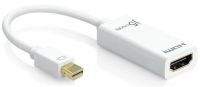
J5create JDA159 Mini DisplayPort or thunderbolt2 to HDMi2.0 125mm Converter cable (female, work with existing HDMi cable) - support up to 4096x2160 4K UHD @30Hz, white, for MAC or PC - retail pack
Video Cables
Video Cables
j5 create
In Stock Buy now!
R 405.00 inc VAT
Overview:
The JDA159 adapter allows you to quickly and easily connect your Mac® or PC to a 4K HDTV or other display device using an HDMI™ input. First connect the JDA159 to your computer. Then plug your existing HDMI™ cable from your display into the mini DisplayPort™ adapter. Compatible with both DisplayPort™ 1.2 and Thunderbolt™ 2, our JDA159 quickly converts the DisplayPort™ video signal into an HDMI™ signal, and with its plug-and-play technology there is no need to download any drivers. Once you’ve experienced multiple monitors, you’ll never want to go back to a single monitor again.
Features:
- Easy-to-use cable
- No software required
- Compatible with DisplayPort™ Dual-Mode v1.2 or Thunderbolt™ 2
- Compliant with HDMI™ 1.4 specifications
- Supports resolutions up to 4K Ultra HD (4096 x 2160, 30 Hz) and 3D video formats over HDMI™
- Dual-Mode DisplayPort™ Adapter
- Supports Audio
- Ideal accessory for Apple® iMac® or MacBook®
- Features are subject to the capabilities of the computer and graphics card solution.
System requirements:
- Available mini DisplayPort™ 1.2 or Thunderbolt™ 2
- DP++™ port (Dual Mode DisplayPort™) required on graphics card or video source
- (DVI and HDMI™ pass-through must be supported)
- DisplayPort™ v1.1a or Thunderbolt™ 1 have a maximum resolution of up to 2560 x 1200
- Mac® models with Thunderbolt™ 2
- MacBook Pro® (Retina, Late 2013 and later)
- Mac Pro® (Late 2013)
- iMac® (Retina 5K, 27-inch, Late 2014)
- Mac® mini (Late 2014)
Specifications:
| ©2026 Respective owners and brand holders. This table has been carefully researched and generated by ComXpert International CC (//www.comx-computers.co.za), however, errors and omissions may occur. Only references to South Africa apply. All products are sourced in South Africa from the official suppliers and the warranty is that of the local supplier. E&OE. This table and our site's content may be used on condition that this notice and link remains intact and unaltered. | |
Specifications | |
| Product Code | Co-MDPH4K-J |
| Interface | |
| Host Interface | mini DisplayPort Male Connector |
| Video & Audio Interface | HDMI Female Connector |
| Converter Type | Passive |
| Physical Specifications | |
| Housing Material | Plastic |
| Dimensions | Main body: |
| 0.83 (W) x 1.33(H) x 0.47(D) inch | |
| 21(W) x 45(H)x12(D) mm | |
| Cable length: 4.9 inch (125 mm) | |
| Weight | Approximately 0.04 lbs. (19g) |
Sold by ComX Computers

Specifications are subject to change without notice. E&OE. Prices are a guide only, and are valid on 2026-11-13 only, subject to stock being available.
The specifications displayed above apply to the entire range and may not apply to this specific model. Kindly note that options cannot be changed for most models, and some options are not available in South Africa.