LC-APT201Q specification sheet
Specifications for LC-APT201Q
Asus PT201Q 19.5" 10-point touch LED Monitor 1024-pressure level pen digitizer
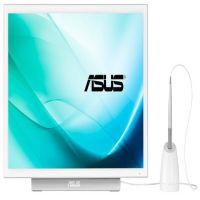
LCD monitors: 19 / 19.5 inch
Asus
Click here to browse for similar products and for great alternatives!
Features:
Easily Write Simply Work
The PT201Q gives you unprecedented levels of interaction, allowing you to simultaneously make inputs through your fingers or the bundled digitizer pen. Now you can draw precise lines or write smoothly directly on screen with the digitizer pen in your dominant hand, leaving your other hand free to manipulate onscreen elements – so you can zoom or rotate images, open or save files, or click on the task bar in an instant.
3 Switchable Modes
A side shourtcut button lets you easily switch between digitizer pen, fingertip, or simultaneous input modes. It recognizes both fingertip and digitizer pen input, but gives priority to the latter. On top of that, palm rejection technology also means you can even rest your hand on the screen without interfering with what you’re doing.
Natural Writing Experience
The PT201Q comes bundled with a digitizer pen so you can draw, take notes or mark presentations directly onscreen. And it feels entirely natural too — 1024-pressure level detection* means line thickness and colors change in relation to the pressure you exert. You can even select eraser or right-click functions through a special shortcut button on the pen**. *Software dependent. Please check software compatibility table at the bottom of this webpage prior to use.
Intuitive Fingertip Control
10-point touch control gives you precise input, even when you’re using it with a friend or two, so collaborating on projects has never been this easy. The PT201Q display is Windows® 8.1-compatible and designed to offer great performance as well as intuitive control; letting you smoothly transition between onscreen typing and navigating. And remember, it’s not just for work; you can have some fun with it too! You can easily pinch-zoom or rotate images, or scroll through webpages on the PT201Q.
Outstanding Visuals with 178° Wide Viewing Angles
The PT201Q features a large 19.5-inch display that’s capable of showcasing up to 16.7 million colors in stunning Full HD. It features a 178-degree wide-view angle so there’s no color shift even when you’re viewing it from extreme angles; while 250 cd/m² brightness ensures you can read what’s onscreen even under bright office lights.
Adjustable Tilt Angles for an Ideal Viewing Position
The PT201Q has an adjustable stand with 20 – 75 degree tilt angles to give you an ideal viewing position. Alternatively, you can detach the display from the stand so you can use it flat on the desk. The PT201Q has an ergonomic design that promotes good posture and minimizes wrist strains, allowing you to get the most out of its 10-point touch display.
Extensive Driver-free Connectivity with Windows®
You can hook up the a PT201Q to your PC or notebook through HDMI or DisplayPort. There’s also a USB port for a mouse, keyboard or other devices. And if you’re using Windows® 7/ 8/ 8.1 , there’s no need to download any additional drivers, so you can get right down to work with your Windows PC*.
Specifications:
| ©2026 Respective owners and brand holders. This table has been carefully researched and generated by ComXpert International CC (//www.comx-computers.co.za), however, errors and omissions may occur. Only references to South Africa apply. All products are sourced in South Africa from the official suppliers and the warranty is that of the local supplier. E&OE. This table and our site's content may be used on condition that this notice and link remains intact and unaltered. | |
Specifications | |
| Product Code | LC-APT201Q |
| Display | Panel Size: Wide Screen 19.5"(49.5cm) 16:9 |
| True Resolution : 1920x1080 | |
| Display Viewing Area(HxV) : 432 x 243 mm | |
| Full HD 1080P : Yes | |
| Pixel Pitch : 0.225mm | |
| Brightness(Max) : 250 cd/ | |
| Contrast Ratio (Max) : 3000:1 | |
| Viewing Angle (CR 10) : 178°(H)/178°(V) | |
| Response Time : 5ms (Gray to Gray) | |
| Display Colors : 16.7M | |
| Touch Screen : Yes, Capacitive 10-point multi-touch | |
| Video Feature | Trace Free Technology : Yes |
| Color Temperature Selection : 5 Modes | |
| Gamma adjustment : Yes (Support Gamma 2.0/2.2/2.4/2.6/1.8 ) | |
| HDCP support : Yes | |
| Audio Features | Stereo Speakers : 1W x 2 Stereo RMS |
| Pen Control | Touch Pen Technology: Digitizer Pen |
| Pressure Level: 1024 levels | |
| Writing Response: 240Hz | |
| Convenient Hotkey | Volume Adjustment |
| Input Selection | |
| I/O Ports | Signal Input : HDMI, DisplayPort |
| AV Audio Input : HDMI | |
| USB Port(s) : 2.0, 1 x Type A port, 1 x microUSB | |
| Signal Frequency | Digital Signal Frequency : 31~68kHz (H) /50~60Hz(V) |
| Power Consumption | Power Consumption:<41W |
| Power Off Mode:<0.3W | |
| Voltage:AC 100–240V, 50/60 Hz | |
| Mechanical Design | Chassis Colors : White |
| Tilt : 20°~ 75° | |
| VESA Wall Mounting : 100x100mm | |
| Security | Kensington lock |
| Dimensions | Phys. Dimension (WxHxD):463.8 x 274.8 x 116.5mm (20 degree) |
| Phys. Dimension without Stand(WxHxD)(For VESA Wall Mount):463.8 x 274.8 x 25.2 mm | |
| Box Dimension (WxHxD):554 x 431 x 137 mm | |
| Weight | Net Weight (Esti.):3.6Kg (with stand)/ 2.3kg(without stand) |
| Gross Weight (Esti.):4.7kg | |
| Accessories | Cable Clamp |
| Power cord | |
| Power adapter | |
| DisplayPort cable | |
| USB cable | |
| Support CD | |
| Warranty Card | |
| Setup Manual | |
| Digitizer Pen with pen stand | |
| Compliance and Standards | BSMI, CB, CE, CU, FCC, J-MOSS, PSE, RoHS, VCCI, WEEE, WHQL (Windows 8.1), RCM, UL |
Sold by ComX Computers
