MD65 specification sheet
Specifications for MD65
Yealink MeetingDisplay 65 inch

Digital Signage
Yealink
Overview Summary:
The Yealink MeetingDisplay 65" is the ultimate choice for transforming your meeting room into a hub of productivity and seamless communication. This 65-inch IPS display with 4K resolution offers exceptional picture quality and ultra-responsive performance, perfect for video conferencing, presentations, and collaboration. With easy installation, integration with the Yealink MTR system, and a user-friendly one-touch console, setting up and managing your meeting space has never been simpler. Get the Yealink MeetingDisplay 65" now for enhanced communication and collaboration in your office.Performance tier: Premium
Uses: Video conferencing, presentations, team collaboration, wireless content sharing, meeting room display
Overview:
Yealink MeetingDisplay 65" - Unified Solution for Seamless Meeting Experiences
Yealink's MeetingDisplay 65" is designed to offer a powerful, user-friendly solution for modern meeting rooms, combining advanced display technology with seamless integration into the Yealink MTR (Microsoft Teams Room) system. Built for convenience, flexibility, and performance, this display is perfect for organizations seeking efficient meeting setups and smoother collaboration.
Description:
The MeetingDisplay 65" features a sleek IPS display with a 4K resolution (3840x2160 ) for crystal-clear visuals, a 60Hz refresh rate, and 8ms grayscale response time. With 500 nits of brightness and a 1200:1 contrast ratio, it ensures optimal picture quality in varied lighting conditions. Integrated with Yealink's unified solutions, the MeetingDisplay allows for easy installation, intuitive configuration, and effortless device coordination. Its one-touch console, seamless content sharing, and centralized management via Yealink's cloud service (YMCS) ensure smooth, efficient meetings every time.
Features:
Effortless Installation and Setup
Installing the Yealink MeetingDisplay is a breeze. The innovative mounting system allows for easy wall-mounting without the need for drilling, making setup quick and hassle-free. The customized bracket structure supports seamless attachment of the Yealink MeetingBar, UVC Camera, and MCore directly to the display, ensuring everything is securely in place without compromising the aesthetics or functionality of your meeting space.
Unified Device Coordination for Smooth Meetings
One of the standout features of the Yealink MeetingDisplay is its seamless integration with the Yealink MTR system. The display automatically switches to the active input source when a Teams call is received, ensuring that your meetings start instantly. It also supports sleep and wake-up functionality to optimize power usage, reducing energy consumption while ensuring your devices are ready when needed.
Simple Configuration at Your Fingertips
Gone are the days of juggling multiple remotes or struggling with complicated settings. With the MeetingDisplay's intuitive one-touch console, configuring your MTR devices and adjusting display settings like brightness, contrast, and volume is incredibly simple. The console allows for efficient device control, ensuring you can focus more on your meeting and less on technical details.
Centralized Management for Streamlined Control
Managing multiple meeting devices has never been easier. Through Yealink's Management Cloud Service (YMCS), users can control the MeetingDisplay and other MTR devices from a single platform. This eliminates the need to switch between different systems, offering centralized device management that saves time and effort.
Enhanced Collaboration with Seamless Connectivity
The MeetingDisplay offers dual Ethernet ports, with one dedicated to network connectivity for MTR devices, solving potential networking issues. It also supports wireless content sharing via a presentation pod, making it easy to share ideas and collaborate in real-time. With near-zero latency HDMI-in, communication flows smoothly without any interruptions or delays, ensuring a seamless meeting experience.
Key Benefits of Yealink MeetingDisplay
- Effortless Installation: The unique mounting system allows for quick and easy installation with no wall drilling required.
- Seamless Coordination: Automatically switches input sources, supports digital signage, and offers power synchronization.
- Centralized Management: Manage all devices on a single platform through Yealink's cloud services (YMCS or YDMP).
- Intuitive Configuration: One-touch console makes device setup and adjustments simple and efficient.
Complete Yealink Meeting Solution
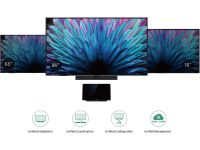
The MeetingDisplay 65" pairs perfectly with the Yealink MTR system, offering a fully integrated solution for any meeting room. It comes with a range of sizes (65", 75", and 86") to suit small, medium, and large spaces, ensuring flexibility for various room configurations. By combining the MeetingDisplay with the MTR system, UVC Camera, and MCore, you can create a powerful, cohesive meeting environment that streamlines communication and enhances productivity.
Experience Seamless Meeting Integration
With the Yealink MeetingDisplay, you'll experience a fully unified meeting solution that enhances coordination, reduces manual interventions, and provides superior visual and audio quality. Whether you're in a small team meeting or a larger conference, the MeetingDisplay ensures an optimal meeting environment that boosts collaboration and productivity.
Specifications:
| ©2026 Respective owners and brand holders. This table has been carefully researched and generated by ComXpert International CC (//www.comx-computers.co.za), however, errors and omissions may occur. Only references to South Africa apply. All products are sourced in South Africa from the official suppliers and the warranty is that of the local supplier. E&OE. This table and our site's content may be used on condition that this notice and link remains intact and unaltered. | |
| Specifications | |
| Product Code | MD65 |
| Parameter | Description |
| Display | Screen Size |
| - MeetingDisplay 65: 65 inch | |
| - MeetingDisplay 75: 75 inch | |
| - MeetingDisplay 86: 86 inch | |
| Display Type: IPS | |
| Surface Treatment: Anti-glare Coating | |
| Refresh Rate: 60Hz | |
| Grayscale Response Time: 8ms | |
| Color Gamut: 72% NTSC | |
| Colour Depth: 1.07G (10bit) | |
| Viewing Angle: 178degrees(H)/178degrees(V) | |
| Contrast Ratio: 1200: 1 | |
| Resolution: 3840 x 2160 | |
| Brightness: 500 cd/² | |
| Haze: 25% | |
| Operation Time: 7*18h | |
| Audio | Speaker: 12W x 2 |
| Content sharing | Wired screen sharing: |
| - HDMI In | |
| Wireless screen sharing: | |
| - AirPlay | |
| - Miracast | |
| - Wireless Presentation Pod (unavailable in the United States) | |
| Hardware Interfaces | Video: HDMI In 2.0 x 3 |
| Audio: 3.5mm Stereo Mini Jack (Output) | |
| USB: USB- A 2.0 x 2, USB- B 2.0 x 1 | |
| LAN: 2x RJ45 10/100/1000M network ports | |
| Control: RS232 x 1, IP Control(Via LAN) | |
| Others: Reset x 1 | |
| Wireless | WiFi: Wi-Fi 6 |
| - 2.4G & 5G dual-band, 802.11a/b/g/n/ac/ax | |
| Bluetooth: Bluetooth 5.1 | |
| IR: Supported | |
| Installation Methods | Wall-mounted Installation |
| Floor-stand Installation | |
| Packaging | 1 x MeetingDisplay |
| 1 x Cable Pack | |
| - 1 x 3m AC power cable | |
| - 1 x 3m CAT5E network cable | |
| - 1 x Quick Start Guide | |
| - Cable ties | |
| - 1 x Remote Controller (IR) | |
| - 2 x AAA Batteries | |
| - 1 x MCore bracket (Compatible with MCore 4, MCore 4 is sold separately) | |
| Optional Accessories | Mounting Accessories for MeetingDisplay: |
| Wall mounting Bracket: MD-WallMount (Suitable for 65", 75", and 86" MeetingDisplay) | |
| Motorized mobile stand: MB-FS-Lift | |
| Mounting Accessories for MVC Series & MeetingBar: | |
| Mounting Bracket: | |
| - MD-AVBracket- S: Compatible with MeetingBar A40, SmartVision 40, MSpeaker Pro | |
| - MD-AVBracket- L: Compatible with MeetingBar A50 | |
| - MD-PTZBracket: Compatible with UVC86 | |
| Casting Accessories: | |
| Wireless Presentation Pod (unavailable in the United States) | |
| System Overview | Operating System: Android 13 |
| Storage | |
| - Memory: 4G | |
| - Flash: 32G | |
| Power | Power Adapter: 100- 240V~50/60Hz |
| Power Consumption | |
| - MeetingDisplay 65 | |
| - Max: 210W | |
| - Typical: 183W | |
| - Off mode: less than 0.5W | |
| - MeetingDisplay 75 | |
| - Max: 215W | |
| - Typical: 186W | |
| - Off mode: less than 0.5W | |
| - MeetingDisplay 86 | |
| - Max: 323W | |
| - Typical: 268W | |
| - Off mode: less than 0.5W | |
| Environmental Factors | Operating Temperature: 0~40degreesC |
| Storage Temperature: -20~60degreesC | |
| Operating Humidity: 10~95% | |
Sold by ComX Computers
