ME60X specification sheet
Specifications for ME60X
Mercusys ME60X AX1500 Wi-Fi 6 Range Extender
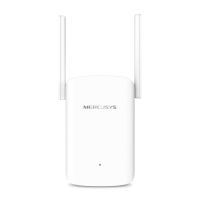


Wireless: Range extenders & repeaters
Mercusys
About this product
The Mercusys ME60X AX1500 Wi-Fi 6 Range Extender expands your existing wireless network into areas with weak Wi-Fi coverage, delivering up to 1201 Mbps on 5 GHz and 300 Mbps on 2.4 GHz. With two external antennas, Wi-Fi 6 technology, EasyMesh compatibility, a Gigabit Ethernet port and easy WPS setup, it is a practical solution for improving wireless coverage at home or in a small office. Buy now from our website for a reliable Wi-Fi coverage upgrade in South Africa.
Overview Summary
The Mercusys ME60X is an AX1500 Wi-Fi 6 range extender designed to extend an existing wireless network into areas where the main router signal is weak. It provides dual-band wireless speeds of up to 1201 Mbps on 5 GHz and 300 Mbps on 2.4 GHz, supporting modern Wi-Fi 6 devices while remaining compatible with earlier Wi-Fi standards.
Two external antennas help extend wireless coverage, while the Gigabit Ethernet port provides a wired network connection for compatible PCs, TVs and game consoles. The ME60X supports RE and access point modes, EasyMesh and management through the MERCUSYS app. One-touch WPS setup makes it simple to expand Wi-Fi coverage without complicated configuration.
Performance tier: Mid-range Wi-Fi 6 range extender
Uses: home Wi-Fi expansion, improving weak Wi-Fi areas, HD streaming, online gaming, smart home connectivity, wireless networking, wired Ethernet connectivity
Description
The Mercusys ME60X AX1500 Wi-Fi 6 Range Extender is designed to improve wireless coverage by extending an existing router network into areas where the Wi-Fi signal is weaker. It operates on both the 2.4 GHz and 5 GHz bands, providing a combined AX1500 class wireless connection with a maximum signal rate of 300 Mbps on 2.4 GHz and 1201 Mbps on 5 GHz.
Wi-Fi 6 technology helps improve network efficiency, capacity and wireless performance for compatible devices. The ME60X also supports earlier Wi-Fi generations, making it suitable for mixed-device home networks where newer Wi-Fi 6 equipment operates alongside existing wireless devices.
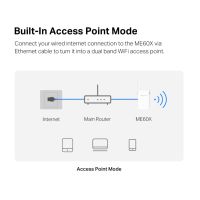
The extender features two external antennas and a Gigabit Ethernet port. The Ethernet connection can be used to connect compatible wired devices such as PCs, televisions and game consoles, while access point mode allows the ME60X to create dual-band Wi-Fi from a wired network connection.
EasyMesh compatibility provides the option of building a compatible whole-home mesh network with supported EasyMesh devices. The ME60X can also be configured using the WPS button for one-touch setup or managed through the MERCUSYS app on compatible Android and iOS devices.
Its compact design measures 84.7 x 39 x 112 mm without the plug, making it suitable for placement near areas that need improved wireless coverage. A signal indicator helps identify a suitable position for the extender when setting up the network.
Features
The ME60X combines Wi-Fi 6 wireless technology with practical range extension features to improve connectivity throughout a home or small office.
- AX1500 dual-band Wi-Fi 6 performance
- Up to 1201 Mbps on the 5 GHz band
- Up to 300 Mbps on the 2.4 GHz band
- Wi-Fi 6 technology for improved speed, efficiency and network capacity
- Two external antennas
- EasyMesh compatible for supported mesh network configurations
- One Gigabit Ethernet port for wired network connections
- RE mode for extending an existing wireless network
- Access point mode for creating Wi-Fi from a wired Ethernet connection
- WPS and reset button
- One-touch WPS setup
- MERCUSYS app support for setup and network management
- Supports WPA, WPA2 and WPA3-PSK wireless security
- Compatible with 802.11a/n/ac/ax on 5 GHz
- Compatible with 802.11b/g/n on 2.4 GHz
- 1024 QAM modulation
- Beamforming support
Wi-Fi 6 Brings Your Network to a Next Level
Armed with Wi-Fi 6 , ME60X improves virtually every aspect of your network: speed, efficiency, and capacity.
Extend WiFi to Where You Need It Most
Expand coverage of your Existing Router. The two adjustable high-gain antennas extends WiFi signals to where your router WiFi cannot reach. This AX1500 Range Extender is backward compatible with previous WiFi generations (11b/g/n/a/ac) and will work with all your existing internet-connected devices.
Cover Your Whole Home with EasyMesh
ME60X is compatible with EasyMesh, enabling you to set up a whole home mesh network with one WiFi name and password with any other APs that support EasyMesh from multiple vendors. Enjoy flexible, scalable, and seamless mesh WiFi throughout your home!
Adaptive Path Selection
Keeps your network running at top speed by automatically choosing the fastest connection path to the router.
High Speed Mode
Use both WiFi bands to enjoy super-fast connections-ideal for HD streaming and gaming.
Effortless One-Touch Setup
Press the WPS button on your router and extender to expand your Wi-Fi coverage in seconds.
Built-In Access Point Mode
ME60X is more than just a WiFi range extender. Connect your wired internet connection to the ME60X via Ethernet cable to turn it into a dual band WiFi access point.
What's in the Box
- Mercusys ME60X AX1500 Wi-Fi 6 Range Extender
- Quick Installation Guide
Specifications
| ©2026 Respective owners and brand holders. This table has been carefully researched and generated by ComXpert International CC (//www.comx-computers.co.za), however, errors and omissions may occur. Only references to South Africa apply. All products are sourced in South Africa from the official suppliers and the warranty is that of the local supplier. E&OE. This table and our site's content may be used on condition that this notice and link remains intact and unaltered. | |
Specifications | |
| Product Code | ME60X |
| Wireless | |
| Wi-Fi Class | AX1500 |
| Wi-Fi (2.4 GHz) | 300Mbps |
| Wi-Fi (5 GHz) | 1201Mbps |
| Wireless Standards | 802.11ax/ac/a/b/g/n |
| Max Channel Width | 80MHz |
| Reception Sensitivity | 5 GHz: |
| 11ax HE80 MCS0: -88 dBm | |
| 11ax HE80 MCS11: -58 dBm | |
| 11a 6Mbps: -94 dBm | |
| 11a 54Mbps: -76 dBm | |
| 11ac VHT80 MCS0: -91dBm | |
| 11ac VHT80 MCS9: -63dBm | |
| 2.4 GHz: | |
| 11g 6Mbps: -95 dBm | |
| 11g 54Mbps: -77 dBm | |
| 11n HT40: -72dBm | |
| Max Wi-Fi Modulation | 1024 QAM |
| Wireless Security | WPA, WPA2, WPA3-PSK |
| Wireless Functions | EasyMesh |
| Beamforming | |
| Software | |
| Operation Modes | RE/AP |
| WAN Mode | / |
| DHCP | Server |
| DHCP Client List | |
| NAT Forwarding | / |
| Protocols | IPv4/IPv6 |
| IPTV | / |
| Guest Network | 2.4G Guest Network |
| 5G Guest Network | |
| Parental Controls | / |
| DDNS | / |
| Easy Mesh | EasyMesh Compatible |
| QoS | / |
| Security | Access Control |
| ISP Feature | / |
| System | Time Settings |
| LED Control | |
| Firmware Upgrade | |
| Backup&Restore | |
| Reboot | |
| Administration | |
| System Log | |
| Diagnostics | / |
| LED Management | LED Control |
| Night Mode | |
| Device Management | MERCUSYS APP |
| Webpage | |
| Cloud | MERCUSYS ID |
| Auto Update | |
| Online Update | |
| Language | Bulgarian |
| Czech | |
| Danish | |
| German | |
| Greek | |
| English | |
| Spanish | |
| Finnish | |
| French | |
| Hungarian | |
| Indonesian | |
| Italian | |
| Japanese | |
| Korean | |
| Dutch | |
| Norwegian | |
| Polish | |
| Portuguese | |
| Portuguese - Brazil | |
| Romanian | |
| Russian | |
| Slovak | |
| Swedish | |
| Turkish | |
| Ukrainian | |
| Vietnamese | |
| Chinese - Taiwan | |
| Advanced Features | / |
| Hardware | |
| Dimensions (W X D X H) | 84.7x39x112 mm |
| Interfaces | 1 Gigabit Ethernet Port |
| Antenna | 2x External Antennas |
| Button | 1x RESET/WPS Button |
| Power Supply | 10W |
| Installation | / |
| LED | 1x SYS |
| Retail Package Dimension | 152*123*102.5 mm |
| Units per Carton | 32 |
| Carton Dimension | 500*315*415 mm |
| Others | |
| Network Services Enabled by Default | Web Server |
| Manage and configure device through web (HTTP/HTTPS) | |
| Port: 80/443 Protocol: TCP | |
| DHCP Server | |
| IP address assignment (DHCP) | |
| Port: 67 Protocol: UDP | |
| App management | |
| Manage and configure device through app | |
| Port: 20001 Protocol: TCP | |
| Port: 20002 Protocol: UDP | |
| Package Contents | Wi-Fi Range Extender ME60X |
| Quick Installation Guide | |
| Environment | Operating Temperature: 0degreesC~40degreesC (32degreesF~104degreesF) |
| Operating Humidity: 10%~90% Non-Condensing | |
FAQ
What is the Mercusys ME60X used for?
The Mercusys ME60X is used to extend an existing Wi-Fi network into areas where the router signal is weak or unavailable, helping improve wireless coverage throughout a home or small office.
What Wi-Fi speeds does the ME60X support?
The ME60X supports up to 1201 Mbps on 5 GHz and up to 300 Mbps on 2.4 GHz, giving it an AX1500 wireless class rating.
Does the Mercusys ME60X support Wi-Fi 6?
Yes. The ME60X supports Wi-Fi 6 and the IEEE 802.11ax standard, while also supporting earlier 802.11 wireless standards.
Does the ME60X have an Ethernet port?
Yes. The ME60X has 1 x Gigabit Ethernet port that can provide a wired network connection for compatible devices such as PCs, TVs and game consoles.
Can the ME60X be used as an access point?
Yes. The ME60X supports access point mode, allowing it to create a dual-band wireless network from a wired Ethernet connection.
Is the Mercusys ME60X compatible with EasyMesh?
Yes. The ME60X supports EasyMesh, allowing it to participate in a compatible mesh network with supported EasyMesh access points.
How do I set up the Mercusys ME60X?
The ME60X supports one-touch WPS setup. Press the WPS button on the router and extender to begin extending the wireless network. The MERCUSYS app can also be used for setup and network management.
How many antennas does the ME60X have?
The ME60X has 2 x external antennas designed to help extend wireless coverage.
What wireless security does the ME60X support?
The ME60X supports WPA, WPA2 and WPA3-PSK wireless security.
What devices can use the ME60X?
The ME60X can extend Wi-Fi for compatible smartphones, laptops, tablets, smart TVs, game consoles, smart home devices and other wireless network equipment. Its Gigabit Ethernet port can also connect compatible wired devices.
Sold by ComX Computers
