ME80X specification sheet
Specifications for ME80X
Mercusys ME80X AX3000 Wi-Fi 6 Range Extender
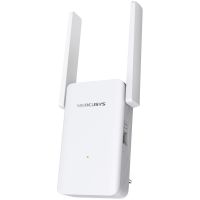
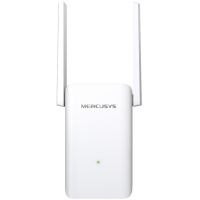


Wireless: Range extenders & repeaters
Mercusys
Overview Summary:
Upgrade your home Wi-Fi instantly with the Mercusys ME80X AX3000 Wi-Fi 6 range extender. Designed for South African homes, it delivers fast dual-band speeds to eliminate dead zones and ensure smooth streaming, gaming, and browsing throughout your space. Installation is simple with one-touch WPS and the MERCUSYS app, letting you set up and manage your network from any smartphone. Extend your Wi-Fi effortlessly and enjoy reliable connections in every corner of your home. Shop now to enhance your internet experience.With two adjustable high-gain antennas and support for EasyMesh, ME80X creates a seamless mesh network with a single Wi-Fi name and password, providing flexible coverage and compatibility with other devices. Whether connecting multiple gadgets, setting up guest access, or managing parental controls, this extender makes network management easy and secure. Buy now to strengthen your home Wi-Fi without complicated installation.
Performance tier: High-performance
Uses: Streaming 4K video, online gaming, connecting multiple devices, extending Wi-Fi coverage, creating mesh networks, guest network setup, parental control management
{END}
Overview:
Mercusys ME80X AX3000 Wi-Fi 6 Range Extender: Expand Your Home Network Effortlessly
Enhance your home or office network with the Mercusys ME80X AX3000 Wi-Fi 6 range extender. Designed for faster speeds, larger coverage, and smoother connectivity, this dual-band extender brings your Wi-Fi to every corner of your space. Whether streaming 4K content, gaming online, or connecting multiple devices, ME80X ensures your network performs at its best. Its flexible setup options, smart signal indicators, and compatibility with any router make it a simple yet powerful solution for improving wireless coverage.
Description:
The Mercusys ME80X is a high-performance Wi-Fi 6 range extender offering dual-band speeds up to 3000 Mbps-2402 Mbps on 5GHz and 574 Mbps on 2.4GHz. Equipped with two adjustable high-gain antennas, it extends your Wi-Fi to hard-to-reach areas while remaining compatible with older Wi-Fi standards and all devices. It features a gigabit Ethernet port for reliable wired connections and supports built-in access point mode to create a dual-band hotspot from a wired connection. With one-touch WPS setup and the MERCUSYS app for iOS and Android, installation and network management are quick and intuitive. The device also supports EasyMesh, allowing seamless integration with other EasyMesh-compatible access points for a full home mesh network.
Features:
Boosted Wi-Fi Performance
ME80X leverages Wi-Fi 6 technology to improve network efficiency, speed, and capacity. Enjoy ultra-low latency and fast connections even in busy networks. Dual-band support ensures smooth streaming and gaming while reducing interference.
Seamless Coverage Anywhere
Extend your network to every room with the ME80X's high-gain antennas and flexible placement options. Its multicolor LED signal indicator helps you find the optimal spot for maximum coverage. Compatible with all routers, it works alongside your existing setup to fill dead zones with fast, reliable Wi-Fi.
EasyMesh for Whole-Home Connectivity
Create a unified Wi-Fi experience with EasyMesh technology. Connect multiple APs from different vendors using a single network name and password, ensuring seamless roaming throughout your home.
Simple Setup and Control
Setting up ME80X is straightforward-just press the WPS button on your router and the extender. Relocate it using the signal indicator for the best connection. For advanced management, the MERCUSYS app allows real-time network monitoring, guest network setup, and parental controls. Adjust access, set time limits, block websites, or pause connections with a few taps.
Versatile Access Point Mode
Convert your wired internet connection into a dual-band Wi-Fi access point. This mode is perfect for creating a dedicated wireless network without compromising your router's performance.
Technical Highlights
- Dual-band speeds: 2402 Mbps at 5GHz, 574 Mbps at 2.4GHz
- Gigabit Ethernet port for wired connections to PCs, consoles, and IPTV devices
- Two external adjustable high-gain antennas for extended coverage
- Smart signal indicator for optimal placement
- Wireless standards: IEEE 802.11a/n/ac/ax (5GHz), IEEE 802.11b/g/n/ax (2.4GHz)
- Security support: WEP, WPA, WPA2, WPA3-PSK
- Dimensions: 138.6 x 100.3 x 68.4 mm
- Power consumption: 13W
- Operating environment: 0degreesC-40degrees C, 10%-90% humidity non-condensing
Manage Your Network Effortlessly
The MERCUSYS app provides an intuitive way to control your home network from anywhere. Monitor connected devices, prioritize bandwidth, and get alerts when new devices join. Create guest networks and manage parental controls for a safer online environment.
Package Includes
- ME80X Wi-Fi Range Extender
- Quick Installation Guide
- Ethernet cable for wired setup
Experience stronger, faster, and smarter Wi-Fi with the Mercusys ME80X, designed to keep your home connected with minimal effort and maximum performance.
Specifications:
| ©2026 Respective owners and brand holders. This table has been carefully researched and generated by ComXpert International CC (//www.comx-computers.co.za), however, errors and omissions may occur. Only references to South Africa apply. All products are sourced in South Africa from the official suppliers and the warranty is that of the local supplier. E&OE. This table and our site's content may be used on condition that this notice and link remains intact and unaltered. | |
Specifications | |
| Product Code | ME80X |
| Wireless | |
| Wireless Standards | IEEE 802.11a/n/ac/ax 5GHz, IEEE 802.11b/g/n/ax 2.4GHz |
| Frequency | 2.4GHz and 5GHz |
| Signal Rate | 574 Mbps at 2.4GHz, 2402 Mbps at 5GHz |
| Reception Sensitivity | 5GHz: |
| 11a 6Mbps:-97dBm | |
| 11a 54Mbps:-78dBm | |
| 11ax HE20 MCS0: -96dBm | |
| 11ax HE20 MCS11: -66dBm | |
| 11ax HE40 MCS0: -93dBm | |
| 11ax HE40 MCS11: -62dBm | |
| 11ax HE80 MCS0: -90dBm | |
| 11ax HE80 MCS11: -60dBm | |
| 11ax HE160 MCS11: -58dBm | |
| 2.4GHz: | |
| 11g 6Mbps:-96dBm | |
| 11g 54Mbps:-78dBm | |
| 11ax HE20 MCS0: -96dBm | |
| 11ax HE20 MCS11: -66dBm | |
| 11ax HE40 MCS0: -93dBm | |
| 11ax HE40 MCS11: -62dBm | |
| Wireless Security | WEP, WPA, WPA2, WPA3-PSK |
| Hardware | |
| Dimensions (W X D X H) | 138.6 x 100.3 x 68.4 mm |
| Interfaces | 1 Gigabit Ethernet Port |
| Button | WPS / Reset Button |
| Antenna Type | 2 x External Antennas |
| Power Consumption | 13W |
| Others | |
| Certifications | RoHS |
| Network Services Enabled by Default | Web Server |
| Device configuration and management | |
| Port: 80/443 , Protocol: HTTP/HTTPS | |
| DHCP Server | |
| IP address assignment | |
| Port: 67 , Protocol: UDP/DHCP | |
| SSH for APP | |
| Port: 20001 , Protocol: TCP/ssh | |
| TMPD for APP | |
| Manage and configure device through app | |
| Port: 20001 , Protocol: UDP/tmpd | |
| TDP Server for APP | |
| device discovery for app | |
| Port: 20002 , Protocol: UDP | |
| Package Contents | Wi-Fi Range Extender ME80X |
| Quick Installation Guide | |
| Environment | Operating Temperature: 0degreesC~40degreesC (32degreesF~104degreesF) |
| Operating Humidity: 10%~90% Non-Condensing | |
Sold by ComX Computers
