NET-RE220BE specification sheet
Specifications for NET-RE220BE
TP-Link RE220BE BE3600 Dual-Band Wi-Fi 7 Range Extender
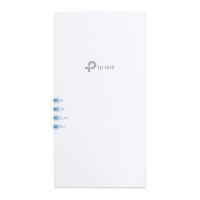
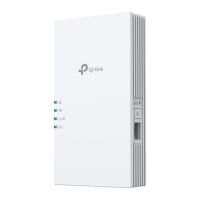
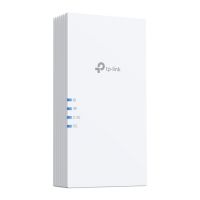
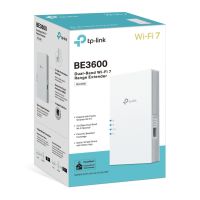
Wireless: Range extenders & repeaters
TP-link
About this product
The TP-Link RE220BE BE3600 Dual-Band Wi-Fi 7 Range Extender expands reliable wireless coverage into weak signal areas with up to 3.6 Gbps dual-band Wi-Fi 7, Multi-Link Operation, 4K-QAM, 160 MHz channels, EasyMesh compatibility and a 1 Gbps Ethernet port. Extend fast and stable Wi-Fi for streaming, gaming, video calls and connected devices. Buy now for a high-performance Wi-Fi 7 range extension solution.
Overview Summary
TP-Link RE220BE BE3600 Dual-Band Wi-Fi 7 Range Extender is designed to extend wireless coverage to areas where an existing Wi-Fi signal is weak. It supports dual-band Wi-Fi 7 with up to 2882 Mbps on 5 GHz and 688 Mbps on 2.4 GHz, providing a combined wireless class of BE3600.
Wi-Fi 7 features including Multi-Link Operation, 4K-QAM, 160 MHz channel support and Multi-RUs help improve throughput, latency and wireless efficiency. EasyMesh compatibility can create a seamless whole-home network with compatible equipment, while Smart Roaming helps compatible devices maintain connectivity as they move around the home.
Performance tier: High-performance Wi-Fi 7
Uses: Wi-Fi coverage extension, home networking, streaming, online gaming, video conferencing, smart home devices, wireless access point
Description
The TP-Link RE220BE is a BE3600 dual-band Wi-Fi 7 range extender designed to improve wireless coverage in areas affected by weak or unreliable Wi-Fi signals. It operates across the 5 GHz and 2.4 GHz bands and provides wireless signal rates of up to 2882 Mbps on 5 GHz and 688 Mbps on 2.4 GHz.
Wi-Fi 7 technologies such as Multi-Link Operation, 4K-QAM, 160 MHz channels and Multi-RUs are designed to improve wireless throughput, reduce latency and increase transmission efficiency. These features make the RE220BE suitable for demanding home networking activities including online gaming, 4K and 8K streaming, video conferencing and connecting multiple wireless devices.
The extender includes two external antennas and supports both Range Extender and Access Point modes. Its 1 Gbps Ethernet port can provide a wired network connection for devices such as computers, smart TVs and game consoles, or can be used when configuring the unit as an access point.
EasyMesh compatibility allows the RE220BE to work with compatible EasyMesh routers and range extenders to create a seamless whole-home Wi-Fi network. Smart Roaming can help compatible devices remain connected as they move between areas of the home. Setup can be completed using the WPS button or the TP-Link Tether app.
Features
The RE220BE combines Wi-Fi 7 performance with practical coverage extension features for modern homes and connected environments.
- BE3600 dual-band Wi-Fi 7: Supports up to 2882 Mbps on 5 GHz and 688 Mbps on 2.4 GHz.
- Multi-Link Operation: Supports MLO to improve throughput, reduce latency and increase connection reliability.
- 4K-QAM: Provides higher transmission efficiency for supported Wi-Fi 7 connections.
- 160 MHz channels: Supports wider channels for compatible Wi-Fi 7 devices.
- Multi-RUs: Supports improved wireless resource utilisation with compatible devices.
- EasyMesh compatible: Can work with compatible EasyMesh equipment to create whole-home Wi-Fi coverage.
- Smart Roaming: Helps compatible devices maintain connectivity while moving around the home.
- 1 Gbps Ethernet: Provides a wired network connection for compatible computers, smart TVs and game consoles.
- Range Extender and Access Point modes: Provides flexible installation options for extending or deploying wireless connectivity.
- Two external antennas: Designed to help extend wireless coverage.
- Simple setup: Supports setup using WPS or the TP-Link Tether app.
- Broad compatibility: Supports Wi-Fi 7 and backward compatibility with previous Wi-Fi generations.
WiFi 7 - WiFi Like Never Before
WiFi 7 offers accelerated throughput, lower latency, stronger anti-jamming, and higher efficiency. Join the league of pros and experience the sheer performance of the next generation of WiFi.
3.6 Gbps Dual-Band WiFi: Speed Meets Stability
Enjoy next-generation performance with a Dual-Band WiFi 7 range extender, offering blazing-fast speeds of up to 3.6 Gbps to ensure seamless connectivity in every corner of your home, keeping you connected with unmatched reliability and efficiency.
Extend Reliable WiFi 7 to Eliminate Dead Zones
Expand your home or office coverage with the RE220BE Range Extender. Easily connecting to your existing router, it extends strong, reliable WiFi to every corner-even hard-to-reach areas. Enjoy seamless, uninterrupted coverage with less interference for a smoother, more consistent connection everywhere.
Range Extender Mode
Plug your PC, smart TV, or game console into the 1 Gbps port for a blazing-fast wired connection.
Access Point Mode
Connect RE220BE with a router to easily turn that 1G wired connection into a high-speed tri-band wireless signal.
EasyMesh - Create Whole-Home Wi-Fi with Your Existing Router
The RE220BE is EasyMesh-compatible. Pair with an EasyMesh-compatible router to eliminate weak spots and create seamless whole-home WiFi, ensuring every corner of your home stays connected.
WiFi Dead Zone Killer
Eliminate weak signal areas with WiFi coverage for the whole house
Smart Roaming
Uninterrupted streaming when moving around your home
One WiFi Name
No more switching WiFi network names
Control at Your Fingertips
Set up and manage your WiFi, including TP-Link routers and range extenders, from your Android or iOS phone with the TP-Link Tether app.
What's in the Box
- TP-Link RE220BE Wi-Fi 7 Range Extender
- Quick Installation Guide
Specifications
| ©2026 Respective owners and brand holders. This table has been carefully researched and generated by ComXpert International CC (//www.comx-computers.co.za), however, errors and omissions may occur. Only references to South Africa apply. All products are sourced in South Africa from the official suppliers and the warranty is that of the local supplier. E&OE. This table and our site's content may be used on condition that this notice and link remains intact and unaltered. | |
Specifications | |
| Product Code | NET-RE220BE |
| HARDWARE FEATURES | |
| Interface | 1 Gbps Ethernet Port |
| Button | WPS Button |
| Reset Button | |
| Input Power | 100-240V~50/60Hz 0.3A |
| Max. Power Consumption | 15W |
| Dimensions ( W x D x H ) | 3.8 x 1.8 x 6.2 in (97 x 46 x 158 mm) |
| Antenna | 2 External Antennas |
| WIRELESS FEATURES | |
| Wireless Standards | Wi-Fi 7 |
| IEEE 802.11be/ax/ac/n/a 5 GHz | |
| IEEE 802.11be/ax/n/b/g 2.4 GHz | |
| Frequency | 5 GHz |
| 2.4 GHz | |
| Signal Rate | 2882 Mbps at 5 GHz |
| 688 Mbps at 2.4 GHz | |
| Working Modes | Range Extender/Access Point |
| Reception Sensitivity | 5GHz: |
| 11be EHT20 MCS0:-96dBm | |
| 11be EHT40 MCS0:-94dBm | |
| 11be EHT80 MCS0:-91dBm | |
| 11be EHT160 MCS0:-88dBm | |
| 11be EHT20 MCS13:-59dBm | |
| 11be EHT40 MCS13:-57dBm | |
| 11be EHT80 MCS13:-54dBm | |
| 11be EHT160 MCS13:-51dBm | |
| 2.4GHz: | |
| 11be EHT20 MCS0:-95dBm | |
| 11be EHT40 MCS0:-93dBm | |
| 11be EHT20 MCS13:-58dBm | |
| 11be EHT40 MCS13:-56dBm | |
| Wireless Security | WPA/WPA2-PSK encryptions |
| WPA2/WPA3 | |
| Advanced Features | Multi-Link Operation (MLO) |
| 160 MHz Channel | |
| 4K-QAM | |
| Multi-RUs | |
| Transmission Power | FCC: |
| 2.4GHz < 30dBm | |
| 5GHz < 30dBm | |
| Mesh Technology | EasyMesh-Compatible |
| Wireless Function | LED Control |
| Access Control | |
| Power Schedule | |
| Wi-Fi Coverage | |
| OTHER | |
| Network Services Enabled by Default | Web Server |
| Manage and configure device through web (HTTP/HTTPS) | |
| Port: 80/443 Protocol: TCP | |
| DHCP Server | |
| IP address assignment (DHCP) | |
| Port: 67 Protocol: UDP | |
| App management | |
| Manage and configure device through app | |
| Port: 20001 Protocol: TCP | |
| Port: 20002 Protocol: UDP | |
| OTHERS | |
| Certification | FCC, RoHS |
| Package Content | Wi-Fi 7 Range Extender RE235BE |
| Quick Installation Guide | |
| System Requirements | Internet Explorer, Firefox, Chrome, Safari, or other |
| JavaScript-enabled browser | |
| Environment | Operating Temperature: 0degreesC~40degreesC (32degreesF ~104degreesF) |
| Storage Temperature: -40degreesC~70degreesC (-40degreesF ~158degreesF) | |
| Operating Humidity: 10%~90% non-condensing | |
| Storage Humidity: 5%~90% non-condensing | |
FAQ
What is the TP-Link RE220BE?
The TP-Link RE220BE is a BE3600 dual-band Wi-Fi 7 range extender designed to expand wireless coverage into areas with weak Wi-Fi signals.
What Wi-Fi speeds does the RE220BE support?
The RE220BE supports up to 2882 Mbps on the 5 GHz band and up to 688 Mbps on the 2.4 GHz band.
Does the RE220BE support Wi-Fi 7?
Yes. The RE220BE supports Wi-Fi 7 and features Multi-Link Operation, 4K-QAM, 160 MHz channels and Multi-RUs.
Does the RE220BE support EasyMesh?
Yes. The RE220BE is EasyMesh compatible and can work with compatible EasyMesh routers and range extenders to create whole-home Wi-Fi coverage.
Does the RE220BE have an Ethernet port?
Yes. It has 1 x 1 Gbps Ethernet port that can be used to connect compatible wired devices or for access point operation.
Can the RE220BE be used as an access point?
Yes. The RE220BE supports both Range Extender and Access Point operating modes.
How is the RE220BE configured?
The RE220BE can be configured using the WPS button or through the TP-Link Tether app on a compatible mobile device.
Is the RE220BE compatible with older Wi-Fi devices?
Yes. The RE220BE supports Wi-Fi 7 as well as previous Wi-Fi generations, allowing compatible older devices to connect to the extended network.
What devices can connect to the RE220BE Ethernet port?
The 1 Gbps Ethernet port can provide a wired network connection for devices such as computers, smart TVs and game consoles.
Sold by ComX Computers
