SHELLY BLU BUTTON1 (RED) specification sheet
Specifications for SHELLY BLU BUTTON1 (RED)
Shelly Blu Button1 - Red
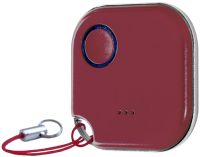


Shelly Blu Button1 - Red, Uses Bluetooth Technology, 1x 3 V CR2032 Battery, Up to 2 years Battery Life, Bluetooth 4.2, Multi-click support - up to 4 possible actions, To use this device with the Shelly Smart control App a Gateway is necessary
Home Automation / Smart home
Home Automation / Smart home
Shelly
In Stock Buy now!
R 197.00 inc VAT
Overview:
What is Shelly BLU Button 1?
Bluetooth-operated action and scenes activation button
Remotely control and activate/deactivate different scenes and other Shelly devices without your mobile phone. Execute up to 4 pre-set actions or scenes with simple click combinations.
Features:
Bluetooth-operated
Use Shelly BLU Button1 to activate Shelly Plus and Pro devices
Multi-click action trigger
Execute up to 4 pre-set actions or scenes with simple click combinations
Immediate response time
Response time fewer than 1 second
Low battery consumption
Up to 2 years, perfect for those who are always on-the-go
Visual & Sound hints
Sound and color indications inform you of its status and help you find it
Broad range
Shelly BLU Button1 has a range of 10m indoors and 30m outdoors
Scripting
With the scripting functionalities on your Shelly devices, you can easily create complex local actions triggered by the Shelly BLU Button1 when it's within range. Now, based on RSSI, you can fully customize and automate your smart home. Every Shelly Plus and Pro in your home with an enabled Bluetooth gateway act as a repeater of the signal. Furthermore, you can use the same button to trigger different actions in multiple locations, like your home, office, and villa, without having to memorize different push combinations. Scripting functionalities can create endless possibilities.
High protection
With support for the Advanced Encryption Standard, we have ensured that all communications are encrypted and secure. This encryption ensures that even if someone attempts to intercept your device's communication, they will not be able to access your data or compromise your security. Moreover, with our device's built-in protection against replay attacks, you can be assured that any attempts to manipulate the signal will be prevented.
One device for all your spaces
Easily manage your smart home devices by creating customized actions that cater to your preferences. You can control an entire room with a simple button click, using four distinct push combinations. These push combinations can be assigned to a variety of actions, such as switching off lights, adjusting blinds, controlling the garage door, and more! Use the Shelly Smart Control app to pre-set desired actions and put no limit to your imagination.
Your key to effortless scene control
Customize your smart home with just a combination of clicks! With Shelly BLU Button1, you can easily set your push sequence on the Shelly App and choose different scenes with a set of actions. Use the Shelly Smart Control app to create a "Movie Night" scene that sets your connected RGBW2 light strips to a dim blue color, creating the perfect atmosphere for your movie experience. Upon leaving your home, activate your previously set "Away" scene to turn off all lights in your home and lock the door with just one click.
The secret to a smarter office
Quickly set up your office environment without interrupting your workflow! With Shelly BLU Button1, you can easily control separate devices or activate complex scenes to meet your specific needs. With a double press of the button, you can trigger a preset meeting scene that sets the lights, temperature, and blinds to the optimal settings for your presentation. With three additional combinations available, you have the flexibility to customize the button, making it the perfect tool for optimizing your office routines.
Set the perfect brightness and position
Whether you're looking to open your curtains partially to let in natural light or close your blinds fully for privacy, the Shelly BLU Button1 has got you covered. With its customizable position-control and dimming feature, you can program the button to control the position of your devices with different press combinations - 75%, 50%, 25%, or fully open/close. Personalized dimming control operates the same way and allows you to set the perfect lighting mood for any occasion, whether you're watching a movie or hosting a dinner party.
Inputs
What is Shelly BLU Button 1?
Bluetooth-operated action and scenes activation button
Remotely control and activate/deactivate different scenes and other Shelly devices without your mobile phone. Execute up to 4 pre-set actions or scenes with simple click combinations.
- Scripting functionality for endless actions based on location
- Full compatibility with Home Assistant and any other device which is supported by BTHome protocol
- Uses BLE technology
- Able to turn on/off appliances, dim, and activate scenes
- Encryption
- Has sound and light alert; "Hush" mode for no sounds
- "Find me" function activated by beacon mode
- Range of 10m indoors and 30m outdoors
- Works with Plus, Pro and Gen3 devices
Features:
Bluetooth-operated
Use Shelly BLU Button1 to activate Shelly Plus and Pro devices
Multi-click action trigger
Execute up to 4 pre-set actions or scenes with simple click combinations
Immediate response time
Response time fewer than 1 second
Low battery consumption
Up to 2 years, perfect for those who are always on-the-go
Visual & Sound hints
Sound and color indications inform you of its status and help you find it
Broad range
Shelly BLU Button1 has a range of 10m indoors and 30m outdoors
Scripting
With the scripting functionalities on your Shelly devices, you can easily create complex local actions triggered by the Shelly BLU Button1 when it's within range. Now, based on RSSI, you can fully customize and automate your smart home. Every Shelly Plus and Pro in your home with an enabled Bluetooth gateway act as a repeater of the signal. Furthermore, you can use the same button to trigger different actions in multiple locations, like your home, office, and villa, without having to memorize different push combinations. Scripting functionalities can create endless possibilities.
High protection
With support for the Advanced Encryption Standard, we have ensured that all communications are encrypted and secure. This encryption ensures that even if someone attempts to intercept your device's communication, they will not be able to access your data or compromise your security. Moreover, with our device's built-in protection against replay attacks, you can be assured that any attempts to manipulate the signal will be prevented.
One device for all your spaces
Easily manage your smart home devices by creating customized actions that cater to your preferences. You can control an entire room with a simple button click, using four distinct push combinations. These push combinations can be assigned to a variety of actions, such as switching off lights, adjusting blinds, controlling the garage door, and more! Use the Shelly Smart Control app to pre-set desired actions and put no limit to your imagination.
Your key to effortless scene control
Customize your smart home with just a combination of clicks! With Shelly BLU Button1, you can easily set your push sequence on the Shelly App and choose different scenes with a set of actions. Use the Shelly Smart Control app to create a "Movie Night" scene that sets your connected RGBW2 light strips to a dim blue color, creating the perfect atmosphere for your movie experience. Upon leaving your home, activate your previously set "Away" scene to turn off all lights in your home and lock the door with just one click.
The secret to a smarter office
Quickly set up your office environment without interrupting your workflow! With Shelly BLU Button1, you can easily control separate devices or activate complex scenes to meet your specific needs. With a double press of the button, you can trigger a preset meeting scene that sets the lights, temperature, and blinds to the optimal settings for your presentation. With three additional combinations available, you have the flexibility to customize the button, making it the perfect tool for optimizing your office routines.
Set the perfect brightness and position
Whether you're looking to open your curtains partially to let in natural light or close your blinds fully for privacy, the Shelly BLU Button1 has got you covered. With its customizable position-control and dimming feature, you can program the button to control the position of your devices with different press combinations - 75%, 50%, 25%, or fully open/close. Personalized dimming control operates the same way and allows you to set the perfect lighting mood for any occasion, whether you're watching a movie or hosting a dinner party.
Inputs
- One push button
- Press shortly once, twice, or three times, or press and hold for about 2 sec to emit a signal
- Press and hold for 10 sec to pair ShellyBLU Button1 with another Bluetooth device.
- Press and hold for 30 sec to factory reset (possible only shortly after inserting the battery).
- Red LED indication
- Buzzer
Specifications:
| ©2026 Respective owners and brand holders. This table has been carefully researched and generated by ComXpert International CC (//www.comx-computers.co.za), however, errors and omissions may occur. Only references to South Africa apply. All products are sourced in South Africa from the official suppliers and the warranty is that of the local supplier. E&OE. This table and our site's content may be used on condition that this notice and link remains intact and unaltered. | |
Specifications | |
| Product Code | SHELLY BLU BUTTON1 (RED) |
| PHYSICAL | |
| Size (HxWxD) | 36x36x6 mm ±0.5 mm / 1.44х1.44х0.25 in ±0.02 in |
| Weight with the battery | 9 g ±1 g / 0.30 ±0.05 oz |
| Shell material | Plastic |
| Color | White, black, red, blue |
| ENVIRONMENTAL | |
| Ambient temperature | -20 °C to 40 °C / -5 °F to 105 °F |
| Humidity | 30 % to 70 % RH |
| Max. altitude | 2000 m / 6562 ft |
| ELECTRICAL | |
| Power supply | 1x 3 V CR2032 battery (included) |
| Battery life | Battery life: up to 2 years |
| RADIO | |
| RF band | 2400 - 2483.5 MHz |
| Max. RF power | <4 dBm |
| Bluetooth Protocol | 4.2 |
| Bluetooth Range | Up to 10 m / 33 ft indoors and 30 m / 100 ft outdoors (Depends on local conditions) |
| FIRMWARE CAPABILITIES | |
| Encryption | AES encryption (CCM mode) |
| Beacon mode | Yes |
| Multi-click support | Up to 4 possible actions |
Sold by ComX Computers

Specifications are subject to change without notice. E&OE. Prices are a guide only, and are valid on 2026-11-04 only, subject to stock being available.
The specifications displayed above apply to the entire range and may not apply to this specific model. Kindly note that options cannot be changed for most models, and some options are not available in South Africa.