TS-462-2G specification sheet
Specifications for TS-462-2G
QNap TS-462-2G 4 Bay NAS with Intel Dual-Core CPU and 2GB RAM
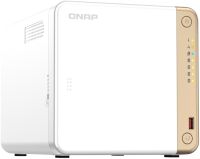

NAS - Enclosures for NAS / no drives included
QNap
Click here to browse for similar products and for great alternatives!
Overview:
TS-462 - Intel Dual-Core 2.5GbE Multimedia NAS with M.2 PCIe slots and PCIe expandability
A fast and vast private cloud storage with a range of multimedia and file management applications, the TS-462 is ideal for home users to maximize their digital lifestyle. Files, data and multimedia saved on the TS-462 can be accessed from all your connected devices, including phones, computers and smart TVs. A 2.5GbE port and HDMI 2.1 port come as standard, allowing you to enjoy lag-free multimedia streaming throughout your home and directly on your TV. The TS-462 can be geared up to fit future needs, supporting two M.2 PCIe slots for Qtier auto-tiering storage technology, and can be easily expanded to fit growing data needs. The TS-462 also supports Edge TPU, allowing you to easily organize your photos based on facial and object recognition with the QuMagie app.
- 2.5GbE port Immediately multiply your network speed by 2.5 times while using existing CAT5e cables.
- HDMI port 4K media playback and real-time transcoding; directly watch videos using HDMI 2.1 (4K @60Hz) output.
- AI-powered image recognition Supports Edge TPU (optional purchase) for supercharged AI-powered image recognition.
- Dual M.2 PCIe slots Attain greater NAS performance by installing M.2 2280 NVMe PCIe SSDs (sold separately).
- PCIe slot Install a PCIe Gen3 x2 card to expand the core functionality of the TS-462, including a Multi-Gig 10GbE/5GbE network card, a USB 3.2 Gen 2 (10Gbps) card, or a Wi-Fi 6 network card.
- Expand storage capacity Flexibly scale your total storage capacity by connecting USB expansion enclosures (please see the compatibility list).
Features:
Upgrade your home network to 2.5GbE
Wi-Fi 6 and 5G are becoming the new normal for networking, and theres no reason why your home wired network shouldnt also get a boost. The TS-462 comes with single 2.5GbE RJ45 LAN port which supports existing CAT5e cables. If your computers dont have 2.5GbE ports, you can use QNAPs USB 3.2 Gen 1 to 5GbE adapter (model name QNA-UC5G1T) to take advantage of the huge speed increase that 2.5GbE provides over standard Gigabit Ethernet. QNAP also provide affordable 2.5GbE switches and other adapters for you to take full advantage of the TS-462s 2.5GbE connectivity.
Intel dual-core processor burst up to 2.9 GHz
The TS-462 is powered by an Intel Celeron N4505 dual-core processor (burst up to 2.9 GHz), and supports SATA 6 Gb/s drives. The Intel AES-NI encryption engine boosts encryption performance while also maintaining the security of your NAS data. You can flexibly install NVMe SSDs in the M.2 PCIe slots for cache acceleration to maximize network and storage performance for data-intensive applications or enable Qtier for auto-tiered storage for higher storage efficiency.
Accelerate AI- powered image recognition and caching with TPU and PCIe expansion
The TS-462 has two M.2 PCIe Gen3 slots, enabling SSD caching or SSD storage pools for improved performance, or Edge TPU for AI image recognition.
2 x M.2 2280 PCIe Gen 3 x1 slots
- Install M.2 NVMe SSDs for cache acceleration or efficient tiered storage The TS-462 supports SSD caching and features two M.2 slots that support M.2 PCIe NVMe SSDs
- with 2280 form factors (sold separately) for boosting overall NAS performance. Qtier technology can also be used to empower the TS-462 with auto tiering that helps continuously optimize storage efficiency across all installed storage devices. : SSD cache, Qtier
- Accelerate AI- powered image recognition with TPU By leveraging a Google Edge TPU to QNAP AI Core (the AI-powered engine for image recognition), the TS-462 can perform high-speed face and object recognition. Google Edge TPU enables QuMagie to quickly process thousands of photos with high-speed AI Image recognition and classification, and QVR Face to analyze real-time video for instant facial recognition. Note: Purchase this item from Coral website : Edge TPU Accelerator
SSD caching and auto-tiering enable 24/7 optimized storage efficiency
While SSD prices continue to fall, and SSD capacity and performance continue to increase, organizations can easily take advantage of SSD strengths. The TS-462 supports numerous SSD-aware features that significantly maximize NAS performance with high cost-effectiveness.
Qtier for auto-tiering
You can add additional SSD over-provisioning (1% ~60%) to avoid write amplification and improve SSD random write speeds and endurance. You can potentially attain enterprise-grade SSD performance levels from affordable consumer SSDs!
Enables SSD caching for increasing IOPS performance and reducing latency for storage volume. This feature is perfect for IOPS-demanding applications including databases and virtualization. The TS-462 also supports write-only cache to boost write-intensive applications.
Qtier technology drives auto-tiered storage with continuous data optimization across high-performance SSDs and high-capacity HDDs based on access frequency. I/O-Aware Qtier can reserve a cache-like space in the SSD tiered to handle burst I/O in real time.
Direct 4K HDMI output for multimedia
The TS-462 supports hardware decoding and real-time transcoding* . The HDMI 2.1 output supports up to 4K (3840 x 2160p) @60Hz, allowing you to directly enjoy high-res videos on a TV or monitor.
The TS-462s hardware provides H.264 hardware decoding, encoding and transcoding capabilities. However, playback quality may vary due to factors including playback software, file formats, system usage, and available bandwidth. H.265 hardware transcoding requires installing CAYIN MediaSign Player with Plus license.
Faster image identification with integrated Intel OpenVINO AI engine.
With integrated Intel OpenVINO AI computing resources, the TS-462 accelerates AI image recognition performance without impacting other applications or services. QNAP AI Core primarily works with the QuMagie application.
Tested in QNAP Labs. Figures may vary by environment and NAS models.
Test environment: NAS: TS-462
Abundant I/O capabilities with PCIe expansion
The TS-462 has a PCIe Gen3 x2 slot that allows for installing a expansion card to expand the TS-462' s potential.
Wireless adapter
Install a QXP-W6-AX200 Wi-Fi 6 wireless adapter to turn the TS-462 into a wireless NAS. Or make the TS-462 a wireless access point by installing the QWA-AC2600 wireless adapter and the WirelessAP Station app.
2.5/5/10GbE network card
Enable lightning-fast throughput for bandwidth-demanding tasks (such as massive data transmission or fast backup/restore).
Wireless adapter
Install a QXP-W6-AX200 Wi-Fi 6 wireless adapter to turn the TS-462 into a wireless NAS. Or make the TS-462 a wireless access point by installing the QWA-AC2600 wireless adapter and the WirelessAP Station app.
2.5/5/10GbE network card
Enable lightning-fast throughput for bandwidth-demanding tasks (such as massive data transmission or fast backup/restore).
QTS 5. Fast, smooth, and easy-to-use!
The TS-462 supports the cutting-edge QTS 5, which builds upon its solid foundations with a smoother user interface and much more!
- Brighter. Smoother. Youll like it. When navigating QTS 5, you will notice a finer attention to detail for a superior browsing experience. Enjoy a smoother NAS experience, comfortable visual design, and find your favorite apps quicker.
- Get started with the notice board When performing first-time installation, the notice board guides you through the setup process. Simply follow the step-by-step instructions for a quick and easy setup.
- Smooth and reactive user interface Whether clicking buttons, switching between apps, expanding/collapsing windows - every action is much smoother. The search bar in the main menu also assists in quickly finding desired apps.
The best storage for your high-resolution multimedia files
High-resolution RAW files eat up phone storage so quickly. Whether you are a photographer enthusiastic, YouTuber, or professional photo/video editors, use the TS-462 with high-capacity hard drives to alleviate your storage anxiety and organize files efficiently as the best storage center.
- RAID protection RAID redundancy protects data against hard drive failure. By dedicating some drives to redundancy, if a drive fails you can simply replace it with a new drive and avoid data loss. : RAID management
- Storage for massive photos The AI-powered QuMagie with intelligent face and object recognition brings you the ultimate photo management and sharing solution. Includes timeline scrolling, customizable folder covers, iOS Live Photo display, a powerful search tool, and more. : AI-powered QuMagie, QuMagie Mobile App
- 10x faster image recognition with Edge TPU
- Affordably leverage the Edge TPU to empower QuMagie for quickly processing thousands of photos with high-speed AI Image recognition and classification. : Edge TPU Accelerator
- Storage for music collections Use Music Station to collect and play lossless music, sing along with lyrics, and share albums, playlists or folders with friends and family. You can also put tons of music right in your pocket using the Qmusic mobile app. : Music Station, Qmusic mobile app App
- Store high-resolution videos Centrally collect GoPro diaries, videos of your family, friends, and pets in Video Station, and easily share your favorites. Take all your videos with you on your mobile devices using the Qvideo mobile app. : Video Station, Qvideo mobile App
Stream all your media to every device in the house
The TS-462 is a complete multimedia center, allowing fast and easy streaming for photos, music and video to TVs, computers and mobile devices.
- Plex multimedia streaming By installing Plex Media Server from the App Center, you can stream media files stored on the TS-462 to mobiles and media streaming devices (including DLNA, Roku, Amazon Fire TV and Google Chromecast).
- Stream to Android TV or Apple TV Qmedia is QNAPs exclusive streaming app, allowing streaming audio, photos, and videos from the TS-462 to Android TV, Apple TV (via Qmedia) or set-top boxes.
Connect to a TV or Monitor with HDMI
With HDMI output, the TS-462 allows you to directly enjoy multimedia content, use web browsers, manage your NAS, or watch recorded surveillance footage or live feeds on your NAS.
- HybridDesk Station Your TS-462 not only provides storage for your multimedia, but it can also be used as a Home Theater PC! Connect the TS-462 to an TV or A/V Receiver with HDMI, install HybridDesk Station, and easily watch movies or play music using the QNAP remote control (sold separately) or the Qremote mobile app.
- Use your NAS as a PC Simply connect a keyboard, mouse, and HDMI display to the TS-462 to use it as a PC - directly accessing your NAS files and services, and browsing the Internet with Google Chrome and Firefox are just that easy.
- Monitor surveillance videos Use the QVR Pro Client on HybridDesk Station to monitor live views and play recorded footage. You can also switch between different channels to view from different angles for greater coverage.
- Ultimate visual experience with 4K HDMI output The TS-462 has an HDMI 2.0 port which supports 4K (3840 x 2160) 60Hz output.
An easy-to-use, all-in-one backup solution
The TS-462 can do many things, but at its heart is a complete backup solution to protect your files and data. By regularly backing up your files and device content, you can make data loss a thing of the past.
- Back up Windows/Mac files For Windows, install NetBak Replicator to back up your PC to the TS-462 . In macOS, simply set up the built-in Time Machine to back up files to NAS. : NetBak Replicator utility
- Back up photos on mobile devices Install Qfile or QuMagie mobile app and enable the "auto-upload" function. Photos will be automatically uploaded to your TS-462 as soon as they are taken. : QuMagie Mobile app
- Back up Google Drive Hybrid Backup Sync can safely back up files and data from Google Drive to the TS-462, helping you save money on cloud storage costs.
- Back up NAS files to the cloud Hybrid Backup Sync supports all your favorite public cloud services, allowing you to effortlessly back up or sync NAS files to cloud storage. : Hybrid Backup Sync multi-cloud backup
- Back up WordPress sites Enjoy efficient WordPress backup/restore and site migration by leveraging the user-friendly Multi-Application Recovery Service (MARS), and easily batch backup WordPress files and database to the TS-462 with backup scheduling. : WordPress backup solution
Protect your data from ransomware threats with Snapshots
Snapshots are an advanced backup method and are normally reserved for high-end business NAS. QNAP provides snapshots as standard for all NAS - including the TS-462 . Snapshots work by recording the current state of the system, allowing it to be restored back this state at any time - greatly helping in mitigating the threat of ransomware.
Back up PCs to your NAS
Always remember to back up! You should routinely (or automatically) back up files and data from your computer to your TS-462.
Tips for a more productive workday
With a wide range of awesome apps, you can easily access files from various devices, instantly synchronize files with friends or colleagues devices, quickly find specific files, and automatically organize your documents and media files. You can also map the TS-462s shared folders as network drives on your computers, making accessing NAS files easy and intuitive. The TS-462 helps you save time while being more efficient and productive.
- File Station Easily manage files stored in your TS-462 using the web-based File Station. The Qfile companion mobile app also puts all your files at your fingertips, providing a complete personal cloud service that is accessible from anywhere! : File Station
- Qsync
- Qsirch
- Qfiling
Access your NAS from anywhere
The myQNAPcloud service enables quick and easy remote access to your TS-462, allowing you to be always connected without needing to configure complex network settings. With myQNAPcloud Link you are provided with a unique domain name for your TS-462, and will automatically connect using the best method based on your network environment.
Easily build a wallet-friendly home surveillance system!
With the subscription-based QVR Elite smart surveillance solution you only pay for the channel licenses you need, allowing you to affordably safeguard your property. You can arrange a dedicated, independent storage space for surveillance data on the TS-462 and enjoy simplified camera management, storage space allocation, camera live viewing and playback. Recordings are saved as MP4 files for playback on nearly every device. You can also use USB webcams as network cameras with the QUSBCam2 app, and remotely monitor your surveillance feeds at any time with the QVR Pro Client companion mobile app.
Specifications:
| ©2026 Respective owners and brand holders. This table has been carefully researched and generated by ComXpert International CC (//www.comx-computers.co.za), however, errors and omissions may occur. Only references to South Africa apply. All products are sourced in South Africa from the official suppliers and the warranty is that of the local supplier. E&OE. This table and our site's content may be used on condition that this notice and link remains intact and unaltered. | |
Specifications | |
| Product Code | TS-462-2G |
| TS-462-2G | |
| CPU | Intel Celeron N4505 2-core/2-thread processor, burst up to 2.9 GHz |
| CPU Architecture | 64-bit x86 |
| Graphic Processors | Intel UHD Graphics |
| Floating Point Unit | Yes |
| Encryption Engine | Yes (AES-NI) |
| Hardware-accelerated Transcoding | Yes |
| System Memory | 2 GB RAM |
| Maximum Memory | 16 GB (2 x 8GB) |
| Memory Slot | 2 x SODIMM DDR4 |
| For dual-DIMM configuration, you must use a pair of identical DDR4 modules. | |
| Flash Memory | 4GB (Dual boot OS protection) |
| Drive Bay | 4 x 3.5-inch SATA 6Gb/s |
| The system is shipped without HDD. | |
| Drive Compatibility | 3.5-inch SATA hard disk drives |
| 2.5-inch SATA hard disk drives | |
| 2.5-inch SATA solid state drives | |
| Hot-swappable | Yes |
| M.2 Slot | 2 x M.2 2280 PCIe Gen 3 x1 |
| SSD Cache Acceleration Support | Yes |
| 2.5 Gigabit Ethernet Port (2.5G/1G/100M) | 1 (2.5G/1G/100M/10M) |
| Wake on LAN (WOL) | Yes |
| Jumbo Frame | Yes |
| PCIe Slot | 1 |
| Slot 1: PCIe Gen 3 x2 | |
| Card dimensions for PCIe slot : 190 x 68.9x 18.76 mm / 7.48 x 2.71 x 0.74 inches. | |
| USB 2.0 port | 2 |
| USB 3.2 Gen 2 (10Gbps) Port | 2 x Type-A |
| IR Sensor | Yes (Optional QNAP RM-IR004 remote control) |
| HDMI Output | 1, HDMI 2.1 |
| Form Factor | Tower |
| LED Indicators | Power/Status, LAN, USB, HDD1-4 |
| Buttons | Power, USB copy, Reset |
| Dimensions (HxWxD) | 168 x 170 x 226 mm |
| Weight (Net) | 2.26 kg |
| Weight (Gross) | 3.6 kg |
| Operating Temperature | 0 - 40 °C (32°F - 104°F) |
| Storage Temperature | -20 - 70°C (-4°F - 158°F) |
| Relative Humidity | 5-95% RH non-condensing, wet bulb: 27°C (80.6°F) |
| Power Supply Unit | 90W adapter, 100-240V |
| Power Consumption: HDD Sleep Mode | 11.3 W |
| Power Consumption: Operating Mode, Typical | 25.98 W |
| Tested with drives fully populated. | |
| Fan | 1 x 120mm, 12VDC |
| System Warning | Buzzer |
| Kensington Security Slot | Yes |
| Max. Number of Concurrent Connections (CIFS) - with Max. Memory | 1500 |
Sold by ComX Computers
