| |

210-BTJB Dell USB-C Pro Dock - WD25Z
Images are for illustrative purposes and actual product may differ.
210-BTJB Notebook chargers / power suppliesDell
210-BTJB information and overview
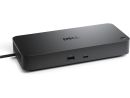
Dell 210-BTJB USB-C Pro Dock - WD25Z, 4 displays supported, Kensington Security slot, Noble wedge Security slot, 4x USB Type-A 3.2 Gen 2 (4.5W each), 1x USB-C 3.2 Gen 2 (15W), 1x USB-C Multi-Function DisplayPort (7.5W), 130W ( Dell systems) Power Delivery, 2.5 Gigabit Ethernet, USB Type-C Host Interface, 2x DisplayPort 1.4, 1x HDMI 2.1, 1x USB-C 3.2 Gen 2 Multi-Function DisplayPort 1.4
Not for sale. This is a discontinued product.
Kindly search for an alternative on our site
Subject to correction, the product was first added on 2026-02-09 and the last date we have for this product is 2026-09-16, where the last unit was sold for R 4005, which may have been a final clearance price.
Specifications & more information about 210-BTJB, Notebook chargers / power supplies manufactured by Dell
Product information notice: Some specifications may describe a broader product range and may not apply to this exact model. Use the product summary above as the primary model reference. Bundled software may be trial software and can require a separate licence.
Overview Summary The Dell Pro Dock WD25Z is a powerful USB-C docking station built for professionals who want a clean, efficient workspace with fewer cables. Designed to support up to four displays and deliver up to 130W of power to compatible Dell laptops, it keeps your device charged while connecting all your essential peripherals through a single USB-C cable.
With fast USB ports, DisplayPort and HDMI outputs, and reliable 2.5 Gigabit Ethernet, this dock is ideal for modern offices and home workspaces across South Africa. It offers dependable performance, strong security features, and broad OS support, making it a smart choice for business users ready to upgrade their setup. Buy now and streamline your workstation today.
Performance tier: Professional-grade
Uses: Office workstations, multi-monitor setups, business laptops, home offices, corporate IT deployments Overview Dell Pro Dock WD25Z is built to streamline modern workspaces by delivering high power output, fast data transfer, and broad display support through a single USB-C connection. Designed for professionals who rely on multiple screens and peripherals, it enables cleaner desk setups while supporting demanding workflows across business, creative, and technical environments. Description The Dell Pro Dock WD25Z is a high-performance USB-C docking station that delivers up to 130W of power to compatible Dell systems while connecting displays, networks, and peripherals through one cable. With support for up to four monitors, ultra-fast 2.5 Gigabit Ethernet, and a wide range of USB and video ports, it helps users stay productive, organized, and ready for multitasking at scale. Features Power and Performance Built for Workdays
This dock supplies ample power for laptops while simultaneously running connected devices. A single USB-C host connection handles charging, video, data, and networking, reducing cable clutter and simplifying daily setup. Power delivery is optimized for Dell systems while remaining compatible with non-Dell devices.
Multi-Screen Productivity
Support for up to four displays makes this dock ideal for analysts, developers, designers, and multitaskers. It handles resolutions ranging from Full HD to 6K at smooth refresh rates, allowing flexible monitor combinations for different workflows.
Port Selection and Layout
Front-facing ports are positioned for quick access, while rear connections keep permanent cables neatly organized. This balance helps maintain a clean workspace without sacrificing convenience. - Front: USB-A 3.2 Gen 2 with PowerShare, USB-C 3.2 Gen 2
- Rear: HDMI 2.1, two DisplayPort 1.4 outputs, USB-C multifunction DisplayPort 1.4, three USB-A 3.2 Gen 2 ports with PowerShare, 2.5 Gigabit Ethernet, power input
Fast Data and Networking
High-speed USB ports support demanding peripherals and fast file transfers, while 2.5 Gigabit Ethernet provides stable, low-latency wired networking. This makes the dock well suited for data-heavy tasks and enterprise environments.
Enterprise Management and Security
Advanced management capabilities support IT-controlled deployments, including MAC address pass-through, PXE boot, Wake-on-LAN, firmware updates, and port control. Physical security is supported through both Kensington and Noble wedge security slots.
Wide System Compatibility
The dock works with a broad range of operating systems, including Windows, Ubuntu, ChromeOS, and Red Hat Enterprise Linux, making it a flexible choice for mixed-device workplaces.
Design and Physical Details
Its compact vertical design saves desk space while maintaining airflow and accessibility. The dock includes the docking station, power adapter, power cord, and documentation to get started quickly. Specifications | ©2026 Respective owners and brand holders. This table has been carefully researched and generated by ComXpert International CC (//www.comx-computers.co.za), however, errors and omissions may occur. Only references to South Africa apply. All products are sourced in South Africa from the official suppliers and the warranty is that of the local supplier. E&OE. This table and our site's content may be used on condition that this notice and link remains intact and unaltered. | Specifications | | Product Code | 210-BTJB | | Technical Information | | Connectivity Technology | Wired | | Device Supported | Notebook | | Desktop PC | | Cable Length | 90 cm | | Features | Power Delivery Pass-through | | LED Power Indicator | | Indicator Light | | Management Features | MAC Address Pass-through | | PXE Boot | | Dock Power Button Sync | | Wake-on-LAN | | WLAN to LAN Switch | | Kernel Direct Memory Access (DMA) Protection | | Dell Command Update (DCU) | | Port Disablement | | Host PC based firmware update | | Firmware update on disconnect | | Number of Displays Supported | 4 | | Screen Mode Supported | FHD @ 60Hz | | QHD @ 60Hz | | 4K @ 60Hz | | WQHD @ 60Hz | | 5K @ 60Hz | | 6K @ 60Hz | | SXGA @ 60Hz | | Supported Resolutions | 1280 x 1024 | | 1920 x 1080 | | 2560 x 1440 | | 3840 x 2160 | | 3440 x 1440 | | 5120 x 2160 | | 6144 x 3456 | | Maximum Data Transfer Rate | 1.25 GB/s | | Security Slot Type | Kensington Security Slot | | Noble Wedge Security Slot | | Power Delivery Details | 4 x USB-A 3.2 Gen 2 (4.5W each) | | 1 x USB-C 3.2 Gen 2 (15W) | | 1 x USB-C Multi-function DisplayPort (7.5W) | | All deliver power with or without PC | | Power Delivery | 130W (Dell Systems) | | 96W (non-Dell Systems) | | Video Resolution Details | SXGA - 60 Hz (Quad Display) | | FHD - 60 Hz (Triple Display) | | QHD - 60 Hz (Dual Display) | | 4K - 60 Hz (Single Display) | | WQHD - 60 Hz (Quad Display) | | WQHD - 60 Hz (Triple Display) | | 5K - 60 Hz (Dual Display) | | 6K - 60 Hz (Single Display) | | Network & Communication | | Ethernet Technology | 2.5 Gigabit Ethernet | | Interfaces/Ports | | Host Interface | USB Type C | | Total Number of USB Ports | 6 | | USB Type-A | Yes | | Number of USB 3.2 Gen 2 Type-A Ports | 4 | | Number of USB 3.2 Gen 2 Type-C Ports | 1 | | Number of USB Type-A Ports | 4 | | USB Type-C | Yes | | USB Type-C Detail | 1 x USB-C 3.2 Gen 2 (10 Gbps), (15W), 1 x USB-C Multi-function DisplayPort (7.5W) | | Number of USB Type-C Ports | 2 | | Network (RJ-45) | Yes | | DisplayPort | Yes | | Number of DisplayPorts | 2 | | DisplayPort Version | 1.4 | | HDMI | Yes | | Number of HDMI Ports | 1 | | HDMI Version | 2.1 | | Interfaces | 2 x DP1.4 | | 1 x HDMI 2.1 | | 1 x USB-C 3.2 Gen 2 Multi-function DisplayPort 1.4 | | Software | | Host Software | Host Software (Windows): | | Dell Firmware Utility | | Dell Display and Peripheral Manager | | Dell Command Update | | Cloud Management (via host PC software) | | Dell Device Management Console enables: | | Automatic firmware updates | | Maintain specific firmware version or downgrade | | Peripheral inventory and status | | Operating System Supported | Windows 10 | | Windows 11 | | Ubuntu 24.04 | | ChromeOS 137 | | Red Hat Enterprise Linux 9.6 | | Power Description | | Maximum Power Supply Wattage | 180 W | | Power Source Type | Power Adapter | | Physical Characteristics | | Height | 205 mm | | Width | 90 mm | | Depth | 35.3 mm | | Weight (Approximate) | 550 g | | Miscellaneous | | Package Contents | Pro Dock WD25Z Docking Station | | Power Adapter | | Power Cord | | Documentation (Quick Start Guide, Safety, Environmental, and Regulatory Information) | | Kensington Security Slot | Yes |
Similar Notebook chargers / power supplies
The best price and guaranteed service and backup from official computer suppliers in South Africa for the 210-BTJB Dell USB-C Pro Dock - WD25Z. Available from this online computer store delivering door-to-door in Johannesburg, Cape Town, Port Elizabeth, Pretoria, Pietermaritzburg, Polokwane, Durban and all over South Africa. Find related 210-BTJB Dell USB-C Pro Dock - WD25Z products in our Notebook chargers / power supplies Category for even more options. Read reviews and find out about 210-BTJB Dell USB-C Pro Dock - WD25Z. Discounts, specials and cheap prices only at ComX Computers.
| |




 Up
Up Down
Down


 Mobile store