| |

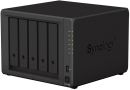
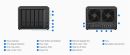
CAS-NASBOX-DS1522+ Synology Diskstation DS1522+ 5-bay Desktop NAS
Images are for illustrative purposes and actual product may differ.
CAS-NASBOX-DS1522+ NAS - Enclosures for NAS / no drives includedSynology
CAS-NASBOX-DS1522+ information and overview
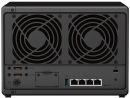
Synology Diskstation DS1522+ 5-bay Desktop NAS, AMD Ryzen R1600 Dual Core CPU, 8GB DDR4 ECC SO-DIMM system Memory, 5x 3.5" / 2.5" SATA Drive bays, 2x NVMe M.2 Drive slots, Hot Swappable Drive, 4x RJ-45 1GbE LAN Port, 2x USB 3.2 Gen 1 Port, 2x eSATA Port, 1x Gen3 x2 Network PCI-e Expansion
Not for sale. This is a discontinued product.
Kindly search for an alternative on our site
Subject to correction, the product was first added on 2023-05-03 and the last date we have for this product is 2026-01-09, where the last unit was sold for R 17510, which may have been a final clearance price.
Specifications & more information about CAS-NASBOX-DS1522+, NAS - Enclosures for NAS / no drives included manufactured by Synology
Product information notice: Some specifications may describe a broader product range and may not apply to this exact model. Use the product summary above as the primary model reference. Bundled software may be trial software and can require a separate licence.
Overview:
DiskStation DS1522+
Versatile data hub for home and office
Flexible data management for homes and small business
The 5-bay Synology DiskStation DS1522+ is easy to scale and expand as your needs change, with optional support for up to 15 drives, 10GbE networking, and NVMe SSD caching. Powered by Synology DiskStation Manager (DSM), it offers a flexible all-in-one solution for data sharing, synchronization, backup, and surveillance.
Throughput
Over 736/796 MB/s sequential read/write
Memory
8 GB DDR4 ECC (max. 32 GB)
Connectivity
Four built-in 1GbE ports with easy 10GbE option
Scalability
Up to 15 drive bays with 2 DX517 expansion units
Features:
Simply faster
DS1522+ can handle more demanding application workloads and a greater number of concurrent users compared to prior-generation systems. Experience faster file indexing in Synology Drive, photo organization in Photos, and concurrent file transfers.
Flexible networking options
Leverage built-in connectivity to integrate the DS1522+ into any network environment, or expand its capabilities by adding plug-and-play modules.
Failover and network balancing
Four built-in Gigabit ports with support for automatic network failover and load balancing deliver fast and dependable performance out of the box.
Easy upgrade to 10GbE
Add an E10G22-T1-Mini Network Upgrade Module through the easily accessible slot to instantly enable faster networking.
Everything you need for your home office
Make the most of high-performance networking and file access without taking up unnecessary space. DS1522+ comes equipped with 5 bays and can scale up to 15 bays with 2 DX517 expansion units as your data needs grow.
Store, share, and protect
Manage all your documents, photos, and other files, back up applications and devices, or protect your assets with professional video surveillance.
File Server
Store and access files from all your devices, and protect them with smart versioning. Sort, manage, share, and sync your data across locations.
A private cloud for all your devices
Store, sync, and access data from any device, wherever you are with Synologys private cloud solution. Sync data between different platforms and devices, and access your files through mobile apps, desktop clients, and a browser-based interface. Leverage smart versioning to back up important data via desktop and mobile applications.
Dependable and secure network storage
Use shared folders on your Synology device as reliable storage available from anywhere on your local network over all common protocols (SMB/NFS/WebDAV/FTP). Protect your files against accidental changes and removal or even malware attacks with built-in snapshot technology and other backup options.
Sort, manage, and share your files
Rely on our file, photo, and multimedia management apps to sort your data by metadata, filters, and labels. Safely share files and folders with family, colleagues, or business customers thanks to granular access and sharing permissions. Create convenient sharing links and secure shared files with expiration dates and individual passwords. Let friends or clients review photos remotely and give easy feedback through star ratings.
Sync files and folders between sites
Benefit from two efficient ways to keep files and folders synchronized between different locations - such as your home and your business, or teams in different countries. Sync folders one or two-way between Synology devices using Synology Drive ShareSync, a free site-to-site solution. Or choose to leverage our secure data centers to store your data in the cloud, while keeping a cache of frequently accessed or manually pinned files on your DS1522+ with Synology Hybrid Share . Such hybrid cloud storage lets you access data at LAN speeds without being limited by your local storage size or bandwidth.
Multi-Layered Backup
Back up files, folders, physical devices, VMs, and SaaS applications with free solutions, and protect your NAS with built-in technologies.
Protect full endpoints, servers, and VMs
Securely back up Windows clients and servers, Linux endpoints, VMware and Hyper-V virtual machines, and other Synology devices. Leverage built-in deduplication technology to greatly reduce backup sizes and multi-versioning restore systems to a time point of your choice.
Make local backups of your cloud apps
Protect business Microsoft 365 and Google Workspace accounts by maintaining complete offline copies of your crucial information and configurations with Active Backup for Microsoft 365 and Active Backup for Google Workspace.
Back up documents and multimedia
Set up backup tasks to protect important folders on your PC and macOS device with Synology Drive. On your mobile device, automatically save another copy of the photos and videos you take, and easily organize and share them through Synology Photos.
Back up your NAS to multiple destinations
Protecting the data on your Synology system, and your server itself, means storing frequent emergency copies to multiple locations. Built-in tools in Synology DSM let you efficiently back up files, folders, or your entire system from your device to remote servers, external drives, or Synology and third-party cloud storage, with space-saving deduplication technology reducing total backup sizes, and customizable backup and retention schedules for maximum flexibility.
High-frequency protection with snapshots
Take point-in-time snapshots of shared folders and LUNs at intervals of down to 5 minutes to protect against data loss, accidental deletion, or malware attacks. Set a custom retention schedule and roll back files and VMs to a version that is unaffected.
Smart Surveillance
Transform your Synology device into a full-featured video management system for a wide range of compatible IP cameras.
Wide compatibility
Connect up to 40 IP cameras from a selection of over 8,300 validated models thanks to wide camera compatibility and ONVIF support in Synology Surveillance Station .
Secure and private
Footage stored locally can be protected from unauthorized access by industry-standard AES-256 encryption.
24/7 everywhere access
Monitor live streams or watch recordings from web browser, desktop client, or the DS cam mobile app.
Assisted camera deployment
Automatically locate cameras within a set IP range, and configure units in batch by importing spreadsheets or by replicating settings to new cameras.
Multi-location alerts
Stay on top of your deployment by previewing triggered events directly on multi-floor or even multi-location maps, with online map integration for Google Maps and OpenStreetMap.
Video analytics
Take advantage of intelligent monitoring features such as motion detection, no idle zone, foreign object detection, and anomaly detection to cater the most common surveillance scenarios.
Performance backed by Synology drives
Leverage high sustained performance and reliability with enterprise-grade drives with built-in data protection designed for Synology systems.
Get more with DiskStation Manager
Take advantage of a host of native productivity, management, and security solutions available in the web-based Synology DSM operating system.
Central Management System
Conveniently manage your fleet of Synology NAS from a centralized console.
Security
Shield your Synology NAS from the most sophisticated threats with industry-leading security solutions.
Synology High Availability
Seamless transition between clustered servers in the event of a server failure to minimize the impact on applications. Specifications: | ©2026 Respective owners and brand holders. This table has been carefully researched and generated by ComXpert International CC (//www.comx-computers.co.za), however, errors and omissions may occur. Only references to South Africa apply. All products are sourced in South Africa from the official suppliers and the warranty is that of the local supplier. E&OE. This table and our site's content may be used on condition that this notice and link remains intact and unaltered. | Specifications | | Product Code | CAS-NASBOX-DS1522+ | | CPU | | CPU Model | AMD Ryzen R1600 | | CPU Quantity | 1 | | CPU Architecture | 64-bit | | CPU Frequency | 2-core 2.6 (base) / 3.1 (turbo) GHz | | Hardware Encryption Engine (AES-NI) | Yes | | Memory | | System Memory | 8 GB DDR4 ECC SODIMM | | Memory Module Pre-installed | 8 GB (8 GB x 1) | | Total Memory Slots | 2 | | Maximum Memory Capacity | 32 GB (16 GB x 2) | | Notes | Synology reserves the right to replace memory modules with the same or higher frequency based on supplier's product life cycle status. Rest assured that the compatibility and stability have been strictly verified with the same benchmark to ensure identical performance. | | Storage | | Drive Bays | 5 | | Maximum Drive Bays with Expansion Unit | 15 (DX517 x 2) | | M.2 Drive Slots | 2 (NVMe) | | Compatible Drive Type* (See all supported drives) | 3.5" SATA HDD | | 2.5" SATA SSD | | M.2 2280 NVMe SSD | | Hot Swappable Drive | Yes | | Notes | The hot swappable drive feature is not supported by M.2 SSD slots. | | "Compatible drive type" indicates drives that have been tested to be compatible with Synology products. This term does not indicate the maximum connection speed of each drive bay. | | External Ports | | RJ-45 1GbE LAN Port | 4 (with Link Aggregation / Failover support) | | USB 3.2 Gen 1 Port | 2 | | eSATA Port | 2 | | Notes | This device's 1GbE LAN ports have a maximum transmission unit (MTU) size of 1,500 bytes. | | The USB 3.0 standard was renamed to USB 3.2 Gen 1 by the USB Implementers Forum (USB-IF) in 2019. | | PCIe | | PCIe Expansion | 1 x Gen3 x2 network upgrade slot | | File System | | Internal Drives | Btrfs | | EXT4 | | External Drives | Btrfs | | EXT4 | | EXT3 | | FAT | | NTFS | | HFS+ | | exFAT | | Appearance | | Size (Height x Width x Depth) | 166 mm x 230 mm x 223 mm | | Weight | 2.7 kg | | Others | | System Fan | 92 mm x 92 mm x 2 pcs | | Fan Speed Mode | Full-Speed Mode | | Cool Mode | | Quiet Mode | | Brightness Adjustable Front LED Indicators | Yes | | Power Recovery | Yes | | Noise Level | 22.90 dB(A) | | Scheduled Power On / Off | Yes | | Wake on LAN / WAN | Yes | | Power Supply Unit / Adapter | 120 W | | AC Input Power Voltage | 100V to 240V AC | | Power Frequency | 50/60 Hz, Single Phase | | Power Consumption | 52.06 W (Access) | | 16.71 W (HDD Hibernation) | | British Thermal Unit | 177.64 BTU/hr (Access) | | 57.02 BTU/hr (HDD Hibernation) | | Notes | For more information on how power consumption is measured, refer to this article. | | Noise testing was conducted with the Synology system fully installed with Synology SATA HDDs and in an idle state. Two GRAS 40AE microphones are placed at a 1 m distance from the front and rear of the device. Background noise: 16.49-17.51 dB(A), Temperature: 24.25-25.75°C, Humidity: 58.2-61.8% | | Temperature | | Operating Temperature | 0°C to 40°C (32°F to 104°F) | | Storage Temperature | -20°C to 60°C (-5°F to 140°F) | | Relative Humidity | 5% to 95% RH | | Certification | | Certification | FCC | | CE | | BSMI | | VCCI | | RCM | | UKCA | | EAC | | CCC | | KC | | Environment | | Environment | RoHS Compliant | | Packaging Content | | Packaging Content | Main Unit X 1 | | Accessory Pack X 1 | | AC Power Adapter X 1 | | AC Power Cord X 1 | | RJ-45 LAN Cable X 2 | | Quick Installation Guide X 1 |
Similar NAS - Enclosures for NAS / no drives included
The best price and guaranteed service and backup from official computer suppliers in South Africa for the CAS-NASBOX-DS1522+ Synology Diskstation DS1522+ 5-bay Desktop NAS. Available from this online computer store delivering door-to-door in Johannesburg, Cape Town, Port Elizabeth, Pretoria, Pietermaritzburg, Polokwane, Durban and all over South Africa. Find related CAS-NASBOX-DS1522+ Synology Diskstation DS1522+ 5-bay Desktop NAS products in our NAS - Enclosures for NAS / no drives included Category for even more options. Read reviews and find out about CAS-NASBOX-DS1522+ Synology Diskstation DS1522+ 5-bay Desktop NAS. Discounts, specials and cheap prices only at ComX Computers.
| |




 Up
 Down


 Mobile store