| |

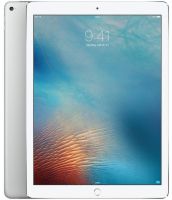
MQEE2 Apple iPad Pro Silver 12.9" LED-backlit Multi-Touch A10X Fusion chip with 64‑bit architecture Embedded M10 coprocessor Wi-Fi + CELLULAR 64GB iOS 11 Tablet
Images are for illustrative purposes and actual product may differ.
MQEE2 iPad AppleApple
MQEE2 information and overview
Apple iPad Pro Silver 12.9" (diagonal) LED-backlit Multi-Touch display, A10X Fusion chip with 64-bit architecture Embedded M10 coprocessor, Wi-Fi + CELLULAR, 64GB, iOS 11
Not for sale. This is a discontinued product.
Kindly search for an alternative on our site
Subject to correction, the product was first added on 2018-02-05 and the last date we have for this product is 2018-07-26, where the last unit was sold for R 17105, which may have been a final clearance price.
Specifications & more information about MQEE2, iPad Apple manufactured by Apple
Product information notice: Some specifications may describe a broader product range and may not apply to this exact model. Use the product summary above as the primary model reference. Bundled software may be trial software and can require a separate licence.
Overview:
No matter the task, the new iPad Pro is up to it — and then some. It offers far more power than most PC laptops, yet is delightfully simple to use. The redesigned Retina display is as stunning to look at as it is to touch. And it all comes together with iOS, the world’s most advanced mobile operating system. iPad Pro. Everything you want modern computing to be. Now even, well, better.
Features:
The most advanced display on the planet.
iPad has always offered the ultimate Multi-Touch experience. The redesigned Retina display on iPad Pro sets a whole new standard. It’s not just brighter and less reflective — with ProMotion technology, it’s also far more responsive. So whether you’re scrolling through pages in Safari or playing an intense 3D game, everything feels utterly smooth, fast, and immersive.
ProMotion. You’ve never seen or felt anything like it.
The new iPad Pro Retina display features ProMotion technology, with support for a 120Hz refresh rate. So movies and videos look spectacular, while games play smoothly without distracting artifacts. Fast, it turns out, is incredibly beautiful. And however you use the display — with your finger or Apple Pencil — everything will feel more responsive.
600 nits brightness
Enhanced brightness makes it easier than ever to see, wherever you are.
P3 wide color display
With a wide P3 color gamut, you get more vibrant greens and reds for truer-to-life images and videos.
1.8% reflectivity
Apple’s custom-designed antireflective coating makes the display clearer and more readable wherever you take your iPad.
Multitasking. Redesigned from the swipe up.
Doing more than ever is easier than ever. In iOS 11, an all-new Dock makes it simple to open recently used apps and files. And when you use Slide Over or Split View, both apps stay active so you can work with them simultaneously. So edit an image in Adobe Photoshop Fix while creating a web page. Or use Safari to plan your next vacation while confirming dates in Calendar. iPad Pro and iOS 11 are perfect for doing everything you want to do — at once.
More powerful than most PC laptops.
The A10X Fusion chip with 64-bit architecture and six cores puts incredible power in your hands. So you can edit a 4K video on the go. Render an elaborate 3D model. Or create and mark up complex documents and presentations. Easily. All on a device that still delivers all-day battery life.
A10X Fusion chip
The A10X Fusion chip makes complex tasks like working with two apps at once, retouching high-resolution photos, or playing games feel effortless.
ISP image signal processor
The Apple-designed image signal processor uses machine learning to make the photos and video you capture look amazing.
Up to 10-hour battery life
Stay productive and creative with all-day battery life.
Now even sharper.
The increased refresh rate of the new iPad Pro display makes Apple Pencil2 feel even more responsive and natural. No other digital pencil lets you write, mark up, and draw with such pixel-perfect precision.
Instant Notes
When inspiration strikes, write. Simply tap Apple Pencil on your iPad Lock screen and a note opens.
Instant Markup
Sign documents, annotate PDFs, or draw on a screenshot with ease.
Inline Drawing
Easily sketch, draw, or write directly alongside text in Notes and Mail.
Searchable Handwriting
Easily search for handwritten text and characters. So you can write it now and find it later.
A monumental leap for iPad.
iOS 11 brings iPad to life like never before. New features and capabilities let you get more done, more quickly and easily, making it a phenomenally powerful and personal experience.
Dock
The all-new Dock makes it easier to access your favorite and recently used apps and files. It’s especially useful for multitasking or navigating through apps.
Files
The new Files app brings all your files together no matter where they are, from iCloud to Dropbox.
Drag and Drop
Drag and Drop gives you a new way to move things around. It’s beautifully designed for Multi-Touch, so you can simply and smoothly move text, photos, and files from one app to another. With just a finger.
App Switcher
The redesigned App Switcher makes changing apps as quick as a swipe. It even remembers the combinations of apps you’ve multitasked with previously.
Multitasking
Multitasking is more powerful and intuitive than ever. You can open a second app right from the Dock, and both apps now stay active in Slide Over and Split View.
Apple Pencil
iOS 11 makes Apple Pencil even more useful. Easily sketch, draw, or write directly alongside text in Notes. You can even write a note instantly by tapping on your iPad Lock screen with Apple Pencil.
Augmented Reality
iOS is the world’s largest augmented reality platform. Games and apps now offer fantastically immersive and fluid experiences that go far beyond the screen. Taking advantage of the stunning Retina display and powerful cameras on iPad, you can digitally redecorate your home, explore a city you’ve never visited, or even walk with dinosaurs. The possibilities are endless.
The power of iPad. Times 1.3 million.
iPad is a powerful way to work, play, and learn. With over a million apps designed to take advantage of its large Multi-Touch display and powerful chip, it can transform the way you do the things you love.
Creativity - Adobe Capture CC
- Procreate
- Affinity Photo
- Notion
- Shapr3D
- Polarr Photo Editor
Productivity - Annotable
- join.me
- MeisterTask
- Microsoft Word
- Slack
- PDF Expert 6
AR - Monster Park
- My Very Hungry Caterpillar AR
- Sky Guide AR
- uMake
- Warhammer 40,000: Freeblade
- Human Anatomy Atlas 2018
Note-Taking - MyScript Nebo
- Notability
- Evernote
- Tayasui Memopad
- GoodNotes 4
- Microsoft OneNote
Learning - Duolingo
- Explain Everything™
- Complete Anatomy
- Kitchen Stories
- Yousician
- TED
Cloud Storage - Tencent
- Baidu
- Box
- Dropbox
- Google Drive
- Microsoft One Drive
Even More - MLB.com At Bat
- Attenborough Story of Life
- Pigment
- HBO NOW
- Within
- Asphalt Xtreme
Barely a pound. Tons of capability.
Even though it’s packed with amazing performance, an advanced display, two cameras, ultrafast wireless, and all-day battery life, iPad Pro is still sleek and compact. So you can go just about anywhere and do just about anything.
Wireless
Browse the web, stream video, and share documents faster from pretty much anywhere with 802.11ac Wi-Fi and LTE Advanced.3 And an embedded Apple SIM lets you connect using cellular data networks in over 180 countries and regions.
Cameras
iPad Pro features the same great cameras as iPhone 7. Advanced optical image stabilization and an ƒ/1.8 aperture make it even better for taking amazing photos and videos in low light. And wider color capture makes every selfie worthy of a gallery.
Touch ID
Touch ID uses an advanced fingerprint sensor that lets you unlock your iPad instantly and secure private data in apps. You can also use it to make purchases with Apple Pay within apps and on the web.
Smart Keyboard
Simply unfold the full-size Smart Keyboard — available for both the 10.5-inch and 12.9-inch iPad Pro — when you need it. Fold it to create a lightweight yet durable cover when you don’t. It’s as easy to use as it is to take with you.
Start something here. Finish it there.
Begin an email on your iPhone and finish it on iPad Pro. Or copy images, video, or text on your iPhone, then paste to your iPad. You can even use AirDrop to quickly share files wirelessly between devices. iPhone and iPad Pro were designed to work not only with each other, but also with your Mac and Apple Watch.
iCloud. One place for everything that matters.
iCloud safely stores all your photos, music, apps, and more, keeping them up to date, secure, and accessible from any device.
Do even more on iPad Pro with iOS 11.
Watch short films that show how the new features in iOS 11 make iPad Pro — and you — even more capable. Get hands-on tips for using the all-new Dock, enhanced multitasking, the powerfully simple Files app, and more.
Cover it. Connect it. Love it.
From durable cases and covers to Apple Pencil and the Smart Keyboard, there’s a world of accessories to help you get the most out of your iPad Pro. Specifications: | ©2026 Respective owners and brand holders. This table has been carefully researched and generated by ComXpert International CC (//www.comx-computers.co.za), however, errors and omissions may occur. Only references to South Africa apply. All products are sourced in South Africa from the official suppliers and the warranty is that of the local supplier. E&OE. This table and our site's content may be used on condition that this notice and link remains intact and unaltered. | Specifications | | Product Code | MQEE2 | | Model | 12.9-inch iPad Pro | | Finish | Silver | | Capacity | 64GB | | Size and Weight | 250.6 mm | | 174.1 mm | | 6.1 mm | | 692 grams | | Buttons and Connectors | Four speaker audio | | Home/Touch ID sensor | | Smart Connector | | 3.5 mm headphone jack | | Four speaker audio | | On/Off | | Sleep/Wake | | Lightning connector | | Nano-SIM tray | | Volume | | up/down | | Dual microphones | | Display | Retina display | | 12.9-inch (diagonal) LED-backlit Multi-Touch display | | 2732-by-2048 resolution at 264 pixels per inch (ppi) | | ProMotion technology | | Wide color display (P3) | | True Tone display | | Fingerprint-resistant oleophobic coating | | Fully laminated display | | Antireflective coating | | Chip | A10X Fusion chip with 64-bit architecture | | Embedded M10 coprocessor | | Camera | 12-megapixel camera | | ƒ/1.8 aperture | | Digital zoom up to 5x | | Optical image stabilization | | Six-element lens | | Quad-LED True Tone flash | | Panorama (up to 63 megapixels) | | Sapphire crystal lens cover | | Backside illumination sensor | | Hybrid IR filter | | Autofocus with Focus Pixels | | Tap to focus with Focus Pixels | | Live Photos with stabilization | | Wide color capture for photos and Live Photos | | Improved local tone mapping | | Body and face detection | | Exposure control | | Noise reduction | | Auto HDR for photos | | Auto image stabilization | | Burst mode | | Timer mode | | Photo geotagging | | Video Recording | 4K video recording at 30 fps | | 1080p HD video recording at 30 fps or 60 fps | | 720p HD video recording at 30 fps | | Optical image stabilization for video | | Quad-LED True Tone flash | | Slo-mo video support for 1080p at 120 fps and 720p at 240 fps | | Time-lapse video with stabilization | | Cinematic video stabilization (1080p and 720p) | | Continuous autofocus video | | Body and face detection | | Noise reduction | | Take 8-megapixel still photos while recording 4K video | | Playback zoom | | Video geotagging | | FaceTime HD Camera | 7-megapixel photos | | 1080p HD video recording | | Retina Flash | | ƒ/2.2 aperture | | Wide color capture for photos and Live Photos | | Auto HDR | | Backside illumination sensor | | Body and face detection | | Auto image stabilization | | Burst mode | | Exposure control | | Timer mode | | Video Calling | FaceTime video | | iPad to any FaceTime-enabled device over Wi-Fi or cellular | | Audio Calling | FaceTime audio | | iPad to any FaceTime-enabled device over Wi-Fi or cellular | | Speakers | Four speaker audio | | Microphones | Dual microphones for calls, video recording, and audio recording | | Cellular and Wireless | Wi-Fi (802.11a/b/g/n/ac); dual band (2.4GHz and 5GHz); HT80 with MIMO | | Bluetooth 4.2 technology | | UMTS/HSPA/HSPA+/DC-HSDPA (850, 900, 1700/2100, 1900, 2100 MHz); GSM/EDGE (850, 900, 1800, 1900 MHz) | | CDMA EV-DO Rev. A and Rev. B (800, 1900 MHz) | | LTE Advanced (Bands 1, 2, 3, 4, 5, 7, 8, 11, 12, 13, 17, 18, 19, 20, 21, 25, 26, 27, 28, 29, 30, 38, 39, 40, 41)4 | | Data only | | Wi-Fi calling | | Embedded Apple SIM | | Location | Digital compass | | Wi-Fi | | iBeacon microlocation | | Assisted GPS and GLONASS | | Cellular | | Sensors | Touch ID | | Three-axis gyro | | Accelerometer | | Barometer | | Ambient light sensor | | Touch ID | Unlock iPad | | Secure personal data within apps | | Make purchases from the iTunes Store, App Store, and iBooks Store | | Apple Pay | Pay with your iPad using Touch ID within apps and on the web | | Send and receive money in Messages | | Siri | Use your voice to send messages, set reminders, and more | | Get proactive suggestions | | Use hands-free | | Listen and identify songs | | Power and Battery | 12.9-inch iPad Pro | | Built-in 41-watt-hour rechargeable lithium-polymer battery | | Charging via power adapter or USB to computer system | | Up to 9 hours of surfing the web using cellular data network | | Operating System | iOS 11 | | With new features and capabilities that let you get more done quickly and easily, iOS 11 makes iPad more powerful, personal, and intelligent than ever. | | Accessibility | Accessibility features help people with disabilities get the most out of their new iPad Pro. With built-in support for vision, hearing, physical and motor skills, and learning and literacy, you can create and do amazing things. | | Features include: | | VoiceOver | | Zoom | | Magnifier | | Siri and Dictation | | Switch Control | | Closed Captions | | AssistiveTouch | | Speak Screen | | Built-in Apps | Camera | | Photos | | Messages | | FaceTime | | Mail | | Music | | Safari | | Maps | | Siri | | Calendar | | iTunes Store | | App Store | | Notes | | Contacts | | iBooks | | Home | | Reminders | | Clock | | TV | | News | | Photo Booth | | Podcasts | | Find My iPhone | | Find My Friends | | Files | | Free Apps from Appl | Pages, Numbers, Keynote, iMovie, GarageBand, and iTunes U are preinstalled on iPad. | | Apple Store | | Trailers | | Remote | | Music Memos | | Clips | | Swift Playgrounds | | System Requirements | Apple ID (required for some features) | | Internet access | | Syncing with iTunes on a Mac or PC requires: | | Mac: OS X 10.9.5 or later | | PC: Windows 7 or later | | iTunes 12.5 or later | | Audio Playback | Frequency response: 20Hz to 20, 000Hz | | Audio formats supported: AAC (8 to 320 Kbps), Protected AAC (from iTunes Store), HE-AAC, MP3 (8 to 320 Kbps), MP3 VBR, Dolby Digital (AC-3), Dolby Digital Plus (E-AC-3), Audible (formats 2, 3, 4, Audible Enhanced Audio, AAX, and AAX+), Apple Lossless, AIFF, and WAV | | User-configurable maximum volume limit | | TV and Video | AirPlay Mirroring, photos, audio, and video out to Apple TV (2nd generation or later) | | Video mirroring and video out support: Up to 1080p through Lightning Digital AV Adapter and Lightning to VGA Adapter (adapters sold separately) | | Supports Dolby Vision and HDR10 content | | Video formats supported: H.264 video up to 4K, 30 frames per second, High Profile level 4.2 with AAC-LC audio up to 160 Kbps, 48kHz, stereo audio or Dolby Audio up to 1008 Kbps, 48kHz, stereo or multichannel audio, in .m4v, .mp4, and .mov file formats; MPEG-4 video up to 2.5 Mbps, 640 by 480 pixels, 30 frames per second, Simple Profile with AAC-LC audio up to 160 Kbps per channel, 48kHz, stereo audio or Dolby Audio up to 1008 Kbps, 48kHz, stereo or multichannel audio, in .m4v, .mp4, and .mov file formats; Motion JPEG (M-JPEG) up to 35 Mbps, 1280 by 720 pixels, 30 frames per second, audio in ulaw, PCM stereo audio in .avi file format | | Mail Attachment Support | Viewable document types | | .jpg, .tiff, .gif (images); .doc and .docx (Microsoft Word); .htm and .html (web pages); .key (Keynote); .numbers (Numbers); .pages (Pages); .pdf (Preview and Adobe Acrobat); .ppt and .pptx (Microsoft PowerPoint); .txt (text); .rtf (rich text format); .vcf (contact information); .xls and .xlsx (Microsoft Excel); .zip; .ics | | Environmental Requirements | Operating ambient temperature: 32° to 95° F (0° to 35° C) | | Nonoperating temperature: -4° to 113° F (-20° to 45° C) | | Relative humidity: 5% to 95% noncondensing | | Operating altitude: tested up to 10,000 feet (3000 m) |

The best price and guaranteed service and backup from official computer suppliers in South Africa for the MQEE2 Apple iPad Pro Silver 12.9" LED-backlit Multi-Touch A10X Fusion chip with 64‑bit architecture Embedded M10 coprocessor Wi-Fi + CELLULAR 64GB iOS 11 Tablet. Available from this online computer store delivering door-to-door in Johannesburg, Cape Town, Port Elizabeth, Pretoria, Pietermaritzburg, Polokwane, Durban and all over South Africa. Find related MQEE2 Apple iPad Pro Silver 12.9" LED-backlit Multi-Touch A10X Fusion chip with 64‑bit architecture Embedded M10 coprocessor Wi-Fi + CELLULAR 64GB iOS 11 Tablet products in our iPad Apple Category for even more options. Read reviews and find out about MQEE2 Apple iPad Pro Silver 12.9" LED-backlit Multi-Touch A10X Fusion chip with 64‑bit architecture Embedded M10 coprocessor Wi-Fi + CELLULAR 64GB iOS 11 Tablet. Discounts, specials and cheap prices only at ComX Computers.
| |


 Up
 Down


 Mobile store