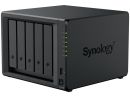
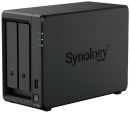
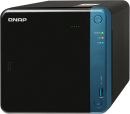
Overview:The TS-453Be features a simple physical design that can easily fit into office and home environments. It provides a PCIe port that can boost its functionality: a QNAP QM2 expansion card can be installed to add M.2 SSD caching/10GbE connectivity and support for Qtier auto-tiering technology, or a compatible wireless card can be installed to use the TS-453Be as a wireless access point. The TS-453Be also supports dual-channel 4K H.264 processing to provide a smooth media viewing experience on all connected devices. In addition, a wide range of productivity tools are available for use on the TS-453Be to improve work efficiency for media creators or creative professionals, while also enriching their multimedia experience.
- The PCIe port supports installing a 10GbE network card, a QM2 dual-port M.2 SSD/10GbE card, a USB 3.2 Gen 2 card or a compatible PCIe wireless adapter.
- 4K media playback and online transcoding; multimedia viewing on HDTV via HDMI output
- Snapshots fully record the system status and data. If files are accidentally deleted or modified, you can quickly restore the previously-recorded data.
- Hybrid Backup Sync consolidates backup and sync tasks into a single app.
- Secure private cloud solution with high storage scalability.
- Supports containerized applications and hosting multi-OS virtual machines.
Features:Extend NAS functionalities with the PCIe slot With PCIe expansion, the TS-453Be provides flexibility in extending NAS functionality and potential applications. Install a QNAP QM2 card to provide M.2 SSD caching/10GbE connectivity, or use the TS-453Be as a wireless access point by installing a compatible wireless network card (ex. QNAP QWA-AC2600), or boost the USB connectivity of the TS-453Be by installing a USB 3.2 Gen 2 card.
Intel Celeron J3455 quad-core 1.5GHz CPU with AES-NI Encryption Powered by an Intel Celeron J3455 quad-core 1.5GHz processor (burst up to 2.3 GHz), 2GB/4GB DDR3L RAM (up to 8GB), dual Gigabit LAN ports, and supporting SATA 6Gb/s hard drives, the TS-453Be provides dependable performance of up to 225 MB/s read/write speeds. The TS-453Be features Intel AES-NI hardware-accelerated encryption to drive transfer speeds of up to 225 MB/s with AES 256-bit encryption for both full NAS volumes and shared folders, boosting system performance while ensuring the security of sensitive data stored in the TS-453Be.
Protect data with snapshots Snapshots help protect your data by fully recording the NAS system state and metadata. If a file is accidentally deleted or modified, you can use snapshots to quickly restore the file to its previously-recorded state. QNAP snapshots are block-based and only record the changed data. Not only does this save storage space but also reduces the time required to back up and restore data. The TS-453Be supports up to 1,024 snapshots per NAS and up to 256 snapshots per volume or LUN.
Upgrade your IT environment with QNAP's fast and affordable 10GbE Switch! QNAP 10GbE/NBASE-T unmanaged switches allow you to instantly upgrade your network environment at a cost-effective price. With a 10GbE network you can enjoy blazing-fast transfer speeds, empower bandwidth-demanding tasks like virtualization, and enable simultaneous real-time access to large NAS-based files using multiple workstations (ideal for video editing and multimedia). QNAP also provide a 10GbE PCIe network expansion card for the TS-453Be and Windows/Linux PCs to take advantage of high-speed LAN environments.
HBS 3 QuDedup technology deduplicates data at the source, helping to reduce the time and storage space needed for backup.
VJBOD Cloud Seamlessly connect local storage with cloud object storage to easily backup local application data to the cloud.
HybridMount Enabling local caching on NAS for low-latency access to the connected cloud services.
QuMagie Integrated AI algorithm for auto photo organization and a powerful search tool for more intuitive and streamlined photo management.
Build an affordable Fibre Channel SAN environment Common Fibre Channel SAN (Storage Area Networks) devices are often expensive. Now you have more budge-friendly options to easily add your NAS to a SAN environment. Once a Marvell, ATTO or QNAP Fibre Channel card has been installed in the TS-453Be, you can set a Fibre Channel Target using the iSCSI & Fibre Channel app, and leverage the many benefits from QNAP NAS including snapshot protection, Qtier tiering storage, SSD cache acceleration and more. In addition, the LUN Masking and Port Binding features provide an additional layer of security for your data.
Real-time video transcoding Featuring advanced 9th-generation Intel HD Graphics, the TS-453Be supports dual-channel 4K H.264* hardware decoding and real-time transcoding, allowing you to convert videos to universal file formats that can be smoothly played on multiple devices*. Therefore, you can easily share movies and videos stored on your NAS with family and friends for their enjoyment on a range of devices. The QNAP RM-IR004remote control (sold separately) can be configured using QButton to customize the actions of individual buttons, providing a more convenient NAS experience.
*The TS-453Bes hardware provides H.264 hardware decoding, encoding and transcoding capabilities. However, playback quality may vary due to factors including playback software, file formats, system usage, and available bandwidth.
Multiple ways to enjoy videos QNAP provides a wide range of multimedia applications for you to easily enjoy photos, music, and videos.
- Qmedia allows music, photos and videos to be effortlessly streamed to Android TVs or set-top boxes.
- Video HD is a free KODI add-on that combines KODI's streaming and video decoding capabilities and fully supports Video Station's features.
Multiply your productivity The app-driven QTS operating system provides solutions for simplifying file backup, management, search, and more. With File Station you can view and manage your files not only from NAS but also from multiple storage devices; the OCR Converter allows you to extract text from images; Qfiling helps automate file organization, and Qsirch helps quickly find files.
- Centralized File Management Use File Station to directly access files on USB devices - including optical disc drives. Files from different devices can be easily viewed and managed on a single interface.
- File Digitization OCR Converter extracts text from images, helping to boost productivity and making it easier to find files. : OCR Converter
- Smart Filing Qfiling automates file organization. Files are automatically archived into folders based on your settings. : Qfiling
- Full-text Search Qsirch quickly finds images, music, videos, documents, emails, and other files. : Qsirch
Multi-point backup and access With integrated data backup, restoration and synchronization, Hybrid Backup Sync helps you easily backup or synchronize data on the TS-453Be to other QNAP NAS, USB storage (one touch copy) or cloud storage. With Qsync, you can also access your NAS files from PCs, laptops or mobile devices connected with the TS-453Be at any time.
NAS as a Multi-OS Platform Virtualization Station and Container Station provide comprehensive solutions for creating virtualized environments to improve business IT infrastructure, workflows, and productivity.
- Virtualization Station Virtualization Station allows you to run multiple Windows, Linux, UNIX and Android virtual machines on the TS-453Be. You can use Virtual Network Computing (VNC) through a browser to manage the VMs. Virtualization Station is ideal for organizations to run multiple applications on a single NAS. : Virtualization Station, P2V
- Container Station Container Station integrates LXC and Docker lightweight virtualization technologies. You can download apps from the built-in Docker Hub to easily import/export container apps and manage access control, enjoying the benefit of easy installation, transferability and high-efficiency. : Container Station, QIoT Containers
Supports 360-degree panorama photos and videos QNAP NAS now supports the popular 360-degree panorama recording format! By clicking the 360-degree panorama display button, these photos and videos will be displayed as 360-degree panorama media files. The QNAP mobile apps Qfile, Qphoto and Qvideo also support 360-degree format viewing.
Whole new QVR Pro surveillance solution QNAPs new QVR Pro surveillance solution allows you to arrange a dedicated, independent storage space for surveillance data on TS-453Be and leverage the advantages of scalability and storage manageability from QTS. With QVR Pro, camera management, storage space allocation, camera live view and playback become more easily. You can also use QVR Pro Clients mobile app to monitor anytime, or use a USB webcam as an ONVIF network camera with the QUSBCam2 app.
*The maximum number of channels supported varies by NAS model, network configuration, and camera settings. For more information, visit https://www.qnap.com/go/qvr-nas-selector .
Comprehensive surveillance solution for 24/7 monitoring Surveillance Station provides an intelligent video management system to assist in managing real-time monitoring, video & audio recording and playback with a wide range of customizable settings to safeguard your physical environment. You can use the Vmobile mobile app to manage the monitored channels at anytime and anywhere, or install the Vcam mobile app to turn your device into a network camera to instantly record to your NAS.
- 3,000+ compatible IP cameras
- 4 free IP camera channels
- 40 expandable channels
- QUSBCam2 record from USB webcams
Flexible and economical storage expansion You need an easy solution to increase storage capacity when running out of space. QNAP provides several ways to expand your NAS storage as needed to accommodate data and business growth.
- Upgrade RAID Capacity Hot swap lower-capacity drives with larger-capacity drives so that your QNAP NAS can grow with your business. : Online RAID Capacity Upgrade
- Attach Expansion Enclosures Connect a UX-800P or UX-500P expansion enclosure and use the QTS Storage & Snapshots Manager to easily handle NAS capacity expansion.
- VJBOD Use VJBOD (Virtual JBOD) to expand your storage capacity by using the unused storage of other QNAP NAS. Up to 8 QNAP NAS can be mounted as local disks on the TS-453Be. : VJBOD
- Migrate to a New NAS Install your NAS hard drives into a larger QNAP NAS and retain all your existing data and configurations. : Migrating from Old NAS
Specifications:
| ©2026 Respective owners and brand holders. This table has been carefully researched and generated by ComXpert International CC (//www.comx-computers.co.za), however, errors and omissions may occur. Only references to South Africa apply. All products are sourced in South Africa from the official suppliers and the warranty is that of the local supplier. E&OE. This table and our site's content may be used on condition that this notice and link remains intact and unaltered. |
Specifications |
| Product Code | NS-QTS453BE |
| TS-453Be-4G |
| CPU | Intel Celeron J3455 quad-core 1.5 GHz processor (burst up to 2.3 GHz) |
| CPU Architecture | 64-bit x86 |
| Graphic Processors | Intel HD Graphics 500 |
| Floating Point Unit | <>Yes |
| Encryption Engine | <>Yes (AES-NI) |
| Hardware-accelerated Transcoding | <>Yes |
| System Memory | 4 GB SO-DIMM DDR3L (1 x 4 GB) |
| Maximum Memory | 8 GB (2 x 4 GB) |
| Memory Slot | 2 x SO-DIMM DDR3L |
| For dual-DIMM configuration, you must use a pair of identical DDR3L modules. |
| Flash Memory | 4GB (Dual boot OS protection) |
| Drive Bay | 4 x 3.5-inch SATA 6Gb/s, 3Gb/s |
| The system is shipped without HDD. |
| Drive Compatibility | 3.5-inch SATA hard disk drives |
| 2.5-inch SATA hard disk drives |
| 2.5-inch SATA solid state drives |
| Hot-swappable | <>Yes |
| M.2 SSD Slot | Optional via a PCIe adapter |
| SSD Cache Acceleration Support | <>Yes |
| Gigabit Ethernet Port (RJ45) | 2 |
| Expandable with an optional PCIe adapter |
| 10 Gigabit Ethernet Port | Optional via a PCIe adapter |
| Jumbo Frame | <>Yes |
| PCIe Slot | 1 |
| Slot 1: PCIe Gen 2 x2 |
| PCIe bandwidth limitations will restrict the NAS 10GbE performance. |
| USB 3.2 Gen 1 port | 5 |
| USB 3.2 Gen 2 (10Gbps) Port | Optional via a PCIe adapter |
| IR Sensor | <>Yes (RM-IR004, RM-IR002, & MCE) |
| HDMI Output | 2, HDMI 1.4b (up to 3840 x 2160 @ 30Hz) |
| Audio Input | 2 x 3.5mm dynamic microphone input jacks |
| Audio Output | 1 x built-in speaker, 1 x 3.5mm line out jack (for amplifier or headphone amplifier) |
| You cannot use the speakers and the line-out jack simultaneously. |
| Form Factor | Tower |
| LED Indicators | Power/Status, LAN, USB, HDD1-4 |
| Buttons | Power, USB copy, Reset |
| Dimensions (HxWxD) | 168 x 170 x 226 mm |
| Weight (Net) | 2.37 kg |
| Weight (Gross) | 3.71 kg |
| Operating temperature | 0 - 40 °C (32°F - 104°F) |
| Relative Humidity | 5-95% RH non-condensing, wet bulb: 27°C (80.6°F) |
| Power Supply Unit | 90W adapter, 100-240V |
| Power Consumption: HDD Sleep Mode | 15 W |
| Power Consumption: Operating Mode, Typical | 30.04 W |
| Fan | 1 x 120mm, 12VDC |
| Sound Level | 18.8 db(A) |
| System Warning | Buzzer |
| Kensington Security Slot | <>Yes |
| Max. Number of Concurrent Connections (CIFS) | 800 |




 Up
 Down


 Mobile store