Product information notice: Some specifications may describe a broader product range and may not apply to this exact model. Use the product summary above as the primary model reference. Bundled software may be trial software and can require a separate licence.
Overview:
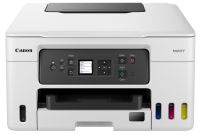
Print large volumes of high-quality business documents while making huge savings on CPP and TCO with this refillable and easy to use 3-in-1 MegaTank-equipped MAXIFY GX printer.
Features:
Brilliant productivity, best-in-class CPP and TCO Cost per page (CPP) is the amount of money that it takes to print a single page. This is determined by dividing the cost of the ink by the page yield. The total cost of ownership (TCO) is a calculation of what a printer would cost you based on the initial purchase cost of hardware plus the costs of ink over a fixed period.
Low running costs, brilliant productivity With a full set of ink bottles producing up to 14,000 prints, this high-performance, high-volume MegaTank printer delivers huge savings on the total cost of ownership and cost per page. That’s a smart investment for any home office.
A4, Letter - Plain Paper (Rear Tray, Cassette only)
Cartridges and Yields
Standard Ink Cartridges
GI-46 BK
GI-46 C
GI-46 M
GI-46 Y
Consumables and Yields
Maintenance Cartridge
MC-G03 (User Replaceable)
Bottle Yield (Plain Paper)
A4 colour documents printing
Black: 6,000 pages (Economy mode 9,000 pages)
Colour: 14,000 pages (Economy mode 21,000 pages)
* Estimated supplemental yield
Included Bottle Yield
A4 colour documents printing
Black: 5,000 pages
Colour: 5,000 pages
Paper Support
Paper Types
Plain Paper, Red Label Superior 80 g/m2 (WOP111), Canon Oce Office Colour Paper 80 g/m2 (SAT213) Photo Paper Pro Luster (LU-101), Photo Paper Plus Glossy II (PP-201) Matte Photo Paper (MP-101), Glossy Photo Paper """"Everyday Use"""" (GP-501) High Resolution Paper (HR-101N), Envelope, Photo Paper Plus Semi-gloss (SG-201), Restickable Photo Paper(RP-101) Magnetic Photo Paper(MG-101) Light Fabric Iron on Transfers (LF-101), Double sided Matte Paper (MP-101D)
Maximum Paper Input
Rear Tray: Max. 100 sheets (plain paper)
Cassette: Max. 250 sheets (plain paper)
Rear Flat Tray: 1 sheet
Paper Sizes
Rear Tray: A4, A5, A6, B5, LTR, LGL, 4""x6"" (10 x 15 cm), 5""x7"" (13 x 18 cm), 7""x10"" (18 x 25 cm), 8""x10"" (20 x 25 cm), Square 5""x 5"", (127mm x 127mm), Envelopes (DL, COM10), Custom size (width: 89 mm - 216 mm, length: 127 mm - 1,200 mm)
Cassette: A4, A5, B5, LTR
[Custom size] width 148 mm - 215.9 mm, length 210 mm - 297 mm
Rear Flat Tray: A4, B5, LTR
[Custom size] width 89 mm - 215.9 mm, length 127 mm - 1,200 mm
Paper Weight
Rear Tray: Plain Paper: 64 g/m2 - 105 g/m2 or supported genuine Canon papers Canon paper: Max. paper weight Approx. 265 g/m2 (Photo Paper Plus Glossy II (PP-201)
Cassette: Plain Paper: 64 g/m2 - 105 g/m2
Rear Flat Tray: Paperboard: 0.1 mm to 0.7 mm
Scanner Specifications
Scanner Type
Flatbed (Platen) CIS colour scanner
Scanner Resolution (Optical)
1,200 x 2,400 dpi
Line Scanning Speed
Colour: 3.5 ms/line (300 dpi)
Greyscale: 1.5 ms/line (300 dpi)
Scanning Depth (Input / Output)
Colour: RGB each 16bit/8bit
Greyscale: 16 bit / 8 bit
Maximum Document Size
Platen: A4/Letter (216 x 297 mm)
Copier Specifications
Copy Speed
sFCOT (colour): 17.0 sec
sESAT (colour): 11.1 ipm
Copy Quality
3 levels (Economy, Standard, High)
Intensity Adjustment
9 positions, Auto intensity (AE copy)
Multiple Copy
99 copies (max.)
Copy Functions
Document Copying, Two-Sided Copy, 2-on-1 and 4-on-1 copy, Frame erase copy (Flatbed only), ID copy
SMB Version support: SMB3.0.0, SMB3.0.2 and SMB3.1.1
Mobile Apps
Canon PRINT Inkjet/SELPHY app
Easy-PhotoPrint Editor app
Creative Park app
Printer Features
Easy-PhotoPrint Editor Software
PIXMA Cloud Link
Canon Print Service Plugin (Android)
Apple AirPrint
Wireless Direct
Mopria (Android)
Smart Assistant & Automation Support
Amazon Alexa
Google Assistant
Software
Supported Operating Systems
"Windows 11, Windows 10, Windows 8.1, Windows 7 SP1 Operation can only be guaranteed on a PC with pre-installed Windows 7 or later.
Driver and IJ Printer Assistant Tool only: Windows Server 2008 R2 SP1, Windows Server 2012 R2, Windows Server 2016, Windows Server 2019, Windows Server 2022
Reviews have been submitted by users and do not necessarily reflect our own opinion.
The best price and guaranteed service and backup from official computer suppliers in South Africa for the PRCAGX3040 Canon PIXMA GX3040 Multifunction A4 Ink Printer.
The Canon
PRCAGX3040Canon PIXMA GX3040 Multifunction A4 Ink Printer is available for R9840. The product is sold by ComX Computers as new. Prices are valid today 2026-11-08 (before , by quote, while stocks last). The product is expected to be in stock, although this is not guaranteed.
Available from this online computer store delivering door-to-door in Johannesburg, Cape Town, Port Elizabeth, Pretoria, Pietermaritzburg, Polokwane, Durban and all over South Africa.
Find related PRCAGX3040 Canon PIXMA GX3040 Multifunction A4 Ink Printer products in our Printers - Multifunction Inkjet Category for even more options. Read reviews and find out about PRCAGX3040 Canon PIXMA GX3040 Multifunction A4 Ink Printer. Discounts, specials and cheap prices only at ComX Computers.


 Up
 Down


 Mobile store