About this product
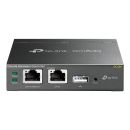
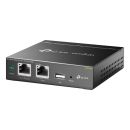
The TP-Link OC200 Omada Cloud Controller (TL-OC200) is a dedicated hardware network management solution designed to centrally configure, monitor and manage compatible TP-Link Omada access points, JetStream switches and Omada routers. Featuring free cloud access, multi-site management, intelligent network monitoring and centralised device configuration, it simplifies network administration for businesses, offices, hotels and enterprise environments. With Power over Ethernet (PoE) support and a compact metal enclosure, the OC200 provides flexible installation and convenient remote network management. Buy the TP-Link OC200 Omada Cloud Controller online in South Africa for reliable and simplified business network management.
Overview Summary
TP-Link OC200 Omada Cloud Controller - Centralised Business Network Management
The TP-Link OC200 Omada Hardware Controller provides a centralised platform for managing compatible Omada networking equipment from a single interface. Designed for professional network environments, it allows administrators to configure and monitor access points, switches and routers without managing each device individually. It supports centralised management of up to 100 Omada access points, 20 JetStream switches and 10 Omada routers, subject to device compatibility and network configuration.
With free cloud access through the Omada app and web interface, network administrators can monitor and manage their network remotely. Features include automatic device discovery, batch configuration, firmware upgrades, real-time network monitoring, network topology visualisation, multi-site management and abnormal event notifications. Its compact metal enclosure, USB 2.0 port for automatic backups and flexible PoE or Micro USB power options make it suitable for dedicated network management installations.
Performance tier: Professional Business Network Management
Uses: Centralised WiFi management, business network administration, access point configuration, switch management, router management, multi-site networking, remote network monitoring, enterprise wireless management
Description
The TP-Link OC200 Omada Cloud Controller is a dedicated hardware controller designed to simplify the administration of Omada business networking equipment. It provides a centralised management platform that allows network administrators to configure, monitor and maintain multiple compatible networking devices through one convenient interface.
Instead of accessing individual access points, switches and routers separately, administrators can use the Omada management interface to oversee their network from a central location. The controller supports automatic device discovery, unified configuration, batch firmware upgrades and scheduled device reboots, helping reduce the time required for routine network maintenance.
Centralised Network Management
The OC200 supports centralised management of up to 100 Omada access points, 20 JetStream switches and 10 Omada routers. This makes it suitable for managing business wireless networks and wired network infrastructure across compatible devices. Actual management capacity depends on the network environment, supported hardware and configuration.
Remote Cloud Management
With free cloud access through the Omada app and web interface, administrators can access their network management platform remotely. This provides convenient access to network monitoring and configuration without requiring administrators to remain physically present at the installation location.
Network Monitoring and Troubleshooting
The Omada management interface provides network dashboards, device statistics and visual network topology information. Administrators can monitor network activity, review connected devices, identify abnormal events and troubleshoot network connectivity through a centralised interface.
Flexible Installation and Power
The OC200 features a compact metal enclosure and supports 802.3af/at Power over Ethernet or a Micro USB power supply rated at DC 5V with a minimum current of 1A. PoE power allows the controller to receive power through a compatible network connection, simplifying installation where supported network infrastructure is available.
Whether deployed in an office, hospitality environment, educational facility or business network, the TP-Link OC200 provides a practical solution for centralised Omada network administration.
Features
The TP-Link OC200 combines centralised device administration, remote accessibility and network monitoring in a compact dedicated hardware controller.
- Centralised Omada Management: Manage compatible Omada access points, JetStream switches and Omada routers through one centralised platform.
- Large Device Management Capacity: Supports up to 100 Omada access points, 20 JetStream switches and 10 Omada routers on supported hardware and firmware versions.
- Free Cloud Access: Access the network management interface remotely through the Omada app or web interface.
- Multi-Site Management: Manage compatible networking installations across multiple locations from one management platform.
- Automatic Device Discovery: Simplifies network deployment by automatically discovering compatible Omada networking devices.
- Batch Configuration: Apply configuration changes to multiple compatible devices through a centralised interface.
- Batch Firmware Upgrades: Simplify network maintenance by managing firmware updates centrally.
- Intelligent Network Monitoring: View network status, device statistics and traffic information through the management dashboard.
- Network Topology Visualisation: View network connections through a visual topology interface to assist with administration and troubleshooting.
- Abnormal Event Notifications: Receive network event warnings to help administrators identify potential issues.
- USB 2.0 Backup: Includes a USB 2.0 interface supporting automatic configuration backup.
- Flexible Power Options: Supports 802.3af/at PoE or Micro USB DC 5V power input.
- Compact Metal Enclosure: Designed for convenient installation in professional networking environments.
Dedicated Network for Centralized Management
The OC200 Omada Cloud Controller provides centralized management of the whole Omada network. Monitor statistics in real-time, view a graphical analysis of network traffic, create a captive portal, upgrade and reboot your system, and effortlessly scale your network to boost your business.
Free Cloud Management-Anytime. Anywhere.
Omada offers free cloud access to its centralized management platform. Take your network with you wherever you go.
Industry Leading Hardware Design
Equipped with an advanced design and the latest chipset, OC200 has enough processing power to support the massive management of your business network.
Guest Network with Facebook Wi-Fi and SMS Login
Give visitors secure Wi-Fi access via a captive portal with wireless isolation technology. A new SMS authentication feature simplifies the connection process while Facebook authentication raises the social media profile of your business.
Greater Convenience with the Omada App
Remotely access and configure the OC200 with a tap of your phone-from anywhere in the world.
What's in the Box
- TP-Link OC200 Omada Hardware Controller
- Ethernet Cable
- Quick Installation Guide
Specifications
| ©2026 Respective owners and brand holders. This table has been carefully researched and generated by ComXpert International CC (//www.comx-computers.co.za), however, errors and omissions may occur. Only references to South Africa apply. All products are sourced in South Africa from the official suppliers and the warranty is that of the local supplier. E&OE. This table and our site's content may be used on condition that this notice and link remains intact and unaltered. |
Specifications |
| Product Code | TL-OC200 |
| HARDWARE FEATURES |
| Interface | 10/100Mbps Ethernet Port*2 |
| USB 2.0 Port*1 |
| Micro USB Port*1 |
| Power Supply | 802.3af/at PoE or Micro USB(DC 5V/Minimum 1A) |
| Dimensions ( W x D x H ) | 3.9x3.9x1.0in. (100x98x25mm) |
| Management Features |
| Omada App | Yes |
| Centralized Management | Up to 100 Omada access points, 20 JetStream switches, and 10 Omada routers |
| Up to 1,000 Clients |
| Note: Please refer to www.tp-link.com / en / business-networking / all-omada / to find all the device models supported by OC200 |
| Cloud Access | Yes |
| L3 Management | Yes |
| Multi-site Management | Yes |
| Management Features | Automatic Device Discovery |
| Batch Configuration |
| Batch Firmware Upgrading |
| Intelligent Network Monitoring |
| Abnormal Event Warnings |
| Unified Configuration |
| Reboot Schedule |
| Captive Portal Configuration |
| FEATURES |
| Wireless Fuction | L3 Management |
| Multi-SSID |
| Load Balance |
| Band Steering |
| Airtime Fariness |
| Beamforming |
| Rate Limit |
| Wireless Schedule |
| QoS |
| Wireless Security | Captive Portal Authentication |
| Access Control |
| Wireless Mac Address Filtering |
| Wireless Isolation Between Clients |
| SSID to VLAN Mapping |
| Rogue AP Detection |
| AP Management | Automatic Discovery |
| Unified Configuration |
| Reboot Schedule |
| Batch Firmware Upgrade |
| LED ON/OFF |
| Authentication | Captive Portal |
| OTHERS |
| Certification | CE, FCC |
| Package Content | Omada Cloud Controller |
| OC200 |
| Quick Installation Guide |
| Ethernet Cable |
| System Requirements | Microsoft Windows 10, 8, 7, Vista, XP or MAC OS, NetWare, UNIX or Linux |
| Environment | Operating Temperature: 0~40 Degrees Celcius |
| Storage Temperature: -40~70 Degrees Celcius |
| Operating Humidity: 10%~90% non-condensing |
| Storage Humidity: 5%~90% non-condensing |
Hardware version note: TP-Link OC200 hardware specifications vary by revision. The V1/V2 specifications above list 10/100 Mbps Ethernet ports. The newer V3 specification lists 2 x Gigabit Ethernet ports and a recommended management capacity of 25 devices. Confirm the actual hardware revision before publishing version-specific specifications.
FAQ
What is the TP-Link OC200 Omada Cloud Controller?
The TP-Link OC200 is a dedicated hardware controller that centrally manages compatible Omada access points, JetStream switches and Omada routers through the Omada SDN management platform.
What does the TP-Link OC200 do?
It allows network administrators to configure, monitor and maintain compatible networking devices from one centralised interface, reducing the need to manage each device individually.
How many devices can the OC200 manage?
Published V1/V2 specifications support up to 100 Omada access points, 20 JetStream switches and 10 Omada routers. The actual capacity depends on the hardware revision, supported devices and network configuration.
Can the TP-Link OC200 be managed remotely?
Yes. The OC200 supports free cloud access through the Omada mobile app and web interface, allowing administrators to monitor and manage their network remotely.
Does the TP-Link OC200 support Power over Ethernet?
Yes. The OC200 supports IEEE 802.3af/at Power over Ethernet, allowing it to receive power through a compatible PoE network connection.
Can the OC200 operate without a PoE switch?
Yes. It also supports an alternative Micro USB power supply rated at DC 5V with a minimum current of 1A.
Is the TP-Link OC200 compatible with Omada access points?
Yes. It is designed to centrally manage compatible TP-Link Omada access points. Check the supported device list and hardware revision to confirm compatibility with a particular access point.
Can the OC200 manage multiple business locations?
Yes. The OC200 supports multi-site management, allowing administrators to organise and manage compatible network installations across multiple locations.
Does the OC200 support automatic firmware upgrades?
Yes. The Omada management platform supports centralised batch firmware upgrades for compatible managed devices, simplifying routine network maintenance.
Does the TP-Link OC200 require a computer to operate?
The OC200 is a dedicated hardware controller that runs the Omada management platform. A compatible computer or mobile device can be used to access its management interface, but a separate computer does not need to run the controller software continuously.
What is the USB port used for on the OC200?
The USB 2.0 port supports automatic configuration backup, helping administrators maintain a backup of their controller configuration.
Is the TP-Link OC200 suitable for small businesses?
Yes. It provides centralised management, remote monitoring and configuration tools that can simplify the administration of small business and growing professional networks.




 Up
 Down


 Mobile store