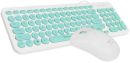
Overview Summary
The Logitech MK540 Advanced Wireless Combo delivers reliable wireless performance and all-day comfort for work, study, and everyday computer use. Featuring a full-size spill-resistant keyboard with palm rest, whisper-quiet keys, and a precision optical mouse, this combo is designed to improve productivity while keeping your workspace clean and efficient. With up to 10 metres of wireless range and long-lasting battery life, it's ideal for both home and office setups.
Enjoy smooth navigation, comfortable typing, and simple plug-and-play connectivity with the Logitech Unifying USB receiver. Compatible with Windows and ChromeOS devices, the MK540 combo is a dependable choice for users looking for convenience and durability. Buy now and upgrade your desktop experience with trusted Logitech quality.
Performance tier: Mid-range productivity peripheral
Uses: Office work, home computing, remote work, school tasks, desktop productivity, data entry, everyday browsing Overview
Logitech MK540 Advanced Wireless Keyboard and Mouse Combo Review for Everyday Productivity
The Logitech MK540 Advanced wireless combo is designed for users who want a comfortable, dependable desktop setup for work, home, or study environments. Combining a full-sized keyboard with a precision optical mouse, this combo delivers a familiar typing experience, reliable wireless connectivity, and long battery life in one practical package. With a wireless range of up to 10 meters, the MK540 helps reduce cable clutter while maintaining stable and encrypted performance.
Description
The Logitech MK540 Advanced Wireless Combo combines ergonomic comfort, long-lasting battery performance, and reliable wireless connectivity for efficient daily computing. The full-sized keyboard includes a palm rest, adjustable tilt positions, spill-resistant construction, and quiet responsive keys, while the contoured optical mouse offers accurate tracking and comfortable use for both left and right-handed users. Designed for productivity and convenience, this combo also includes media shortcut keys, a numeric keypad, and Logitech Unifying receiver support. Part number 920-008691.
Features
Built for Comfortable Daily Use
The keyboard layout feels instantly familiar, making it easy to transition from older desktop keyboards without any learning curve. Logitech optimized the keys for quieter operation and improved accuracy, helping users stay productive during long work sessions.
Comfort is a major advantage of the MK540 Advanced combo. The integrated palm rest supports natural wrist positioning, while adjustable tilt legs allow users to customize typing angles according to their preference.
Key comfort highlights include:
- Full-sized keyboard with integrated numeric keypad
- Adjustable typing angles with 3 tilt positions
- Palm rest for extended comfort during long sessions
- Abrasion-resistant key printing for improved durability
- Spill-resistant keyboard construction for added reliability
Reliable Wireless Performance
The included Logitech Unifying USB receiver connects both the keyboard and mouse through a single compact receiver. Setup is quick and straightforward with true plug-and-play functionality.
Users benefit from:
- Stable wireless connectivity up to 10 meters
- Encrypted wireless communication for secure use
- Minimal delays and reduced signal dropouts
- Cleaner desk setup with fewer cables
This makes the Logitech MK540 Advanced ideal for office environments, home workstations, and shared desk setups.
Precision Mouse for Smooth Navigation
The included wireless mouse is shaped for long-term comfort and features soft rubber side grips for improved control. Its ambidextrous-friendly design fits naturally in either hand, making it suitable for a wide range of users.
Mouse advantages include:
- Smooth optical tracking for accurate cursor movement
- Three-button layout for simple navigation
- Line-by-line scrolling wheel
- Comfortable contoured design
- Suitable for left and right-handed use
Quick Access Controls for Better Productivity
The keyboard includes dedicated shortcut keys that provide fast access to commonly used functions. Media controls, calculator shortcuts, and battery status keys help streamline workflow without interrupting productivity.
Compatible users can also customize selected function keys through Logitech Logi Options+ software for a more personalized experience.
Battery Efficiency That Lasts
One of the standout benefits of the Logitech MK540 combo is its impressive battery longevity. The keyboard can operate for up to 36 months on two AA batteries, while the mouse offers up to 18 months of usage from a single AA battery.
Battery details:
- Keyboard battery life: up to 36 months
- Mouse battery life: up to 18 months
- Keyboard power source: 2 AA batteries
- Mouse power source: 1 AA battery
Long battery life reduces maintenance and makes the combo ideal for business users and remote workers who need dependable daily performance.
Technical Details
Important specifications for the Logitech MK540 Advanced Wireless Combo:
- Product: Logitech MK540 Advanced Wireless Combo
- Part Number / SKU: 920-008691
- Wireless range: up to 10 meters
- Connection type: Logitech Unifying USB receiver
- Keyboard layout: Full-size with number pad
- Keyboard design: Spill-resistant with palm rest
- Mouse tracking: Optical
- Mouse buttons: 3
- Scroll type: Scroll wheel with line-by-line scrolling
- Color: Black
A Smart Wireless Combo for Home and Office
The Logitech MK540 Advanced Wireless Combo balances comfort, reliability, and long battery life in a practical desktop solution. Whether used for office productivity, remote work, studying, or general home computing, this keyboard and mouse combo provides dependable wireless performance with user-friendly functionality.
With ergonomic enhancements, customizable shortcut keys, and the trusted Logitech wireless ecosystem, the MK540 Advanced remains a strong option for users looking for a durable and efficient wireless keyboard and mouse combo.
Specifications
| ©2026 Respective owners and brand holders. This table has been carefully researched and generated by ComXpert International CC (//www.comx-computers.co.za), however, errors and omissions may occur. Only references to South Africa apply. All products are sourced in South Africa from the official suppliers and the warranty is that of the local supplier. E&OE. This table and our site's content may be used on condition that this notice and link remains intact and unaltered. |
Specifications |
| Product Code | 920-008691 |
| Keyboard |
| Height | 193.5 mm |
| Width | 457.3 mm |
| Depth | 24 mm |
| Weight (without batteries) | 633 g |
| Mouse |
| Height | 111.5 mm |
| Width | 61.8 mm |
| Depth | 39.2 mm |
| Weight | 73.5 g |
| Technical Specifications |
| WiFi range (in meters) | 10 meters |
| Keyboard | Spill-resistant design |
| Familiar key shape and feel, whisper-quiet |
| Adjustable Height | 3 tilt positions (natural, 4degrees, and 8degrees) |
| Special Keys | Music Controls, Programmable keys |
| Palm Rest |
| Abrasion resistant key print |
| 10-Key Number pad |
| Key type | Deep profile |
| On/Off power switch |
| Caps lock indicator light |
| Battery indicator light | 2 AA batteries (Alkaline Battery) |
| Battery | 36 months |
| Mouse |
| Sensor Technology | Smooth Optical Tracking |
| Number of Buttons | 3 (Left/Right-click, Middle click) |
| Scrolling | line-by-line |
| Scroll Wheel | Yes, 2D, optical |
| Connect/Power | On/Off power button |
| 1 AA battery (Alkaline Battery) |
| Battery | 18 months |
| Customization app | Supported by Logi Options+ on Windows and macOS |
| System Requirements | Windows 7, 10, 11 or later |
| ChromeOS |
| An available USB ports |
| Internet access required to download optional customization app Logi Options+ |
| Part Number |
| Black English International (QWERTY) | 920-008685 |


 Up
Up Down
Down


 Mobile store