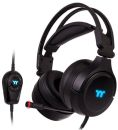
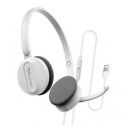
About this product
The delivers clear digital-audio quality and reliable communication with its plug-and-play USB connection, noise-cancelling microphone and comfortable padded headband for long-session use.
Overview Summary
Product Title: Logitech USB Headset H390 (Part Number 981-000406)
This wired USB headset from Logitech offers a streamlined solution for desktop communication, VoIP calls, online meetings and general PC use. With high-quality stereo digital audio and a noise-cancelling microphone, it helps reduce background noise for clearer voice capture. The in-line volume and mute controls provide convenient call management without needing to reach for the computer. Built with a plush adjustable headband and leatherette ear pads, the headset is designed for extended comfort.
Easy to install via USB-A, the H390 works across Windows, macOS and Chrome OS without additional drivers. Whether you are working from home, attending virtual meetings or simply listening to audio, the headset offers reliable performance in a single-cable format.
Performance tier: Mid-range professional communication
Uses: Online meetings, VoIP calls, remote work, e-learning, basic multimedia listening
Overview
Catch the combination of style and comfort with the H390 USB Headset from Logitech. It features adjustable, padded headband and plush ear pads that keep you comfortable. Plus, the rotating microphone is just out of the way when you're listening to music or watching a movie. Moveover, the noise-canceling microphone cuts background noise and instantly adjust the volume and mute the microphone. With this USB headset, it is time to immerse yourself in full, rich sound that you will never want to come out of.
Description
The Logitech USB Headset H390 brings together practical design and communication-ready features in a single device. The headset connects via USB-A for easy setup and plug-and-play operation. It produces full digital stereo sound through its built-in drivers while the adjustable, left-side microphone boom uses noise-cancelling technology to reduce unwanted ambient noise and focus on your voice. In-line controls on the cord allow for volume adjustment and microphone muting, with a visible mute indicator to help avoid confusion during calls.
Designed with comfort in mind, the headband and ear cushions are padded with leatherette for extended wear - ideal for remote work sessions, webinars or long conference calls. The microphone boom can rotate up when not in use to keep it out of the way for music listening or casual computer use. Compatibility spans Windows, Mac and Chrome OS platforms, making it versatile for multiple environments.
Features
Key features and benefits:
- USB plug-and-play connection: No driver installation required. Just connect to your computer's USB-A port and begin using it immediately.
- Noise-cancelling microphone: Minimises background noise so your voice is clearer on calls or recordings.
- In-line volume and mute controls: Conveniently placed on the cord for quick adjustments and muting during meetings.
- Comfort-first build: Adjustable headband plus padded leatherette ear cushions for prolonged comfortable wear.
- Rotating microphone boom: Flexes out of the way when not in use, transforming the headset for casual audio listening.
Comfortable design
The adjustable, padded headband and plush ear pads keep you comfortable.
Noise-canceling microphone
You won't have to compete with background noise to be heard.
Rotating microphone
The microphone rotates out of the way when you're listening to music or watching a movie.
In-line audio controls
You can instantly adjust the volume and mute the microphone.
Pure digital USB
You'll experience clear, digital sound with the simplicity of a single USB plug-and-play connection.
What's in the Box
- Logitech USB Headset H390 (USB-A connection)
- User documentation (Quick Start Guide)
Specifications
| © 2026 Respective owners and brand holders. This table has been carefully researched and generated by ComXpert International CC (//www.comx-computers.co.za), however, errors and omissions may occur. Only references to South Africa apply. All products are sourced in South Africa from the official suppliers and the warranty is that of the local supplier. E&OE. This table and our site's content may be used on condition that this notice and link remains intact and unaltered. |
Specifications and features |
| Product Code | 981-000406 |
| General |
| Product Type | Headset |
| Recommended Use | PC multimedia |
| Additional Features | Noise canceling circuit, mute button, volume control |
| Headphones |
| Headphones Type | Headphones - binaural |
| Headphones Form Factor | Ear-cup |
| Connectivity Technology | Wired |
| Sound Output Mode | Stereo |
| Response Bandwidth | 20 - 20000 Hz |
| In-Cord Volume Control | Yes |
| Microphone |
| Type | Boom |
| Sensitivity | -62 dBV/uBar |
| Response Bandwidth | 100 - 10000 Hz |
| Connections |
| Connector Type | 1 x USB ( 4 pin USB Type A ) |
| Miscellaneous |
| Cables Included | 1 x headset cable - 8 ft |
| Compatible with Windows 7 | Compatible with Windows 7 |
FAQ
Is the Logitech USB Headset H390 compatible with Mac and Windows?
Yes. The H390 supports Windows (including older versions such as XP and Vista) and macOS via its USB-A connection without requiring additional drivers.
Does the microphone really cancel background noise?
Yes. The headset features a noise-cancelling microphone boom that is designed to minimise ambient background noise so your voice is clearer during calls or recordings.
Can I use it for gaming as well as for work calls?
While the H390 is primarily targeted at communication tasks (VoIP, online meetings, e-learning), its stereo drivers and full digital audio also make it suitable for casual multimedia and light gaming use. Just keep in mind it does not include advanced gaming features such as surround sound or detachable cables.
Does the headset require batteries or charging?
No. The Logitech H390 is a wired USB headset that draws power from the USB port and does not require batteries or charging.
What does the in-line mute light do?
The in-line controls include a mute button with an LED indicator that shows when the microphone is muted, helping to avoid unintentional silent participation.


 Up
Up Down
Down


 Mobile store