Product information notice: Some specifications may describe a broader product range and may not apply to this exact model. Use the product summary above as the primary model reference. Bundled software may be trial software and can require a separate licence.
Overview:
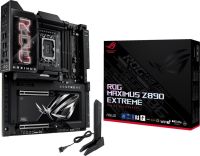
The ROG Maximus Z890 Extreme is the ultimate expression of cutting-edge motherboard technology and performance. Discover the upper limits of Intel® Core™ Ultra Series 2 processors, DDR5 modules, PCIe® 5.0 graphics cards, NVMe storage, USB connectivity, Thunderbolt™ functionality and more – all wrapped up in a sleek package featuring a full-color 5-inch long LCD screen that can deliver vibrant imagery or live system stats to suit your personal tastes.
Features:
AI NETWORKING II AI Networking II combines intelligent technologies to continuously optimize network performance, provide trustworthy and seamless connectivity, and unleash the full speed of WiFi 7*.
Traffic Monitor Armoury Crate's Traffic Monitor tracks your current WiFi channel usage. Move to a less congested channel by clicking the “Channel Switch” button* for improved network performance.
Fast Check Armoury Crate’s Fast Check empowers users to rapidly detect WiFi signal strength.
Direction Finder Armoury Crate’s Direction Finder* helps users detect the optimal antenna orientation for achieving the best WiFi signal strength.
Gamefirst GameFirst is now integrated into Armoury Crate for an even better user experience. GameFirst optimizes networking performance by allocating bandwidth in real time, based on intelligent algorithms designed for various application customizable usage scenarios and corresponding learning algorithms. The latest update includes dedicated support for NVIDIA® GeForce NOW to ensure the lowest latency possible during intense game streaming cloud gaming sessions.
ai OVERCLOCKING Tuning is now faster and smarter than ever before.
AI OVERCLOCKING ASUS AI Overclocking profiles the CPU and cooling to predict the optimal configuration and push the system to its limits. Predicted values can be engaged automatically or used as a launching ground for further experimentation.
AI COOLING II Balance the thermals and acoustics of any build with a single click.
AI COOLING II A proprietary ASUS algorithm slashes unnecessary noise while running a quick stress test, and then monitors CPU temperatures to dynamically adjust fans to optimal speeds.
ASUS AI ADVISOR Using AI technology to understand natural-language questions or scenario descriptions, ASUS AI Advisor allows users to explore the functionality and advanced features of ASUS motherboards in a simple and straightforward way.
ASUS AI Advisor ASUS AI Advisor is an ASUS technical expert that's always available to answer your questions. Owners of compatible ASUS motherboards can interact with this AI-powered technology using natural language to learn more about their hardware. For DIY beginners, it can provide easy-to-understand explanations of one-click optimization features like AI Overclocking and fan speed tuning, and for seasoned PC-building veterans, it can offer guidance and instructions on the latest features offered by ASUS.
NPU BOOST The integrated NPU in Intel® Core™ Ultra Processors (Series 2) efficiently accelerates AI workflows — and NPU Boost lets you do more with it. This BIOS feature overclocks the NPU with just one click, increasing performance by up to 24%.
DIFFERENTIAL SENSING Conventional motherboards use single-ended sensing tapped from a location that isn't ideal, leading to a large disparity between the actual voltage fed to the CPU and the value reported to software. The ROG Maximus Z890 Extreme features a differential-sensing circuit and delicate IC that simplify overclocking and tuning by allowing you to track voltages more accurately.
OVERCLOCKER’S TOOLKIT The ROG Overclocker’s Tooklit is a powerful set of hardware-level controls to enhance your overclocking experience. Some are quick and easy time savers, while others offer masterful functionality to help you smash benchmarks and break records.
SAFE BOOT BUTTON Instantly reset the PC and boot directly into Safe mode.
BCLK BUTTONS Adjust the BCLK frequency to improve system performance.
PROBEIT Includes eighteen integrated measurement points for advanced tuning.
RETRY BUTTON Instantly initiates a hard reset with just a press.
RSVD SWITCH Helps the system boot under extreme temperatures (≤ -120°C)
LN2 MODE Jumper to enable special options and functions for liquid-nitrogen (LN2) overclocking.
BIOS SWITCH Switches between BIOS 1 and 2.
SLOW MODE SWITCH Reduces the CPU ratio to 8X to keep the system stable during setup for extreme overclocking.
DDR5 DOMINATION Thanks to improved signal routing, now enthusiast-grade kits can be driven far beyond the 9 GT/s mark on the ROG Maximus Z890 Extreme*.
DDR5 Strength ROG has a long legacy of flexing the fastest memory performance, and DDR5 is no outlier. Thanks to improved signal routing, now enthusiast-grade kits have been driven far beyond the 9 GT/s mark on the ROG Maximus Z890 Extreme, and who knows how far future DIMMs can go? Seasoned veterans can test their mettle by tinkering with the extensive array of tuning options in the UEFI.
NitroPath DRAM Technology Frequency up to 400 MT/s higher, Slot retention force enhanced by 57%
NitroPath DRAM Technology NitroPath DRAM Technology provides enhanced DDR5 memory performance. Shorter gold finger pins and optimized signal pathways ensure faster data transfers between your DRAM and CPU, allowing for greater memory overclocking headroom and stability. These reinformed DRAM slots are also better prepared to withstand the wear and tear of the RAM installation process than traditional slot designs, perfect for enthusiasts who keep their system upgraded with the fastest kits available.
DIMM Fit / DIMM Fit Pro DIMM Fit is an ASUS-exclusive BIOS feature that precisely analyzes individual memory modules to optimize performance and pinpoint potential issues; whereas DIMM Fit Pro is an advanced option that provides more extensive customizability for memory optimization.
DIMM Fit / DIMM Fit Pro DIMM Fit is an ASUS-exclusive BIOS feature that precisely analyzes individual memory modules to optimize performance and pinpoint potential issues. DIMM Fit Pro gives advanced PC builders more extensive customizability for memory tuning. It allows users to control up to twenty overclocking parameters, define testing ranges, and prioritize stability or performance, offering a more flexible and granular approach to memory optimization.
DIMM FLEX DIMM Flex employs specialized circuitry that can boost performance or address potential stability issues, depending on temperature readings.
DIMM FLEX DIMM Flex provides enthusiasts with a powerful new way to overclock their DDR5 memory modules. It employs specialized circuitry that can boost performance or address potential stability issues, depending on temperature readings. When temperatures are nominal, it can use the extra headroom to increase speeds and efficiency. And when temperatures increase, it can adjust memory behavior downward to maintain stability.
AEMP III ASUS Enhanced Memory Profile III (AEMP III) is an advanced firmware feature that empowers users to achieve unparalleled memory performance with cutting-edge CUDIMM memory.
AEMP III ASUS Enhanced Memory Profile III (AEMP III) is an advanced firmware feature that empowers users to achieve unparalleled memory performance with cutting-edge CUDIMM memory. Through a two-phase comprehensive tuning process, AEMP III first optimizes the clock driver and then the memory frequency. This results in the best balance between performance and stability, even at cutting-edge speeds of DDR5-8000 or higher.*
VRM and aluminum I/O heatsink A VRM heatsink on the MOSFETs and chokes is connected to the aluminum I/O cover via an embedded heatpipe to increase mass and surface area for dissipation.
3D VC M.2 Heatsink The 3D vapor chamber M.2 heatsink offers a larger heat dissipation area, connected to extended heat pipes through a temperature equalization plate to form a vacuum chamber, significantly improving cooling for PCIe 5.0 M.2 SSDs.
M.2 heatsinks and backplates Large aluminum heatsinks provide extensive surface area to cool mounted M.2 drives, and four onboard M.2 slots have dedicated backplates for additional heat dissipation.
High-conductivity thermal pads Each thermal pad improves overall heat transfer from the system by bridging the heat generated by the power stages to the heatsink.
Chipset heatsink A dedicated heatsink draws heat away from the chipset to maintain optimum operating temperature.
THERMAL MANAGEMENT An extensive array of headers line the ROG Maximus Z890 Extreme for precise cooling control and monitoring.
Multiple temperature sources Each header can be set to monitor and react to three user-configurable thermal sensors for workload-based cooling, and all settings can be easily managed by Fan Xpert 4 or UEFI.
4-pin fan headers In addition to the pair of CPU fan headers, the ROG Maximus Z890 Extreme features four chassis headers, and each supports auto-detection of PWM or DC fans.
COOLER COMPATIBILITY ASUS AIO coolers offer robust performance, high overclocking potential, bold aesthetics and customizable functionality for new Z890 motherboards, empowering you to build your dream gaming rig.
M.2 Slots with ROG M.2 PowerBoost The ROG Maximus Z890 Extreme features ROG M.2 PowerBoost, which enables all M.2 devices to operate simultaneously at optimal performance.
FOUR Onboard M.2 Slots The ROG Maximus Z890 Extreme features four onboard M.2 slots, three of which are PCIe 5.0-ready to offer blistering 16 GB/s speeds, while the other offer still-impressive 8 GB/s over PCIe 4.0 interfaces.
ROG M.2 POWERBOOST ROG M.2 PowerBoost is an exclusive ASUS motherboard feature that provides amperage exceeding industry standards, enabling all M.2 slots to operate simultaneously at optimal performance. This advanced power setup helps ensure stability and data integrity even under high loads, while also helping to ensure the rated lifespan of an M.2 SSD.
ROG Q-DIMM.2 The ROG Q-DIMM.2 expansion card lets you easily mount two PCIe 4.0 M.2 drives next to the memory module slots, where the card’s large heatsinks convect heat directly into the path of chassis airflow. (M.2 drive not included.)
PCIE 5.0 Fully embracing the new standard, the ROG Maximus Z890 Extreme offers abundant Gen 5 support to give unfettered bandwidth to the fastest SSDs and graphics cards available.
PCIE 5.0 EXPANSION SLOT Both of the x16 expansion slots offer incredible speeds of up to 64 GB/s for compatible devices. To bear the brunt of massive graphics cards, they are also protected with SafeSlot retention brackets, and both slots can be released easily with PCIe Slot Q-Release Slim.
WIFI 7 The revolutionary WiFi 7 is up to 4.8X times faster than standard WiFi 6*, thanks to tech like 320MHz channels** on the 6GHz band and 4K QAM*. Multi-Link Operation (MLO) provides a more stable WiFi connection and lower latency, unlocking the realms of the unknown in gaming, streaming and industrial IoT.
2.5Gb ETHERNET Low-latency gaming, speedy file transfers, and high-resolution video streaming are among the many perks of onboard Intel® 2.5Gbps Ethernet.
10Gb ETHERNET Low-latency gaming, speedy file transfers, and high-resolution video streaming are among the many perks of onboard Marvell® Aqtion 10Gbps Ethernet.
ASUS WiFi Q-Antenna Dual transceivers support the 2.4, 5 and 6GHz bands to enable faster throughput, with directional sensitivity to improve signal quality and cover greater distances.
Wireless Signal Reception Improvement Versus previous-generation antenna
TWO THUNDERBOLT™ 5 TYPE-C® PORTS Thunderbolt™ 5 supports up to 80 Gbps of bi-directional bandwidth, and up to 120 Gbps with Bandwidth Boost. External display support reaches up to 8K resolution with DSC. Please see specifications for more details.
ONE USB 20Gbps & ONE USB 10Gbps TYPE-C FRONT PANEL CONNECTORS The USB 20Gbps front-panel connector features Quick Charge 4+ technology that can rapidly charge devices up to 60W.
SupremeFX ROG SupremeFX audio technology delivers an exceptional 110 dB signal-to-noise ratio to the line-in jack for pristine recording quality. There’s also a low-dropout regulator for cleaner power delivery to the SupremeFX ALC4082 codec and an integrated ESS® ES9219 Quad DAC capable of reaching -114dB THD+N for superior front-panel output. This combined solution allows for end-to-end 32-bit 384 kHz resolution playback that conveys all the subtlety and nuances of each audio track.
Dolby Atmos Dolby Atmos expands on traditional surround sound systems by adding height channels, allowing sounds to be interpreted as three-dimensional objects. This creates an immersive audio experience, giving the sensation of sound coming from above, below, and around the listener.
UEFI BIOS The renowned ROG UEFI (BIOS) provides everything you need to configure, tweak, and tune your rig. It offers intelligently simplified options for newcomers to PC DIY, as well as more comprehensive features for seasoned veterans.
BIOS Q-DASHBOARD Simplify your motherboard configuration with BIOS Q-Dashboard. Its intuitive visual representation of hardware connections and corresponding BIOS settings takes the complexity out of setting up your system. Upgrade now, and discover the power of BIOS Q-Dashboard to easily and efficiently enhance your computing setup.
Advanced Mode When you’re ready for a deeper dive, delve into the UEFI’s Advanced mode and take complete control. Advanced mode enables full control over every aspect of the motherboard, and a built-in search function helps you quickly find the setting you need.
My Favorites Quickly locate tuning options and add preferred tools to your favorites list.
EZ Flash Flash the latest BIOS via the internet from within the BIOS.
S.M.A.R.T. Check your storage device Self-Monitoring, Analysis, and Reporting Technology (S.M.A.R.T.) logs to gauge reliability or to identify potential failures.
GPU POST Automatically detect selected ASUS graphics cards to view detailed information.
Secure Erase Restore your SSDs and NVMe storage to factory settings.
Last Modified Log Track the last change and save preferred profiles to a USB drive.
SATA Port Renaming Rename SATA ports for easy identification.
ASUS User Profile Port configuration settings between different BIOS versions or share them with friends.
Q-Fan Control Configure the fan's operating speed manually or use pre-configured Standard, Silent, Turbo, or Full Speed modes. By default, system fans will automatically switch to full speed if the temperature reaches 75° C.
Aura On/Off mode (Stealth) Easily enable or disable Aura RGB lighting or every onboard LED, for a more subdued aesthetic.
ASUS DriverHub ASUS DriverHub streamlines the installation and management of ASUS drivers and utilities to keep your hardware up-to-date and performing optimally. This standalone application automatically detects current driver versions and presents available updates in a list view. By default, it supports ASUS motherboards, and users are invited to install ASUS DriverHub after OS installation. Additionally, ASUS DriverHub offers one-click installation and update checks, making it easier for users to keep their systems running smoothly and efficiently.
TURBOV CORE Accessed via ASUS DriverHub, TurboV Core delivers intuitive CPU tuning that can unleash performance for overclocking enthusiasts. No need to enter the BIOS – you can seamlessly modify settings directly from within Windows and apply them right away, without needing to reboot. TurboV Core is engineered to elevate system capabilities, with unprecedented simplicity.
Seamless Dual-PC Sharing with Thunderbolt™ Share Experience a revolutionary way to interact with two PCs using Thunderbolt™ Share—the ultrafast connectivity solution that transforms your dual-PC setup. Seamlessly share screens, keyboards, mice, storage and files between two computers, with the unparalleled speed of Thunderbolt™ technology.
Dolby Atmos Dolby Atmos expands on traditional surround sound systems by adding height channels, allowing sounds to be interpreted as three-dimensional objects. This creates an immersive audio experience, giving the sensation of sound coming from above, below, and around the listener.
ASUS GlidEx ASUS GlideX is a cross-device, cross-platform screen-sharing, screen-control and operation solution for enhanced productivity across PCs, tablets, and smartphones via USB or WiFi. Features include screen mirroring, screen extension, unified control with one keyboard and mouse, easy file transfers, and using mobile cameras as PC webcams. It's compatible with Windows, macOS, Android, and iOS.
HWiNFO HWiNFO and ROG have collaborated on this comprehensive system information and diagnostic tool that provides detailed information about hardware components and real-time monitoring of system performance in ROG style. It supports a wide range of hardware devices, and it is regularly updated to include the latest technologies.
AIDA64 Extreme The ROG Maximus Z890 Extreme includes a one-year AIDA64 Extreme subscription, a tool that provides detailed information about hardware and software, as well as benchmarks to measure the performance of the entire system or individual components. AIDA64 Extreme includes a monitoring and diagnostics feature to detect and prevent hardware issues. All vital system sensors can be tracked in real time, allowing voltage readings, fan speeds, and temperature information to be displayed on the desktop or sent to dedicated displays or to the LCD panels of ROG AIO liquid coolers*.
Armoury Crate Armoury Crate is a software utility designed to give you centralized control of supported gaming products, making it easy to tune the look and feel of your system. From a single intuitive interface, Armoury Crate helps you customize RGB lighting and effects for compatible devices and synchronize them with Aura Sync to create a unified lighting scheme across your system. In addition, Armoury Crate’s Fan Xpert4 tool provides comprehensive control over fans, water pumps, and all-in-one (AIO) coolers.
Boundless creativity, endless style. The ROG Maximus Z890 Extreme features a full-color 5-inch LCD screen that can show exclusive ROG animations, system information and even personalized services* through Armoury Crate, empowering gamers to define their unique style on a vibrant display.
Dare to Be Green Green Asus logo We at the Republic of Gamers are on a mission to create a sustainable future where all gamers can flourish on the planet we call home. Every step counts, and as part of ROG’s commitment to creating a more sustainable future, ROG has begun to utilize post-consumer recycled (PCR) plastic and paper materials certified by the Forest Stewardship Council (FSC™) in the packaging of motherboard.
* Supported memory types, data rate (speed), and number of DRAM modules vary depending on the CPU and memory configuration, for more information please refer to CPU/Memory Support list under the Support tab of product information site or visit https: / / www.asus.com / support / download-center / . Adjustments will be made based on the specifications of mass-produced memory products available on the market.
2 x Intel Thunderbolt 5 ports (USB Type-C) support DisplayPort and Thunderbolt video outputs
* Graphics specifications may vary between CPU types.
**Supports max. 8K@60Hz with DSC as specified in HDMI 2.1.
*Supports up to 1 x 8K@60HZ(DSC mode)+2 x 4K@60HZ monitors, It is recommended to chain-connect the monitors using a verified Thunderbolt cable.
**For resolution support please check DisplayPort 2.1 specs.bandwidth limited by DisplayPort 2.1 with up to 77.4 Gbit/s.
***In Thunderbolt 4 mode, supports up to 8K@60Hz x1 with DSC, maximum total bandwidth up to 23.8Gbps, for resolution support please check DisplayPort 2.1 specs. In DP alt mode, supports up to UHBR20.
**VGA resolution support depends on processors' or graphic cards' resolution.
***While installing the operating system, please ensure that your monitor is connected to the HDMI port on the back I/O panel or to a discrete graphics card.
Expansion Slots
Intel Core Ultra Processors(Series 2)
2 x PCIe 5.0 x16 slots (supports x16 or x8/x8 or x8/x4/x4 modes)
Intel Z890 Chipset
1 x PCIe 4.0x4 slot
**M.2_3 & M.2_4 share bandwidth with PCIEX16(G5)_2. When M.2_3 is enabled, PCIEX16(G5)_1 will run x8 & PCIEX16(G5)_2 will run x4. When M.2_3 & M.2_4 are enabled, PCIEX16(G5)_1 will run x8 & PCIEX16(G5)_2 will disabled.
- To ensure compatibility of the device installed
Storage
Ethernet
1 x Intel 2.5Gb Ethernet
1 x Marvell AQtion 10Gb Ethernet
ASUS LANGuard
Wireless & Bluetooth
Intel Wi-Fi 7
2x2 Wi-Fi 7 (802.11be)
Supports 2.4/5/6GHz frequency band
Support Wi-Fi 7 320MHz bandwidth, up to 5.8Gbps transfer rate.
Bluetooth v5.4
*Wi-Fi features may vary depending on the operating system
For Windows 11, Wi-Fi 7 will require 24H2 or later version for full functions, Windows 11 21H2/22H2/23H2 only supports Wi-Fi 6E. For Windows 10, only Wi-Fi 6 is supported.
** Wi-Fi 6GHz frequency band and bandwidth regulatory may vary between countries.
* The Bluetooth version may vary, please refer to the Wi-Fi module manufacturer's website for the latest specifications.
USB
Rear USB (Total 10 ports)
2 x Thunderbolt 5 ports (2 x USB Type-C)
1 x USB 20Gbps port (1 x USB Type-C)
7 x USB 10Gbps ports (5 x Type-A + 2 x USB Type-C)
Front USB (Total 10 ports)
1 x USB 20Gbps connector (supports USB Type-C with up to 60W PD/QC4+)
1 x USB 10Gbps connector (supports USB Type-C)
2 x USB 5Gbps headers support 4 additional USB 5Gbps ports
2 x USB 2.0 headers support 4 additional USB 2.0 ports
ROG SupremeFX 7.1 Surround Sound High Definition Audio CODEC ALC4082
- Impedance sense for front and rear headphone outputs
- Supports: Jack-detection, Multi-streaming, Front Panel MIC Jack-retasking
- High quality 120 dB SNR stereo playback output and 110 dB SNR recording input
- Supports up to 32-Bit/384 kHz playback on front panel
Audio Features
- SupremeFX Shielding Technology
- ESS ES9219 QUAD DAC
- LED-illuminated audio jacks
- Rear optical S/PDIF out port
- Premium audio capacitors
* A chassis with an HD audio module in the front panel is required to support 7.1 Surround Sound audio output.
** The LINE OUT port on the rear panel does not support spatial audio. If you wish to use spatial audio, make sure to connect your audio output device to the audio jack on the front panel of your chassis or use a USB interface audio device.
Back Panel I/O Ports
2 x Thunderbolt 5 USB Type-C ports
1 x USB 20Gbps port (1 x USB Type-C)
7 x USB 10Gbps ports (5 x Type-A + 2 x USB Type-C)
1 x HDMI port
1 x Wi-Fi Module
1 x Intel 2.5Gb Ethernet port
1 x Marvell AQtion 10Gb Ethernet port
2 x LED-illuminated audio jacks
1 x Optical S/PDIF out port
1 x BIOS FlashBack button
1 x Clear CMOS button
Internal I/O Connectors
Fan and Cooling related
1 x 4-pin CPU Fan header
1 x 4-pin CPU OPT Fan header
2 x 4-pin Chassis Fan headers
2 x 4-pin Radiator Fan headers
2 x W_PUMP+ headers
1 x WB_SENSOR header
Power related
1 x 24-pin Main Power connector
2 x 8-pin +12V CPU Power connector
1 x 8-pin PCIe Power connector
Storage related
4 x M.2 slots (Key M)
1 x DIMM.2 slot supports 2 x M.2 slots (Key M)
4 x SATA 6Gb/s ports
USB
1 x USB 20Gbps connector (supports USB Type-C)
1 x USB 10Gbps connector (supports USB Type-C)
2 x USB 5Gbps headers support 4 additional USB 5Gbps ports
2 x USB 2.0 headers support 4 additional USB 2.0 ports
Miscellaneous
1 x 6-pin ARGB Gen 2 header to support 2 x ARGB Gen 2 headers
Reviews have been submitted by users and do not necessarily reflect our own opinion.
The best price and guaranteed service and backup from official computer suppliers in South Africa for the ASUS ROG MAXIMUS Z890 EXTREME Asus ROG Maximus Z890 Extreme Z890 Chipset LGA 1851 E-ATX Motherboard.
The Asus
ASUS ROG MAXIMUS Z890 EXTREMEAsus ROG Maximus Z890 Extreme Z890 Chipset LGA 1851 E-ATX Motherboard is available for R26455. The product is sold by ComX Computers as new. Prices are valid today 2026-09-19 (before , by quote, while stocks last). The product is expected to be in stock, although this is not guaranteed.
Available from this online computer store delivering door-to-door in Johannesburg, Cape Town, Port Elizabeth, Pretoria, Pietermaritzburg, Polokwane, Durban and all over South Africa.
Find related ASUS ROG MAXIMUS Z890 EXTREME Asus ROG Maximus Z890 Extreme Z890 Chipset LGA 1851 E-ATX Motherboard products in our Motherboards: Intel LGA1851 Core Ultra Category for even more options. Read reviews and find out about ASUS ROG MAXIMUS Z890 EXTREME Asus ROG Maximus Z890 Extreme Z890 Chipset LGA 1851 E-ATX Motherboard. Discounts, specials and cheap prices only at ComX Computers.


 Up
Up Down
Down


 Mobile store