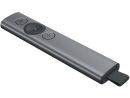
Overview Summary
The Logitech Spotlight 2 Presentation Remote gives presenters precise, intuitive control with digital pointing, highlighting and magnification modes. Bluetooth and USB connectivity make it suitable for professional presentations across Windows and macOS.
Buy now for a streamlined presentation experience in boardrooms, classrooms and virtual meetings. Shop now for the Logitech Spotlight 2 in Graphite.
Performance tier: Premium
Uses: business presentations, classroom presentations, PowerPoint presentations, Keynote presentations, virtual meetings, hybrid presentations, video conferencing Overview
Spotlight Presentation Remote
Bluetooth and USB. Digital pointing for screens
Description
The Logitech Spotlight 2 Presentation Remote is designed to make presentations more engaging and easier to follow. Instead of relying on a traditional laser pointer, it gives presenters advanced digital pointing tools that work across physical, virtual and hybrid presentation environments. With Bluetooth and USB connectivity, motion sensing and rechargeable battery power, Spotlight 2 provides flexible control for boardrooms, classrooms, meetings and online presentations.
Features
Advanced Presentation Control
Logitech Spotlight 2 gives you greater control over how information is presented on screen. Its digital pointing system lets you highlight important content, magnify specific details or precisely point to information. The motion sensor uses a 3D accelerometer and gyroscope to provide responsive and accurate control while you move the remote naturally.
The presentation remote works with projectors, TV screens, video conferencing systems and multi-screen setups, making it suitable for a wide range of presentation environments.
Highlight, Magnify and Point
Spotlight 2 provides three digital pointing modes to help keep an audience focused:
- Highlight creates a spotlight effect around important information on the screen.
- Magnify zooms in on selected details for clearer viewing.
- Digital Laser precisely points to specific information without requiring a traditional laser pointer.
These controls are useful when presenting charts, documents, diagrams, presentations and other detailed on-screen content.
Bluetooth and USB Connectivity
The Logitech Spotlight 2 supports both Bluetooth and USB connectivity, giving users flexible options for connecting to a compatible computer. This makes it practical for different presentation setups, whether presenting from a laptop in a meeting room or controlling content during a virtual presentation.
Wide Software Compatibility
Spotlight 2 is compatible with Windows and macOS and supports popular presentation and video conferencing applications, including:
- Microsoft PowerPoint
- Apple Keynote
- Adobe Acrobat
- Google Slides
- Prezi
- Zoom
- Microsoft Teams
- BlueJeans
This broad compatibility makes the Logitech Spotlight 2 a versatile presentation clicker for business meetings, education, training sessions and remote presentations.
Rechargeable Battery for Presentations
The built-in rechargeable battery provides up to 3 months of battery life, helping reduce the need for frequent charging. The long battery life makes Spotlight 2 well suited to users who regularly travel between meetings, classrooms or presentation venues.
Motion Sensor Technology
The integrated 3D accelerometer and gyroscope allow the remote to detect movement and provide responsive digital control. This enables presenters to move naturally around the room while maintaining control of their on-screen presentation.
Designed for Modern Presentations
Whether you are presenting in person, remotely or using a hybrid meeting setup, Spotlight 2 is designed to help audiences follow the content being discussed. Its combination of digital pointing, wireless connectivity and broad software compatibility makes it a practical presentation remote for professional and educational environments.
Product Details
- Product: Logitech Spotlight 2 Presentation Remote
- Part Number / SKU: Logi Spotlight2 910-007672
- Colour: Graphite
- Connectivity: Bluetooth and USB
- Pointing technology: Digital pointing for screens
- Motion technology: 3D accelerometer and gyroscope
- Battery: Rechargeable
- Battery life: Up to 3 months
- Compatible operating systems: Windows and macOS
- Suitable for: Presentations, meetings, classrooms, training and video conferencing
A Practical Presentation Clicker for Business and Education
The Logitech Spotlight 2 combines intuitive movement control with advanced on-screen pointing tools, allowing presenters to focus attention exactly where it is needed. With Bluetooth and USB connectivity, long rechargeable battery life and support for popular presentation and conferencing software, it is a versatile choice for modern presentation environments.
Specifications
| ©2026 Respective owners and brand holders. This table has been carefully researched and generated by ComXpert International CC (//www.comx-computers.co.za), however, errors and omissions may occur. Only references to South Africa apply. All products are sourced in South Africa from the official suppliers and the warranty is that of the local supplier. E&OE. This table and our site's content may be used on condition that this notice and link remains intact and unaltered. |
Specifications |
| Product Code | Logi Spotlight2 910-007672 |
| Dimensions |
| Presentation remote | Height: 131.3 mm |
| Width: 28.1 mm |
| Depth: 12.1 mm |
| Weight: 49.2 g |
| Receiver | Height: 40.4 mm |
| Width: 17.2 mm |
| Depth: 6.8 mm |
| Weight: 3.3 g |
| Charging cable | Length: 140 mm |
| Technical Specifications |
| Sensor technology | Motion sensor |
| 3D accelerometer and Gyroscope |
| Battery | Battery Life (rechargeable): 3 months |
| Battery Details: Rechargeable Lithium Polymer, 85 mAh |
| Connectivity | Connection Type: Bluetooth Low Energy and 2.4 GHz wireless connection |
| Wireless range: 30 m |
| Indicator Lights | LED : Battery and Connectivity |
| Customization app | Supported by Logi Options+ on Windows and macOS |
| System Requirements |
| Bluetooth | Required: Bluetooth Low Energy Technology Windows 10, 11 or later macOS: 10.2 or later Limited functionalities (no Software): ChromeOS , iPadOS 13.4 or later, Android 5.0 or later, iOS 11 or later, Linux Kernel 2.6+. |
| USB Receiver | Required : Available USB port Windows 10, 11 or later macOS 10.2 or later Limited functionalities (no Software): ChromeOS, Linux Kernel 2.6+. |
| Customization app | Internet access required to download optional customization app Logi Options+ |






 Up
Up Down
Down


 Mobile store