Wireless Routers (SIM / 5G / 4G / LTE / 3G). Computer sales South Africa

Account | Contact | Links | Pricelist | Newsletter | View all brands
Laptops
Computers
HP Epson Canon Lexmark Panasonic OKI Brands.. Categories.. Loadshedding power Newsletter
computers


computers
Viewed recently
upUp | downDown 
computers
Join the newsletter
computers
Solar Hyrid Inverters
computers
computers
computers


computers
ADSL FIBRE LTE
  ComX Computers - since 2002 • home Thu 17 Sep, 2026View enquiry cart
Computers, laptops and PC hardware in South Africa.Computers
Laptops
Laptops, computers and computer hardware South Africa Computers, laptops and other PC hardware in South Africa.
Computers South AfricaLaptops, Notebooks and PDA South AfricaDigital camerasComputer hardware Tablets South AfricaSoftware - software titles South AfricaPrinters South Africa SpeakersGaming Brands
PC
My account  |  How to buy  |  Specials
computer salespc salescomputerscomputerscomputers
computers
 
computers
computers

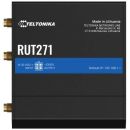
TTK-RUT271 Teltonika Redcap 5G Router

computers

TTK-RUT271

computers
TTK-RUT271
R 6,115.00
inc. VAT
In Stock


Teltonika Redcap 5G Router
Images are for illustrative purposes and actual product may differ.
TTK-RUT271 image 1TTK-RUT271 image 2TTK-RUT271 image 3TTK-RUT271 image 4TTK-RUT271 image 5


TTK-RUT271

Wireless Routers (SIM / 5G / 4G / LTE / 3G)

Teltonika


TTK-RUT271 information and overview
Teltonika Redcap 5G Router, RUT271, Release 17 Redcap, Wi-Fi 4, Up to 50 simultaneous connections, 1x WAN Port 10/100 Mbps, 1x LAN Ports, 10/100 Mbps, RutOS Operating System, 1x Digital Input, 1x Digital Output, 4 pin Industrial DC Power Socket, 1x SIM slot (Mini SIM - 2FF), 2x SMA for Mobile, 1x RP-SMA for Wi-Fi, Aluminum housing


Specifications & more information about TTK-RUT271, Wireless Routers (SIM / 5G / 4G / LTE / 3G) manufactured by Teltonika
Specifications & downloads View specification Printable PDF
Product information notice: Some specifications may describe a broader product range and may not apply to this exact model. Use the product summary above as the primary model reference. Bundled software may be trial software and can require a separate licence.
Overview:

RUT271 REDCAP 5G ROUTER
The RUT271 is a Redcap 5G router, bridging the gap between 4G and full-capacity 5G. Supporting SA architecture, this 5G router can wirelessly support up to 50 end devices and features the low latency of 5G-at affordable pricing. The RUT271 supports Wi-Fi and is backward compatible with 4G LTE Cat 4. This industrial-grade RedCap 5G router is also equipped with WAN failover, two 10/100 RJ45 ports, a compact and durable design, and numerous other brilliant features for expert professional deployment.  

REDCAP 5G
Low latency, high capacity, affordable pricing

FUTURE-PROOFING
Backward compatible with 4G LTE Cat 4

WI-FI
Wireless access point with Hotspot functionality

WAN FAILOVER
Automatic switching to available backup connection

Specifications:

©2026 Respective owners and brand holders. This table has been carefully researched and generated by ComXpert International CC (//www.comx-computers.co.za), however, errors and omissions may occur. Only references to South Africa apply. All products are sourced in South Africa from the official suppliers and the warranty is that of the local supplier. E&OE. This table and our site's content may be used on condition that this notice and link remains intact and unaltered.
Specificationsspacer
Product CodeTTK-RUT271spacer
Mobile
Mobile module5G Sub-6Ghz SA 223 Mbps DL , 123 Mbps UL , 4G LTE Cat 4 - LTE 195 Mbps DL, 105 Mbps UL
3GPP ReleaseRelease 17 RedCap
StatusIMSI, ICCID, operator, operator state, data connection state, network type, bandwidth, connected band, signal strength (RSSI), SINR, RSRP, RSRQ, EC/IO, RSCP, data sent/received, LAC, TAC, cell ID, ARFCN, UARFCN, EARFCN, MCC, and MNC
SMSSMS status, SMS configuration, send/read SMS via HTTP POST/GET, EMAIL to SMS, SMS to EMAIL, SMS to HTTP, SMS to SMS, scheduled SMS, SMS autoreply, SMPP
USSDSupports sending and reading Unstructured Supplementary Service Data messages
Block/Allow listOperator block/allow list (by country or separate operators)
Multiple PDNPossibility to use different PDNs for multiple network access and services
Band managementBand lock, Used band status display
SIM PIN code managementSIM PIN code management enables setting, changing, or disabling the SIM card's PIN
APNAuto APN
BridgeDirect connection (bridge) between mobile ISP and device on LAN
PassthroughRouter assigns its mobile WAN IP address to another device on LAN
Wireless
Wireless mode802.11b/g/n (Wi-Fi 4), Access Point (AP), Station (STA)
Wi-Fi securityWPA2-Enterprise: PEAP, WPA2-PSK, WPA-EAP, WPA-PSK, WPA3-SAE, WPA3-EAP, OWE , AES-CCMP, TKIP, Auto-cipher modes, client separation, EAP-TLS with PKCS#12 certificates, disable auto-reconnect, 802.11w Protected Management Frames (PMF)
SSID/ESSIDSSID stealth mode and access control based on MAC address
Wi-Fi usersUp to 50 simultaneous connections
Wireless Connectivity FeaturesWireless mesh (802.11s), fast roaming (802.11r), BSS transition management (802.11v), radio resource measurement (802.11k)
Wireless MAC filterAllowlist, blocklist
Wireless QR code generatorOnce scanned, a user will automatically enter your network without needing to input login information
TravelMateForward Wi-Fi hotspot landing page to a subsequent connected device
Ethernet
WAN1 x WAN port 10/100 Mbps, compliance with IEEE 802.3, IEEE 802.3u, 802.3az standards, supports auto MDI/MDIX crossover
LAN1 x LAN ports, 10/100 Mbps, compliance with IEEE 802.3, IEEE 802.3u, 802.3az standards, supports auto MDI/MDIX crossover
Network
RoutingStatic routing, Dynamic routing (BGP, OSPF v2, RIP v1/v2, EIGRP, NHRP), Policy based routing
Network protocolsTCP, UDP, IPv4, IPv6, ICMP, NTP, DNS, HTTP, HTTPS, SFTP, FTP, SMTP, SSL v3, TLS, ARP, VRRP, PPP, PPPoE, UPNP, SSH, DHCP, Telnet, SMPP, SNMP, MQTT, Wake on Lan (WOL), VXLAN
VoIP passthrough supportH.323 and SIP-alg protocol NAT helpers, allowing proper routing of VoIP packets
Connection monitoringPing Reboot, Wget Reboot, Periodic Reboot, LCP and ICMP for link inspection
FirewallPort forward, traffic rules, custom rules
Firewall status pageView all your Firewall statistics, rules, and rule counters
Ports managementView device ports, enable and disable each of them, turn auto-configuration on or off, change their transmission speed, and so on
Network topologyVisual representation of your network, showing which devices are connected to which other devices
DHCPStatic and dynamic IP allocation, DHCP relay, DHCP server configuration, status, static leases: MAC with wildcards
QoS / Smart Queue Management (SQM)Traffic priority queuing by source/destination, service, protocol or port, WMM, 802.11e
DDNSSupported >25 service providers, others can be configured manually
DNS over HTTPSDNS over HTTPS proxy enables secure DNS resolution by routing DNS queries over HTTPS
Network backupWi-Fi WAN, Mobile, VRRP, Wired options, each of which can be used as an automatic Failover
Load balancingBalance Internet traffic over multiple WAN connections
HotspotCaptive portal (hotspot), internal/external Radius server, Radius MAC authentication, SMS authorisation, SSO authentication, internal/external landing page, walled garden, user scripts, URL parameters, user groups, individual user or group limitations, user management, 9 default customisable themes and optionality to upload and download customised hotspot themes
SSHFSPossibility to mount remote file system via SSH protocol
Security
AuthenticationPre-shared key, digital certificates, X.509 certificates, TACACS+, Internal & External RADIUS users authentication, IP & login attempts block, time-based login blocking, built-in random password generator
FirewallPreconfigured firewall rules can be enabled via WebUI, unlimited firewall configuration via CLI, DMZ, NAT, NAT-T, NAT64
Attack preventionDDOS prevention (SYN flood protection, SSH attack prevention, HTTP/HTTPS attack prevention), port scan prevention (SYN-FIN, SYN-RST, X-mas, NULL flags, FIN scan attacks)
VLANPort and tag-based VLAN separation
Mobile quota controlMobile data limit, customizable period, start time, warning limit, phone number
WEB filterBlacklist for blocking out unwanted websites, Whitelist for specifying allowed sites only
Access controlFlexible access control of SSH, Web interface, CLI and Telnet
SSL certificate generationLet's Encrypt and SCEP certificate generation methods
802.1xPort-based network access control server
VPN
OpenVPNMultiple clients and a server can run simultaneously, 27 encryption methods
OpenVPN EncryptionDES-CBC 64, RC2-CBC 128, DES-EDE-CBC 128, DES-EDE3-CBC 192, DESX-CBC 192
BF-CBC 128, RC2-40-CBC 40, CAST5-CBC 128, RC2-64-CBC 64, AES-128-CBC 128, AES-128-CFB 128, AES-128-CFB1 128, AES-128-CFB8 128, AES-128-OFB 128, AES-128-GCM 128, AES-192-CFB 192, AES-192-CFB1 192, AES-192-CFB8 192, AES-192-OFB 192, AES-192-CBC 192, AES-192-GCM 192, AES-256-GCM 256, AES-256-CFB 256, AES-256-CFB1 256, AES-256-CFB8 256, AES-256-OFB 256, AES-256-CBC 256
IPsecXFRM, IKEv1, IKEv2, with 14 encryption methods for IPsec (3DES, DES, AES128, AES192, AES256, AES128GCM8, AES192GCM8, AES256GCM8, AES128GCM12, AES192GCM12, AES256GCM12, AES128GCM16, AES192GCM16, AES256GCM16)
GREGRE tunnel, GRE tunnel over IPsec support
PPTP, L2TPClient/Server instances can run simultaneously, L2TPv3, L2TP over IPsec support
StunnelProxy designed to add TLS encryption functionality to existing clients and servers without any changes in the program's code
DMVPNMethod of building scalable IPsec VPNs, Phase 2 and Phase 3 and Dual Hub support
SSTPSSTP client instance support
ZeroTierZeroTier VPN client support
WireGuardWireGuard VPN client and server support
TincTinc offers encryption, authentication and compression in it's tunnels. Client and server support.
OPC UA
Supported modesClient, Server
Supported connection typesTCP
MODBUS
Supported modesServer, Client
Supported connection typesTCP
Custom registersMODBUS TCP custom register block requests, which read/write to a file inside the router, and can be used to extend MODBUS TCP Client functionality
Supported data formats8-bit: INT, UINT , 16-bit: INT, UINT (MSB or LSB first) , 32-bit: float, INT, UINT (ABCD (big-endian), DCBA (little-endian), CDAB, BADC), HEX, ASCII
DATA TO SERVER
ProtocolHTTP(S), MQTT, Azure MQTT
Data to serverExtract parameters from multiple sources and different protocols, and send them all to a single server , Custom LUA scripting, allowing scripts to utilize the router's Data to server feature
MQTT Gateway
Modbus MQTT GatewayAllows sending commands and receiving data from MODBUS Server through MQTT broker
DNP3
Supported modesStation, Outstation
Supported connectionTCP
DLMS/COSEM
DLMS SupportDLMS - standard protocol for utility meter data exchange
COSEMAllows to scan meter COSEM objects for automatic detection and configuration
DLMS
Supported modesClient
Supported connection typesTCP
API
Teltonika Networks Web API (beta) supportExpand your device's possibilities by using a set of configurable API endpoints to retrieve or change data. For more information, please refer to this documentation: https: / / developers.teltonika-networks.com
Monitoring & Management
WEB UIHTTP/HTTPS, status, configuration, FW update, CLI, troubleshoot, multiple event log servers, firmware update availability notifications, event log, system log, kernel log, Internet status
FOTAFirmware update from server, automatic notification
SSHSSH (v1, v2)
SMSSMS status, SMS configuration, send/read SMS via HTTP POST/GET
CallReboot, Status, Mobile data on/off, Output on/off, answer/hang-up with a timer, Wi-Fi on/off
EmailReceive email message status alerts of various services
TR-069OpenACS, EasyCwmp, ACSLite, tGem, LibreACS, GenieACS, FreeACS, LibCWMP, Friendly tech, AVSystem
MQTTMQTT Broker, MQTT publisher
SNMPSNMP (v1, v2, v3), SNMP Trap, Brute force protection
JSON-RPCManagement API over HTTP/HTTPS
RMSTeltonika Remote Management System (RMS)
IoT Platforms
ThingWorxAllows monitoring of: WAN Type, WAN IP, Mobile Operator Name, Mobile Signal Strength, Mobile Network Type
Cumulocity - Cloud of ThingsAllows monitoring of: Device Model, Revision and Serial Number, WAN Type and IP, Mobile Cell ID, ICCID, IMEI, Connection Type, Operator, Signal Strength. Has reboot and firmware upgrade actions
Azure IoT HubCan be configured with Data to Server to send all the available parameters to the cloud. Has Direct method support which allows to execute RutOS API calls on the IoT Hub. Also has Plug and Play integration with Device Provisioning Service that allows zero-touch device provisioning to IoT Hubs
AWS IoT CoreUtility to interact with the AWS cloud platform. Jobs Support: Call the device's API using AWS Jobs functionality
System Characteristics
CPUMediatek, 580 MHz, MIPS 24KEc
RAM128 MB, DDR2
FLASH storage32 MB, NOR Flash
Firmware / Configuration
WEB UIUpdate FW from file, check FW on server, configuration profiles, configuration backup
FOTAUpdate FW
RMSUpdate FW/configuration for multiple devices at once
Keep settingsUpdate FW without losing current configuration
Factory settings resetA full factory reset restores all system settings, including the IP address, PIN, and user data to the default manufacturer's configuration
FIRMWARE CUSTOMISATION
Operating systemRutOS (OpenWrt based Linux OS)
Supported languagesBusybox shell, Lua, C, C++
Development toolsSDK package with build environment provided
GPL customizationYou can create your own custom, branded firmware and web page application by changing colours, logos, and other elements in our firmware to fit your or your clients' needs
Package ManagerThe Package Manager is a service used to install additional software on the device
Input / Output
Input1 x Digital Input, 0 - 6 V detected as logic low, 8 - 30 V detected as logic high
Output1 x Digital Output, Open collector output, max output 30 V, 300 mA
EventsEmail, RMS, SMS
I/O jugglerAllows to set certain I/O conditions to initiate event
Power
Connector4-pin industrial DC power socket
Input voltage range9 - 30 VDC, reverse polarity protection , surge protection >31 VDC 10us max
PoE (passive)Passive PoE over spare pairs. Possibility to power up through LAN1 port, not compatible with IEEE802.3af, 802.3at and 802.3bt standards, Mode B, 9 - 30 VDC
Power consumptionIdle: < 1.5 W, Max: < 3 W
Physical Interfaces
Ethernet2 x RJ45 ports, 10/100 Mbps
I/O's1 x Digital Input, 1 x Digital Output on 4-pin power connector
Status LEDs3 x Connection type status LEDs, 5 x Connection strength LEDs, 2 x LAN status LEDs, 1 x Power LED
SIM1 x SIM slot (Mini SIM - 2FF), 1.8 V/3 V, external SIM holder
Power1 x 4-pin power connector
Antennas2 x SMA for Mobile, 1 x RP-SMA for Wi-Fi
ResetReboot/User default reset/Factory reset button
Physical Specification
Casing materialAluminum housing, plastic panels
Dimensions (W x H x D)83 x 25 x 74 mm
Weight130 g
Mounting optionsDIN rail, wall mount, flat surface (all require additional kit)
Operating Environment
Operating temperature-40 °C to 75 °C
Operating humidity10% to 90% non-condensing
Ingress Protection RatingIP30
Regulatory & Type Approvals
RegulatoryCE, FCC, ISED, CB, WEEE


Reviews about TTK-RUT271 Teltonika Redcap 5G Router

There are no reviews about this product
+ Be the first to add a review


Reviews have been submitted by users and do not necessarily reflect our own opinion.

WebAfrica Internet


The best price and guaranteed service and backup from official computer suppliers in South Africa for the TTK-RUT271 Teltonika Redcap 5G Router.
The Teltonika TTK-RUT271 Teltonika Redcap 5G Router is available for R 6115. The product is sold by ComX Computers as new. Prices are valid today 2026-09-17 (before , by quote, while stocks last). The product is expected to be in stock, although this is not guaranteed.

Available from this online computer store delivering door-to-door in Johannesburg, Cape Town, Port Elizabeth, Pretoria, Pietermaritzburg, Polokwane, Durban and all over South Africa.

Find related TTK-RUT271 Teltonika Redcap 5G Router products in our Wireless Routers (SIM / 5G / 4G / LTE / 3G) Category for even more options. Read reviews and find out about TTK-RUT271 Teltonika Redcap 5G Router. Discounts, specials and cheap prices only at ComX Computers.


TTK-RUT271 laptops South AfricaTTK-RUT271 Notebooks South AfricacomputersTTK-RUT271 notebook sales in South Africa
CGSO
ComX Computers is a South African online store since 2002. All transactions are subject to our terms of sale.

E&OE. All prices and specifications are subject to change without notice. All prices are a reference and are an invitation for potential buyers to make an offer to purchase, which we may reject without reason. At no point do we make offers to sell on any website and quotes are required before a purchase can be made.

All materials and content posted on this Web site, including, but not limited to, all text, graphics, photographs, data, images, functions and scripts are the property of, subject to and protected by copyrights owned by the ComXpert International CC © ("ComX Computers" / " Laptop Direct" ).

Other brands, trademarks and Logos are the property of their respective owners in South Africa and/or other countries.

Navigate
Policies
Other links
Related sites
laptop sales
computer sales